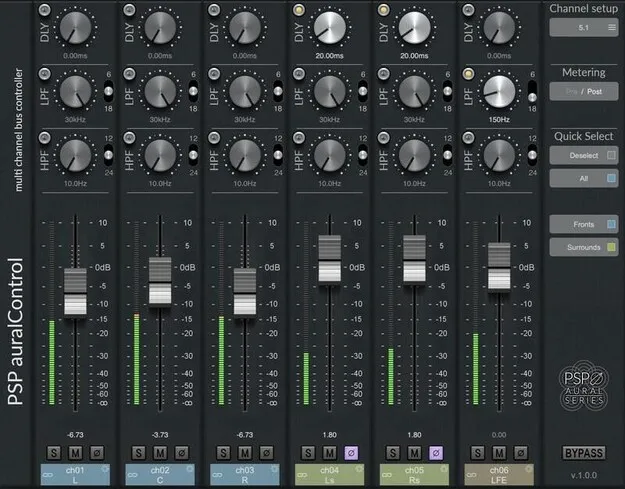
PSP auralControl multichannel plugin interface by PSP Audioware

PSP auralControl: Multichannel Level, Delay and Filter Plugin by PSP Audioware

PSP auralControl is a multichannel mastering and effects plugin from PSP Audioware that adjusts level, delay, filtering and monitoring for each channel in a surround set. It runs in VST3, VST2, AU and AAX on Windows and macOS.

VST3VST2AUAAXWindowsmacOS
AVAILABLE ATPlugin Boutique
Opens the store in a new tab
01Overview

PSP auralControl is built for working with multichannel material, from two-channel Left-Right or Mid-Side stereo up to 7.1.4 surround. It gives you one screen with a level fader, peak meter, mute and solo for every channel, plus delay and high-pass and low-pass filters. The developer positions it as a tool for tracking, mixing and mastering surround projects, where channel balance and timing need to be controlled one channel at a time.

Best for

  • Surround stem balancing
  • Multichannel reverb shaping
  • Surround bus monitoring
  • LFE roll-off
  • Multichannel gain staging
  • Surround mastering
Developer
PSP Audioware
Category
Mastering
Store
Plugin Boutique
02Key features

What you get

  • Level faders with peak meters on each channel
  • Adjustable delay time per channel
  • High-pass and low-pass filters on each channel
  • Mute and solo buttons for every channel
  • Predefined or custom parameter groups
  • Multichannel formats from stereo up to 7.1.4
  • Mid-Side processing for stereo tracks
03In depth

Per-Channel Control for Surround Mixes

PSP auralControl lets you set level, delay time and filtering separately for each channel in a multichannel set. Each channel has its own peak meter and mute and solo buttons, so you can check a single speaker feed or audition one channel of a bus without rerouting anything.

Parameters can be controlled in predefined or custom groups, or individually. Grouping is useful when you want to move a whole set of channels together, such as the front or rear speakers, while keeping the rest of the mix untouched.
Filtering, Delay and Multichannel Formats

Each channel includes adjustable high-pass and low-pass filters, which can be used to roll off the LFE channel or remove low content from top speakers. The delay section sets timing differences between channels, which is relevant when you want to shape the depth of a multichannel reverb or balance the timing of a center channel against left and right.

The plugin supports predefined industry standard formats, so the channel layout matches your session without manual setup.

04Specs

Will it run?

Formats, systems and requirements as listed by Plugin Boutique. Missing details are left out, not guessed.

DeveloperPSP Audioware
TypePlugin
CategoryMastering
FormatsVST3, VST2, AU, AAX
Operating systemsWindows, macOS
05FAQ

Questions, answered

What formats does PSP auralControl support?

PSP auralControl is available in VST3, VST2, AU and AAX formats.

Which operating systems can run PSP auralControl?

It runs on Windows and macOS. On Windows it supports Windows 7 through Windows 11, and on macOS it supports macOS 10.12 through macOS 13 Ventura, with Apple Silicon supported.

What do I need to use PSP auralControl?

You need the latest iLok License Manager application installed on your computer to run the plugin.

How many channels can auralControl handle?

It supports predefined multichannel formats from two-channel Left-Right or Mid-Side stereo up to 7.1.4.

07Developer

More from PSP Audioware

All PSP Audioware products →