Perception AB by MeterPlugs A/B plugin interface

Perception AB: Level-Matched A/B Plugin for Mixing and Mastering

Rated 4.6/5 on Plugin Boutique (65 ratings)

Perception AB is an A/B comparison plugin from MeterPlugs that automatically level-matches and delay-compensates before and after audio, so you can judge processing chains by sound rather than loudness.

VST2AUAAXWindowsmacOS64-bit
AVAILABLE ATPlugin Boutique
Opens the store in a new tab
01Overview

Perception AB is built around one problem: louder usually sounds better, even when it is not. Its automatic loudness matching lets you compare a signal before and after a processing chain at equal level. Plugin delay compensation keeps the two sides time-aligned, so differences you hear come from the processing itself. The plugin is available in VST2, AU and AAX formats for Windows and macOS.

Best for

  • Mix EQ comparisons
  • Compression before and after
  • Mastering chain checks
  • Bypassing the full mix
  • Reference level matching
Developer
MeterPlugs
Category
Metering
Store
Plugin Boutique
02Key features

What you get

  • Automatic loudness matching for before and after comparisons
  • Plugin delay compensation for time-aligned A/B switching
  • New Bypass All function for bypassing an entire mix
  • Bypass any processing chain, including external analog gear
  • Multiple loudness matching modes
  • Fast A/B testing with a single click
  • Easy bulk insertion across tracks
03In depth

Level-matched A/B testing for mixing and mastering

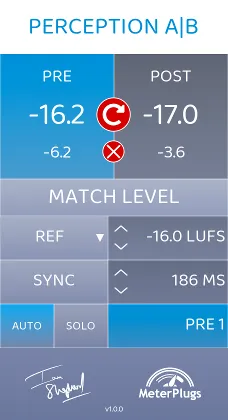
Insert Perception AB before the processing chain you want to test and set it to Pre. Insert a second instance at the end of the chain and set it to Post. Click Match Level, then toggle between the two to hear the chain with and without its effect at matched loudness.

MeterPlugs says the plugin offers multiple loudness matching modes and delay compensation for each comparison. The result is a fairer way to check EQ, compression and other processing while you work.

The Bypass All function is aimed at mixing. It lets you bypass the whole mix, or any part of it, with one click, without a change in loudness.
Workflow features for faster comparisons

Perception AB supports bypassing any processing chain, including external analog gear, so you can compare before and after on hardware as well as plugins. Fast A/B switching and easy bulk insertion are intended to speed up setting up a session.

MeterPlugs describes the original Perception as the first plugin for loudness-matched A/B comparisons in mastering. Perception AB extends that approach to mixing.

04Specs

Will it run?

Formats, systems and requirements as listed by Plugin Boutique. Missing details are left out, not guessed.

DeveloperMeterPlugs
TypePlugin
CategoryMetering
FormatsVST2, AU, AAX
Operating systemsWindows, macOS
Architecture64-bit
05Upgrades

Upgrade and crossgrade options

06FAQ

Questions, answered

What is Perception AB used for?

Perception AB is used to A/B test processing chains at matched loudness. You insert one instance before the chain and one after, then toggle between them to hear the effect of the processing without the change in volume.

Which formats and operating systems does Perception AB support?

Perception AB is available in VST2, AU and AAX formats. It runs on Windows and macOS. The macOS version requires 10.7 or later and is 64-bit only, with Apple Silicon native support. Windows XP SP3 or later is supported in 32-bit and 64-bit.

What is the difference between Perception AB and the original Perception?

According to MeterPlugs, Perception AB is the first version fully optimized for mixing as well as mastering. It adds a Bypass All function for bypassing an entire mix with one click, without a change in loudness.
08Developer

More from MeterPlugs

All MeterPlugs products →