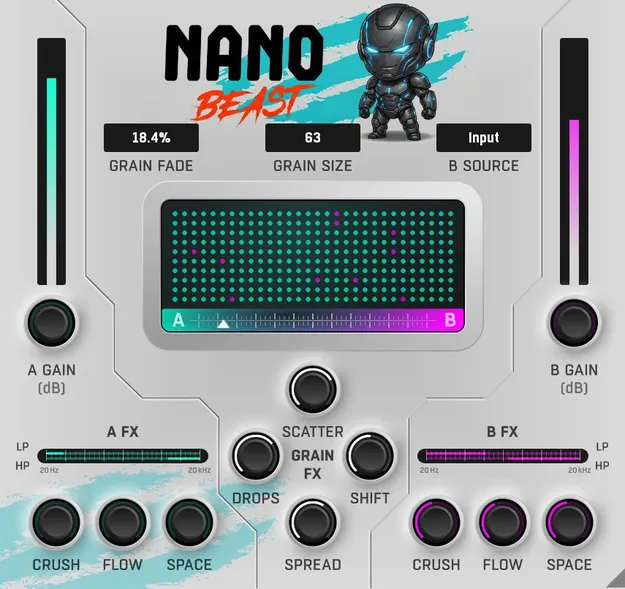
NanoBeast granular effects plugin interface by W. A. Production

NanoBeast: Granular Effects Plugin by W. A. Production

Rated 5.0/5 on Plugin Boutique (14 ratings)

NanoBeast is a granular effects plugin from W. A. Production that slices any audio source into tiny grains and rebuilds them as textures, stutters and glitches.

AVAILABLE ATPlugin Boutique
Opens the store in a new tab
01Overview

NanoBeast is an effects plugin built around granular processing, a method that breaks audio into very short grains and reassembles them. Its granular engine can be synced to tempo, with grain sizes down to 1/64 and adjustable fade times. A dedicated Morph control lets you choose how the grains are played back, including blending between a sidechain source and the input, or muting for gated, stuttering results. Filters, Crush, Space, Flow and a Grain FX section add further shaping options.

Best for

  • Vocal textures
  • Glitch drum processing
  • Ambient soundscapes
  • Hyper-pop synth effects
  • Rhythmic gated stutters
  • Sidechain morph transitions
Category
Granular FX
Store
Plugin Boutique
02Key features

What you get

  • Granular morphing and manipulation engine
  • Real-time slicing visualization of grains
  • Morph between input, sidechain or mute modes
  • Tempo-syncable grain size down to 1/64
  • Smooth grain fade control
  • High-pass and low-pass filters
  • A and B FX: Crush, Space and Flow
  • Grain FX: Drops, Stereo Spread, Pitch Shift, Scatter
03In depth

Granular Morphing and Grain Control

The core of NanoBeast is its granular engine. Grains can be synced to tempo, from 1/64 notes upward, and the fade setting shapes how each grain starts and ends, from sharp, transient-heavy rhythms to softer, washed-out clouds. A real-time slicing display shows the grains as they are rebuilt, which makes it easier to see what the settings are doing.

The Morph control offers three playback modes. Sidechain lets you morph between two sources by progressively swapping grains. Input processes your own audio with the effects in front. Mute produces stuttered, gate-like patterns that break apart over time.
Effects, Filters and Grain FX

The A and B effect slots offer Crush for bit-crushing, Space for reverb and Flow for tape-style modulation, alongside high-pass and low-pass filters for shaping the output.

The Grain FX section works on the grains themselves. Drops creates random dropouts for irregular rhythmic patterns, Stereo Spread places grains across the stereo field, and Pitch Shift and Scatter add random pitch and timing variation.

04Specs

Will it run?

Formats, systems and requirements as listed by Plugin Boutique. Missing details are left out, not guessed.

DeveloperW. A. Production
TypePlugin
CategoryGranular FX
05FAQ

Questions, answered

What is NanoBeast used for?

NanoBeast is used to atomize audio into grains and rebuild it. Typical uses include turning vocals into soundscapes, breaking drums into rhythmic patterns and creating stuttered or morphing transitions.

Does NanoBeast include presets?

Yes. NanoBeast includes factory presets covering soundscape creation and more chaotic transformations, which can be used as starting points for any audio source.

Is there a manual or tutorial for NanoBeast?

Yes. NanoBeast comes with a full PDF manual and a tutorial video.

07Developer

More from W. A. Production

All W. A. Production products →