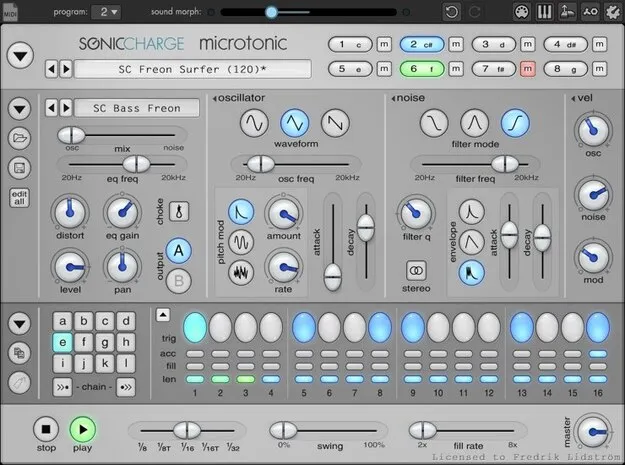
Microtonic by Sonic Charge drum and percussion synth plugin interface

Microtonic: Synthetic Drum and Percussion Synth by Sonic Charge Free Download

Rated 4.8/5 on Plugin Boutique (364 ratings)

Microtonic is a VST and AU drum and percussion synthesizer from Sonic Charge that combines eight synthesized drum channels with a pattern-based drum-machine engine synced to your host.

VST2AUWindowsmacOS64-bit
AVAILABLE ATPlugin Boutique
Free trial available from the developer
01Overview

Microtonic is a plugin for Windows and macOS built around a drum and percussion synthesizer rather than sample playback. Every sound is generated in real time, so you shape each hit from the oscillators up. It can work as a sound module played from a MIDI keyboard or sequencer, or it can run its own pattern engine in sync with your project. Sonic Charge developed it, and it was created by Magnus Lidström.

Best for

  • Synthesized drum kits
  • Electronic percussion
  • Drum pattern sequencing
  • Techno and electro drums
  • Sound design percussion
Developer
Sonic Charge
Category
Drum Synths
Store
Plugin Boutique
02Key features

What you get

  • Eight-channel drum and percussion synthesizer
  • Pattern-based drum-machine engine synced to the host
  • 100% synthetic sound rendered in real time, no samples
  • Over-sampled oscillators and sample-accurate triggering
  • Low CPU use, reported under 5% on low-end systems
  • Morphing, smart alteration and randomization for editing
  • Context menus and popup hints in the interface
  • Factory sounds and patterns included
03In depth

Synthesized Drum Sounds and Sound Design

Microtonic has eight drum and percussion channels. Each channel is a synthesis voice, and the developer states that no samples or pre-rendered waveforms are used. The oscillators are over-sampled, and triggering is sample-accurate, which keeps timing tight when you play or sequence hits.

Creative editing includes morphing between sounds, smart alteration and randomization. These tools are useful for generating variations of a kick, snare or percussion hit without building each one from scratch.
Pattern Engine, Workflow and Resource Use

The built-in pattern-based drum-machine engine stays synced to your host, so drum patterns follow your project tempo. You can also ignore the pattern engine and play the eight channels from a MIDI keyboard or sequencer.

The developer describes CPU use as extremely low, under 5 percent on low-end systems. The interface uses context menus and popup hints, and the plugin ships with a large set of factory sounds and patterns to start from.

04Specs

Will it run?

Formats, systems and requirements as listed by Plugin Boutique. Missing details are left out, not guessed.

DeveloperSonic Charge
TypePlugin
CategoryDrum Synth
FormatsVST2, AU
Operating systemsWindows, macOS
Architecture64-bit
Free trialYes
05FAQ

Questions, answered

What formats does Microtonic support?

Microtonic is available as a VST2 and AU plugin. It runs on Windows and macOS and is listed as a 64-bit product.

What are the system requirements for Microtonic?

On Windows, it requires Windows 7 or later, a 2GHz Pentium IV processor or equivalent, and 60MB of free disk space. On macOS, it requires macOS 10.13 High Sierra or later, an Intel or Apple Silicon processor, and 60MB of free disk space. A host that supports 64-bit VST 2.4 or AudioUnit 2 plugins is needed.

Does Microtonic use samples?

No. The developer states that all sounds are 100% synthetic and rendered in real time, with no samples or pre-rendered waveforms.

What do I need to use Microtonic?

You need a host application that supports 64-bit VST 2.4 or AudioUnit 2 plugins, with 60MB of free disk space for installation.

07Developer

More from Sonic Charge

All Sonic Charge products →