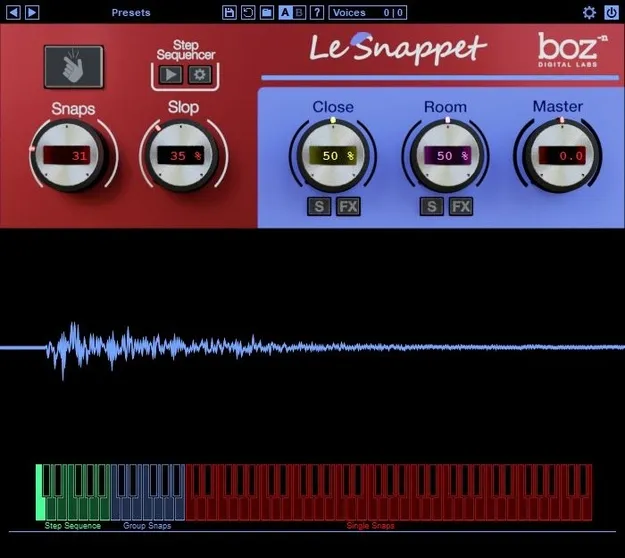
Le Snappet by Boz Digital Labs finger snap generator plugin interface

Le Snappet: Realistic Finger Snap Generator by Boz Digital Labs Free Download

Rated 5.0/5 on Plugin Boutique (20 ratings)

Le Snappet is a realistic finger snap generator plugin from Boz Digital Labs. It creates snap tracks of any group size, with adjustable looseness, mic positioning and built-in processing for music and film post-production.

VST3VST2AUAAXRTASWindowsmacOS
AVAILABLE ATPlugin Boutique
Free trial available from the developer
01Overview

Le Snappet is built around one job: producing finger snap parts. The plugin lets you set the group size and how tight or loose the snaps sound, then shape the microphone mix. Three adjustable mic positions cover close, mid and room perspectives. Each close and room mic has its own compressor with a mix knob, a 4-band EQ and a width control, so you can shape the sound without adding separate processing plugins. A built-in step sequencer and MIDI velocity control handle timing and dynamics.

Best for

  • Finger snap tracks
  • Film post-production snaps
  • Crowd snap effects
  • Groove and percussion layering
  • Rhythmic snap patterns
Category
Generators
Store
Plugin Boutique
02Key features

What you get

  • Generates single snaps up to large crowd-style snap tracks
  • Three adjustable mic positions: close/mid and room
  • Close and room mics with compressor, 4-band EQ and width
  • Slop control for tight or loose snap timing
  • MIDI velocity-sensing curve control
  • Panning, timing, layer and round-robin settings
  • Built-in step sequencer with 12 editable patterns
  • Suited to music and film post-production
03In depth

Snap Sound, Group Size and Mic Mix

Le Snappet is designed to make it simple to create snap tracks of any size. The Slop control sets how tight or loose the snaps are, so the same plugin can cover an intimate single snap or a crowd.

The mic controls set the spatial character. Three adjustable mic positions, close/mid and room, let you place the snaps from front to back. The close and room mics each have a compressor with a mix knob, a 4-band EQ and width control.

The developer says the snaps are built from multiple snappers recorded at multiple layers, with round-robin variation, captured from three mic perspectives.
Sequencing, MIDI Control and Workflow

You can play Le Snappet from MIDI, where velocity-sensing curve control shapes how each hit responds. Panning, timing, layer and CPU-saving round-robin settings are available alongside the main controls.

For patterned parts, the built-in step sequencer holds 12 editable patterns that you can switch between. It works for complex or simple rhythms.

The interface is kept simple at the front, with the advanced controls available when you need them.

04Specs

Will it run?

Formats, systems and requirements as listed by Plugin Boutique. Missing details are left out, not guessed.

DeveloperBoz Digital Labs
TypePlugin
CategoryGenerator
FormatsVST3, VST2, AU, AAX, RTAS
Operating systemsWindows, macOS
Free trialYes
05FAQ

Questions, answered

What formats does Le Snappet support?

Le Snappet is available in VST3, VST2, AU, AAX and RTAS formats.

Does Le Snappet work on Windows and macOS?

Yes. It runs on Windows and macOS. On M1 Macs, the developer says the plugin is not yet compiled natively and should run under Rosetta in the meantime, with a native version in progress.

Can Le Snappet be controlled from MIDI?

Yes. It supports MIDI control with velocity-sensing curve settings, and you can also use the built-in step sequencer with 12 editable patterns.

Is there a trial version?

Yes, a trial is available for Le Snappet.

07Developer

More from Boz Digital Labs

All Boz Digital Labs products →