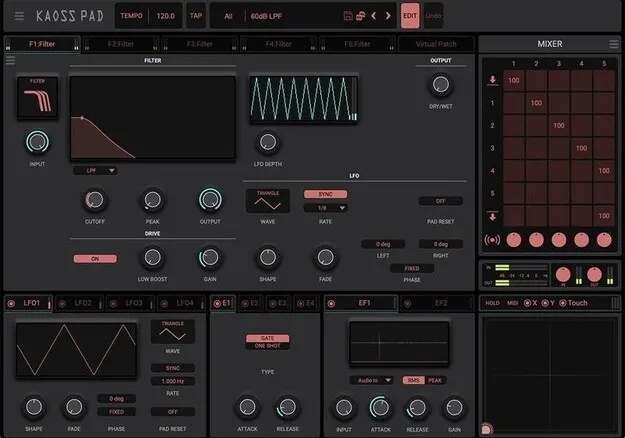
Kaoss Pad by KORG multi-effect plugin touch pad interface

Kaoss Pad: Touch-Controlled Multi-Effect Plugin by KORG

Rated 4.7/5 on Plugin Boutique (9 ratings)

Kaoss Pad is a multi-effect plugin from KORG that lets you control effects in real time by touching a pad. It runs on Windows and macOS in VST3, VST2, AU and AAX formats.

VST3VST2AUAAXWindowsmacOS64-bit
AVAILABLE ATPlugin Boutique
Opens the store in a new tab
01Overview

Kaoss Pad brings the touch-pad concept of KORG's hardware series into a DAW plugin. Instead of turning knobs, you touch, trace and rub the pad to change the sound in real time. The developer describes it as a new design rather than a software copy of the hardware, with an interface that stays simple while the internal structure opens up to editing. It covers both performance and production work.

Best for

  • Live performance effects
  • Beat production
  • Vocal processing
  • Glitch and stutter effects
  • Real-time DAW automation
  • Sound design
Developer
KORG
Store
Plugin Boutique
02Key features

What you get

  • Touch-pad control of effect parameters in real time
  • 25 effect algorithms, including reverb, delay and grain shifter
  • Edit page for building custom effect programs
  • Up to five effects per program running simultaneously
  • Four LFOs, four envelope generators and two envelope followers as modulators
  • Drag-and-drop modulation mapping with per-parameter depth and polarity
  • MIDI CC and MIDI note control from hardware controllers
  • DAW automation support for recording pad movements
  • 128 built-in effect programs
03In depth

Touch Pad Control and Editable Effect Programs

The main interface is a touch pad you can play with a mouse or trackpad. Select one of the preloaded programs and move across the pad to change the sound. You can also drive effects from a hardware controller that sends MIDI CC, such as an XY pad controller, or send MIDI note on/off to trigger positions on the pad like a keyboard.

DAW automation is supported, so pad movements can be recorded and played back, and automation can be drawn by hand for changes that are hard to perform live.

An edit page lets you build your own effect programs. Up to five effects can run at once in one program. Each effect's parameters can be controlled by four LFOs, four envelope generators, two envelope followers, an XY pad and other modulators, with drag-and-drop mapping and per-parameter depth and polarity settings.
Effect Algorithms and Built-In Programs

The 25 effect algorithms cover spatial effects such as reverb and delay, modulation effects such as chorus and flanger, filter effects such as filter, isolator and equalizer, and digital effects such as grain shifter, impulse response, pitch shifter, ring modulator, vinyl break, looper and vocal processor. An analog oscillator algorithm generates its own sound.

The vocal processor lets you sing or add vocals over played-back samples, which can be useful for building beats with vocals inside the plugin. The plugin includes 128 built-in effect programs that combine up to five algorithms each.

04Specs

Will it run?

Formats, systems and requirements as listed by Plugin Boutique. Missing details are left out, not guessed.

DeveloperKORG
TypePlugin
CategoryMulti Effect
FormatsVST3, VST2, AU, AAX
Operating systemsWindows, macOS
Architecture64-bit
05FAQ

Questions, answered

What formats and systems does Kaoss Pad support?

Kaoss Pad is available in VST3, VST2, AU and AAX formats. It runs on Windows and macOS and is a 64-bit plugin.

What do I need to run Kaoss Pad?

On Mac, you need macOS 10.14 Mojave or higher and an Intel Core i5 or better, with Apple Silicon supported natively. On PC, you need Windows 10 64-bit or higher and an Intel Core i5 or better. Both need 8 GB of RAM (16 GB recommended), 8 GB of free disk space, and an internet connection.

Can I control Kaoss Pad with a hardware controller?

Yes. Effects can be controlled by sending MIDI CC from a hardware controller, such as one with an XY pad. MIDI note on/off can also be used to trigger pad positions like playing a keyboard.

Can I build my own effects with Kaoss Pad?

Yes. The edit page lets you combine up to five effects in a program and map modulators such as LFOs and envelope generators to their parameters.

07Developer

More from KORG

All KORG products →