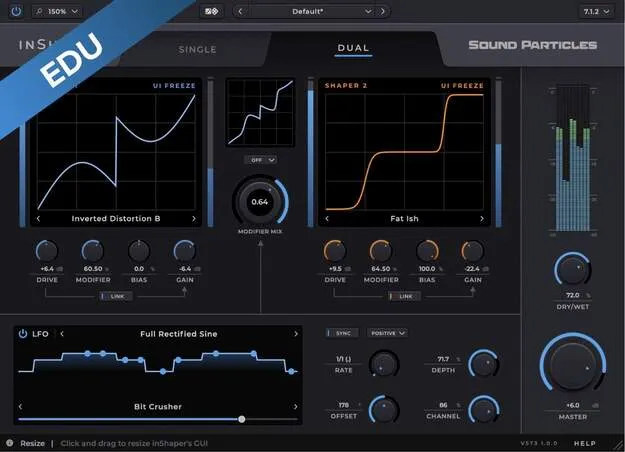
InShaper Educational Version by Sound Particles distortion plugin interface

InShaper Educational Version: Waveform Shaping and Distortion Plugin by Sound Particles

InShaper Educational Version is a multi-effect audio plugin from Sound Particles that shapes and folds waveforms to create distortion, from subtle saturation to aggressive sound. It is an educational edition for students and academic professionals.

VST3VST2AUAAXWindowsmacOS64-bit
AVAILABLE ATPlugin Boutique
Opens the store in a new tab
01Overview

InShaper Educational Version is a distortion plugin built around waveform shaping and folding. The developer describes it as a tool for creating distortion that stays flexible and precise, whether you are producing music, designing sound effects or working on mixes. It is offered as an educational version for students and academic professionals, and Sound Particles confirms educational status after purchase. The plugin runs in VST3, VST2, AU and AAX formats on Windows and macOS.

Best for

  • Saturation and warmth
  • Aggressive sound design distortion
  • Modulated bass processing
  • Immersive mix effects
  • Academic audio production
Store
Plugin Boutique
02Key features

What you get

  • Single and Dual modes for shaping and folding the signal
  • Wide range of distortion characters from saturation to heavy distortion
  • Control over drive, gain, modifier, oversampling and bias
  • Link Drive to Gain keeps levels consistent when adjusting drive
  • Multiple LFO waveforms and modifiers for modulation
  • Channel offset applies different LFO offsets to each speaker
  • Support for mono, stereo and immersive output formats
03In depth

Shaping and Folding Distortion Characters

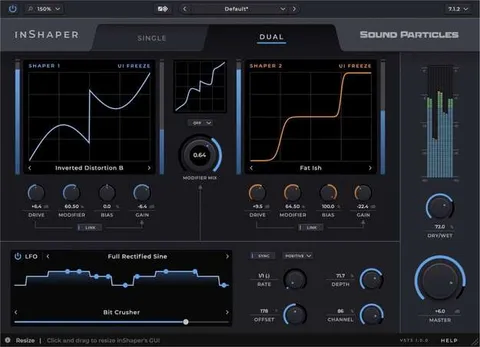
The core of InShaper is its Single and Dual modes. In either mode you shape and fold the signal, moving from subtle saturation to heavier distortion. The plugin offers a wide range of distortion characters, so the same drive setting can produce very different textures depending on the mode and settings you choose.

Full control covers drive, gain, modifier, oversampling and bias. Linking drive to gain keeps output levels steady while you push the drive, which makes it easier to compare settings without constantly re-balancing the level.
LFO Modulation and Multichannel Output

InShaper includes LFOs with multiple waveforms and modifiers. You can route them to drive, bias, gain or the modifier to make distortion move over time. Channel offset applies a different LFO offset to each speaker, which adds movement across a multichannel field.

The plugin supports all major output formats, from mono and stereo to immersive formats, so it can be used in standard stereo mixes and in surround or immersive projects.

04Specs

Will it run?

Formats, systems and requirements as listed by Plugin Boutique. Missing details are left out, not guessed.

DeveloperSound Particles
TypePlugin
CategoryMulti Effect
FormatsVST3, VST2, AU, AAX
Operating systemsWindows, macOS
Architecture64-bit
05FAQ

Questions, answered

What formats does InShaper Educational Version support?

It is available in VST3, VST2, AU and AAX formats. AAX requires Pro Tools 64-bit compatible with PT11 or above.

What operating systems does it run on?

It runs on Windows and macOS. The macOS version supports Mac OS X 10.15 or higher, including Intel and native Apple Silicon Macs. Windows 10 or higher is required on the PC side.

What do I need to run InShaper?

The minimum requirements are a 2-core or higher CPU, 4 GB or more of RAM and 600 MB of disk space. A 4-core CPU and 8 GB of RAM are recommended.

Who is the educational version for?

It is intended for students and academic professionals. Sound Particles confirms educational status after purchase.

07Developer

More from Sound Particles

All Sound Particles products →