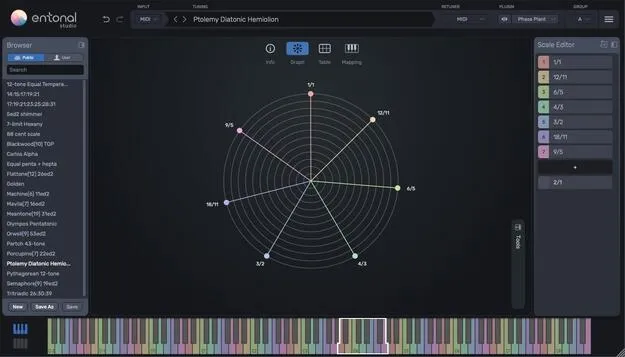
Entonal Studio by Node Audio microtonal tuning plugin interface with radial graph

Entonal Studio: Microtonal Tuning Plugin by Node Audio

Entonal Studio is a microtonal tuning plugin by Node Audio that works as a MIDI plugin and as a host for AU, VST2 and VST3 instruments. It lets producers retune notes using cents, ratios, EDO degrees or math expressions.

VST3AUAAXCLAPWindowsmacOSLinux64-bit
AVAILABLE ATPlugin Boutique
Opens the store in a new tab
01Overview

Entonal Studio is built for producers who want to work outside standard 12-tone equal temperament. Its radial graph lets you adjust the pitch of each scale note by colour and angle, while the input mapping controls how a scale is played from a keyboard controller or a DAW piano roll. Because the plugin can host instruments itself, you can make a favourite synth microtonal without setting up MIDI routing. It is available in VST3, AU, AAX and CLAP formats.

Best for

  • Microtonal synth tuning
  • Just intonation scales
  • Equal temperament experiments
  • Linking tunings across tracks
  • Alternative tuning systems
Developer
Node Audio
Category
Utilities
Store
Plugin Boutique
02Key features

What you get

  • Radial graph for angular control over pitch
  • Enter note values as cents, ratios, EDO degrees or expressions
  • Custom mapping of scale intervals to MIDI notes
  • Snap notes to ratios or EDO degrees
  • Display relative intervals between held notes
  • Scales of up to 192 notes
  • Generate equal temperaments
  • Import and export Scala files and Tuning XML
03In depth

Retuning Notes With the Radial Graph and Scale Editor

The radial graph shows scale notes by colour and angular position, so you can drag a note freehand in cents or snap it to simple ratios within a chosen prime limit. You can also view the relative intervals between two or more held notes to check how they align.

The scale editor works from a list. Add or remove notes and type each value as cents, ratios, EDO degrees or a mathematical expression. For scales that do not repeat at the octave, you can set the ratio of the repeating interval instead of assuming 2/1.

Scales can contain up to 192 notes, and you can generate equal temperaments directly. Scala and Tuning XML files can be imported and exported, which makes it easier to move scales between tools.
Hosting Instruments and Sharing Tunings Across Tracks

Entonal Studio can host AU, VST2 and VST3 instruments, so the tuning and the sound live in one plugin chain. Its built-in simple synthesizer is available if you want to audition a tuning without loading another instrument.

Group plugin instances to link tunings between tracks in a project. This keeps a microtonal system consistent when several parts use the same scale.

In Bitwig Studio, FL Studio and Studio One, the DAW piano roll can display note values as note names, which helps when reading microtonal parts. A tuning information table covers octaves from -2 to 8, and the view can switch between a traditional keyboard, a white-notes keyboard or an MPE keyboard.

04Specs

Will it run?

Formats, systems and requirements as listed by Plugin Boutique. Missing details are left out, not guessed.

DeveloperNode Audio
TypePlugin
CategoryUtility
FormatsVST3, AU, AAX, CLAP
Operating systemsWindows, macOS, Linux
Architecture64-bit
05FAQ

Questions, answered

What is Entonal Studio used for?

Entonal Studio retunes individual notes for microtonal music. It can act as a MIDI plugin or host AU, VST2 and VST3 instruments, so the tuning is applied directly within your chain.

Which formats and operating systems does Entonal Studio support?

It is available in VST3, AU, AAX and CLAP formats. It runs on macOS 10.15 or later, Windows 7, 10 and 11 (64-bit only), and Linux.

What do I need to use Entonal Studio?

It works in compatible DAWs such as Ableton Live, Logic Pro, FL Studio, Bitwig, Reaper, Studio One, Cubase Pro and Pro Tools. In Ableton Live, only the VST3 version is compatible, not the AU version.

Do I need to know music theory to use it?

The developer describes the plugin as easy to use with any level of tuning knowledge. The radial graph and the cents, ratio and EDO input options let you work with the level of detail you prefer.

07Developer

More from Node Audio

All Node Audio products →