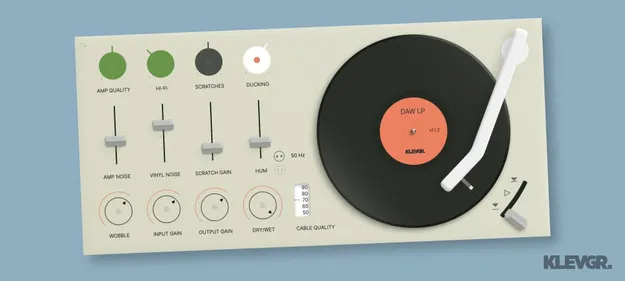
DAW LP by Klevgrand vinyl player simulation plugin interface

DAW LP: Vinyl Player Simulation Plugin by Klevgrand Free Download

Rated 4.7/5 on Plugin Boutique (26 ratings)

DAW LP is a vinyl player simulation plugin from Klevgrand that adds scratches, crackle, hum and noise to audio, modeling the path from record surface to RIAA amplifier output.

VST2AUAAXWindowsmacOS
AVAILABLE ATPlugin Boutique
Free trial available from the developer
01Overview

DAW LP is an effects plugin in the saturation subcategory that recreates the imperfections of a record player. Klevgrand's controls cover the record surface, the pickup needle, the RIAA amplifier and the output cable, so you can dial in everything from an old 78 rpm sound to a cleaner modern hi-fi tone. Scratch, hum and noise levels are adjustable on their own, and input, output and dry/wet controls help you fit the effect into a mix.

Best for

  • Lo-fi drum processing
  • Vintage vinyl texture
  • Old 78 rpm sound
  • Hum and noise texture
  • Mix-bus character
  • Sound design for film
Developer
Klevgrand
Category
Saturation
Store
Plugin Boutique
02Key features

What you get

  • Scratch and crackle rate, level and ducking controls
  • Separate levels for vinyl noise, amplifier noise and low-frequency hum
  • Continuous control of amplifier, pickup needle and cable quality
  • Switchable 50 Hz or 60 Hz mains hum
  • Input gain, output gain and dry/wet mix for easy blending
  • Available as VST2, AU and AAX plugin formats
03In depth

Vinyl Artifacts and Sound Character

DAW LP is built around layered vinyl artifacts. Scratches and crackles can be set by rate, level and ducking, which controls how the noise responds to the audio. Vinyl noise, amplifier noise and low-frequency hum each have their own level control.

Klevgrand describes the plugin as covering the signal chain from the record surface to the amplifier output cable. Continuous controls for amplifier, pickup needle and cable quality let you shift the overall character from worn and lo-fi to cleaner and more detailed.
Workflow and Key Controls

The Anatomy section of the interface is organized around three areas: where and when, quality, and noise. The first sets the mains hum frequency, with a switch between 50 Hz and 60 Hz, which lets you match the grid frequency of a chosen region.

The quality controls shape the RIAA amplifier, pickup needle and cable together. The noise controls set how much scratch, hum, wear and noise you add. Input gain, output gain and dry/wet mix sit alongside these so you can balance the effect against the rest of your signal.

04Specs

Will it run?

Formats, systems and requirements as listed by Plugin Boutique. Missing details are left out, not guessed.

DeveloperKlevgrand
TypePlugin
CategorySaturation
FormatsVST2, AU, AAX
Operating systemsWindows, macOS
Free trialYes
05FAQ

Questions, answered

What is DAW LP used for?

DAW LP is used to add vinyl player artifacts such as scratches, crackle, hum and noise to audio. It suits anyone wanting an analog record character, from old 78 rpm recordings to a cleaner hi-fi sound.

Which formats and operating systems does DAW LP support?

DAW LP is available in VST2, AU and AAX formats. It runs on Windows and macOS. Klevgrand lists macOS 10.10 or later, optimized for the M1 processor, and Windows 7 SP1 or later.

Can I switch between 50 Hz and 60 Hz mains hum?

Yes. DAW LP includes a switch between 50 Hz and 60 Hz hum, so you can match the mains frequency you want to emulate.

Is there a trial version of DAW LP?

Yes, DAW LP has a trial available.

07Developer

More from Klevgrand

All Klevgrand products →