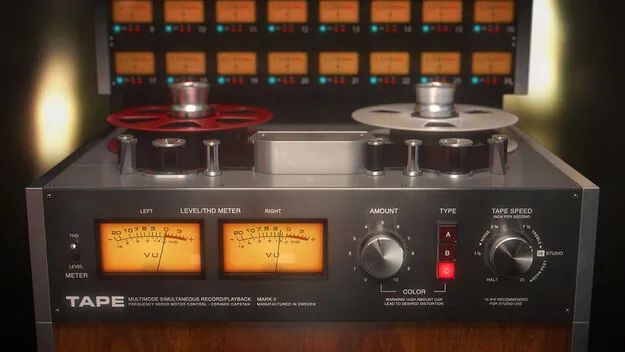
Tape tape machine emulation plugin by Softube interface

Tape: Tape Machine Emulation Plugin by Softube

Rated 4.7/5 on Plugin Boutique (3,017 ratings)

Tape by Softube is a tape emulation plugin that adds cohesion and weight to mixes. It includes three tape machine types, adjustable tape speed and a low CPU load.

VST3VST2AUAAXRTASWindowsmacOS64-bit
AVAILABLE ATPlugin Boutique
Opens the store in a new tab
01Overview

Tape is a tape emulation effect from Softube built for mixing. Softube says analog tape smooths a mix and adds cohesion, and Tape offers that character inside a DAW. The plugin combines three tape machine types in one interface, with an Amount control for setting how much tape character you apply. Its Remote Control panel gives access to further settings such as tape speed stability and crosstalk amount.

Best for

  • Mix bus glue
  • Vintage track coloring
  • Low-end weight on bass
  • Studio One mixing
  • Mix-down tape simulation
Developer
Softube
Store
Plugin Boutique
02Key features

What you get

  • Three tape machine types in a single plugin
  • Type A: Swiss reel-to-reel character with precise, linear response
  • Type B: transformer-based machine adding low-end weight
  • Type C: British tape machine with a vintage character
  • Amount control for setting effect strength
  • Adjustable tape speed with tape head bump
  • Remote Control panel for speed stability and crosstalk
  • Tape Multitrack in Studio One MixFX slot
03In depth

Three Tape Machine Types for Different Colors

Tape includes three machine types. Type A is based on a Swiss reel-to-reel machine that Softube describes as precise and linear. Type B is a transformer-based machine that adds weight and low-end body. Type C is based on a British tape machine with a vintage character.

The Amount knob sets the strength of the effect on whichever machine type you choose. Tape speed also changes the sound. According to Softube, slower tape speeds bring out the tape head bump, which adds low end to the mix.

The Remote Control panel adds controls for speed stability and crosstalk amount.
Using Tape on a Master Bus or Individual Tracks

Softube says a single instance of Tape on the master bus can imitate a mix that is printed to a stereo tape machine. You can also insert it on every track for a more heavily colored, vintage-style sound.

Softube states that Tape uses little processor power, so multiple instances are practical in a large session.

For Presonus Studio One users, adding Tape to the MixFX slot unlocks Tape Multitrack. It adds selectable crosstalk between individual tracks and lets you control all track settings from one interface. Tape and Tape Multitrack share one license.

04Specs

Will it run?

Formats, systems and requirements as listed by Plugin Boutique. Missing details are left out, not guessed.

DeveloperSoftube
TypePlugin
CategoryTape Emulation
FormatsVST3, VST2, AU, AAX, RTAS
Operating systemsWindows, macOS
Architecture64-bit
05FAQ

Questions, answered

What formats does Tape support?

Tape is available in VST3, VST2, AU, AAX and RTAS formats. Softube recommends VST3, because some of its plugins have features that are not present in the older VST format.

Which operating systems can run Tape?

Tape runs on Windows and macOS. The Windows version requires Windows 10 (64-bit) or Windows 11. The macOS version supports Big Sur 11, Monterey 12 and Ventura 13.

What do I need to use Tape?

You need a Softube account and an iLok account, plus a computer with an AU, VST, VST3 or AAX compatible DAW. Internet access is required to download installers and manage licenses. Softube recommends the latest iLok License Manager, which is downloaded from ilok.com.

Does Tape Multitrack come with Tape?

Tape Multitrack is included with Tape for Presonus Studio One users. It is used in the MixFX slot and adds selectable crosstalk between tracks. Tape and Tape Multitrack share the same license.

07Developer

More from Softube

All Softube products →