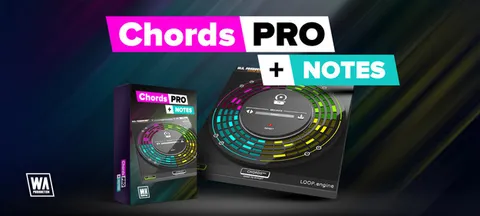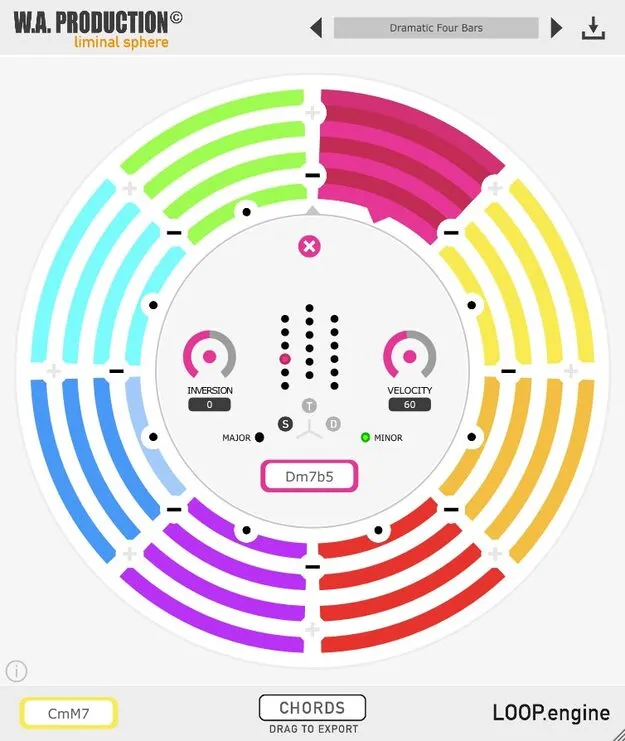
CHORDS chord progression MIDI effect plugin interface by W. A. Production

CHORDS: Chord Progression MIDI Effect by W. A. Production Free Download

Rated 4.4/5 on Plugin Boutique (293 ratings)

CHORDS is a chord-creating MIDI effect plugin by W. A. Production that generates looped chord progressions of up to 8 chords for your DAW. It is available as an AAX plugin for Windows and macOS.

AAXWindowsmacOS64-bit
AVAILABLE ATPlugin Boutique
Free trial available from the developer
01Overview

CHORDS is built to help you start a track when you need a harmonic idea. The developer designed it for EDM production but says it suits a range of genres. You assign it to a MIDI or instrument track in your DAW, and it generates looped chord progressions with control over chord shape, inversions and velocity. Once you have a progression you like, you can drag the MIDI out of the plugin and edit it freely in your project.

Best for

  • EDM chord progressions
  • Starting new tracks
  • Chord riff ideas
  • Editable MIDI chord export
  • Music theory practice
Store
Plugin Boutique
02Key features

What you get

  • Chord-creating MIDI effect that connects to any sequencer
  • Up to 8 chord segments per looped progression
  • Global controls for inversions, length, speed and root key
  • Per-segment control of chord shape, inversion and velocity
  • Inversions from -6 to +6 for each segment
  • Tonic, Subdominant and Dominant chord shape buttons
  • Syncs playback to the host DAW BPM
  • Export MIDI by drag and drop; includes factory presets and a resizable interface
03In depth

Chord Progression Control: Global and Per-Segment Editing

CHORDS uses segments to build a progression. You can have up to 8 segments, and each one can trigger between one and four notes per chord. Playback syncs to the host BPM of your DAW, so the progression stays locked in time.

Global controls adjust inversions, length, speed and the root key of the whole riff. To work on detail, click a segment to change its chord shape, including major and minor variations, its individual inversion and its velocity. Inversions range from -6 to +6, so you can move the lowest notes up an octave or the highest notes down one.

The 18 buttons in the centre of the interface let you pick Tonic, Subdominant or Dominant chord shapes, from simple triads to more complex voicings.
Exporting Chord MIDI to Your Project

CHORDS works as a MIDI effect, so it connects to any sequencer that accepts MIDI routing. Route it through the MIDI In of your track as described in your DAW's manual.

To move a progression into your project, drag and drop the MIDI from the plugin into your DAW. You can then edit the notes, chop up the MIDI and transpose it to fit your arrangement.

CHORDS also includes a large set of factory preset progressions, each labelled in detail. They can serve as a starting point for a full track.

04Specs

Will it run?

Formats, systems and requirements as listed by Plugin Boutique. Missing details are left out, not guessed.

DeveloperW. A. Production
TypePlugin
CategoryMusic Theory Tools
FormatsAAX
Operating systemsWindows, macOS
Architecture64-bit
Free trialYes
05FAQ

Questions, answered

What formats and operating systems does CHORDS support?

CHORDS is available in AAX format and runs on Windows and macOS. It is 64-bit only. The AAX format requires Pro Tools 11 or higher.

What do I need to use CHORDS?

CHORDS is a MIDI effect that must be assigned to a MIDI or instrument track in your DAW through MIDI In. It needs a Pro Tools 11 or higher setup for AAX. The developer lists Maschine 2 and Reason as incompatible because they do not support MIDI routing to it.

Can I edit the chords after I export them?

Yes. You can drag and drop the MIDI from CHORDS into your DAW and then edit it, chop it up, transpose it or change it however you like.

Is there a trial version?

Yes, CHORDS offers a trial.

07Developer

More from W. A. Production

All W. A. Production products →