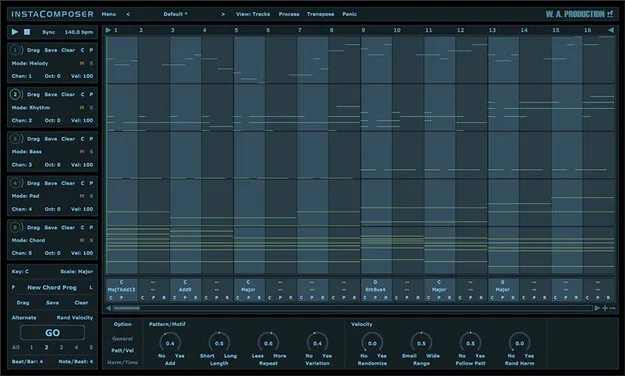
InstaComposer MIDI generation plugin interface by W. A. Production

InstaComposer: AI MIDI Generation Plugin by W. A. Production Free Download

Rated 4.3/5 on Plugin Boutique (2,263 ratings)

InstaComposer is a MIDI generation plugin by W. A. Production that creates melodies, phrases, riffs, bass, pads and chords. It is available in VST2, AU and AAX formats for Windows and macOS.

VST2AUAAXWindowsmacOS64-bit
AVAILABLE ATPlugin Boutique
Free trial available from the developer
01Overview

InstaComposer is designed for producers who run short on ideas or want a fast starting point. The plugin generates MIDI across five tracks at once, covering melody, rhythm, bass, pad and chord parts. Its generation is shaped by controls for probability, complexity and variation, along with chosen scale, time signature and riff length. Generated material can be edited in a built-in piano-roll editor and dragged into a DAW or routed to other virtual instruments.

Best for

  • Melody and riff ideas
  • Chord progression starting points
  • Bass and pad generation
  • Multi-instrument MIDI sketching
  • Writer's block recovery
Store
Plugin Boutique
02Key features

What you get

  • Generates melodies, phrases, riffs, bass, pads and chords
  • Creates new sequences for up to five tracks simultaneously
  • Multi-track and multi-channel MIDI routing
  • Automatic harmony and chord progression generation
  • Controls for probability, complexity and variation
  • Piano-roll MIDI editor with velocity editing
  • Drag-and-drop MIDI export to your DAW
  • Support for multiple time signatures
  • Factory presets and a full PDF manual with tutorial video
03In depth

Generation Controls and Musical Output

InstaComposer's generation is governed by a decision-making engine that weighs musical rules alongside a set of user parameters. These parameters, located in the bottom panel, include repetition probability, chord shape complexity, harmonic variation, strumming technique and note density.

Because the scale, time signature and riff length are set in advance, the output stays within the musical context you define. You can generate new sequences for one, several or all five tracks, in any combination of melody, rhythm, bass, pad and chord.
Editing and Routing MIDI Into Your DAW

The onboard MIDI editor lets you adjust generated notes before they leave the plugin. Notes can be moved, copied, deleted and have their velocity changed in a piano-roll interface.

Finished tracks can be dragged directly into your DAW. Alternatively, you can set up multi-channel instruments and route each track from InstaComposer to your own virtual instruments, previewing all five tracks at once without leaving the plugin. Factory presets provide motifs that can serve as a basis for full arrangements.

04Specs

Will it run?

Formats, systems and requirements as listed by Plugin Boutique. Missing details are left out, not guessed.

DeveloperW. A. Production
TypePlugin
CategoryMusic Theory Tools
FormatsVST2, AU, AAX
Operating systemsWindows, macOS
Architecture64-bit
Free trialYes
05FAQ

Questions, answered

What formats does InstaComposer support?

InstaComposer is available in VST2, AU and AAX formats. It is a 64-bit plugin.

Which operating systems are supported?

InstaComposer runs on Windows 8 and later (32 and 64-bit) and on macOS 10.13 and later (64-bit only). Mac users on Apple Silicon should check the current compatibility status on the developer's site before purchasing.

Does InstaComposer produce audio?

No. InstaComposer generates MIDI, which you route to your DAW or to virtual instruments of your choice.

Is there a trial version?

Yes, InstaComposer offers a trial version.

07Developer

More from W. A. Production

All W. A. Production products →