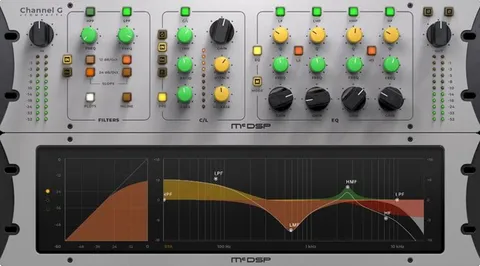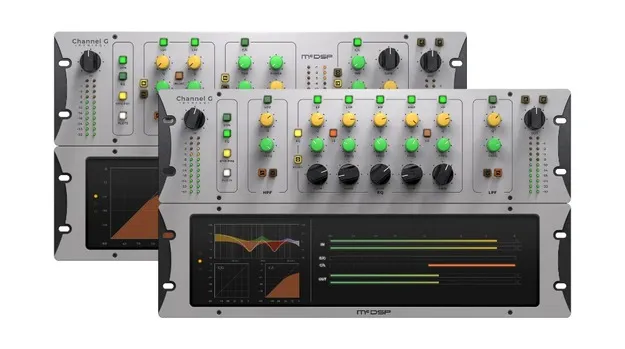
Channel G Surround HD v7 by McDSP channel strip plugin interface

Channel G Surround HD v7: Console-Style Channel Strip by McDSP Free Download

Channel G Surround HD v7 is a console-style channel strip plugin from McDSP, combining dynamics and equalization sections in VST3, VST2, AU and AAX formats.

VST3VST2AUAAXWindowsmacOS64-bit
AVAILABLE ATPlugin Boutique
Free trial available from the developer
01Overview

Channel G Surround HD v7 is McDSP's channel strip plugin for music and post-production work. It bundles a console-style dynamics section and a five-band equalizer, and it can run as a combined G Console configuration. The developer describes the set as bringing a big-board sound and workflow into software. The plugin is listed for Windows and macOS and includes calibration modes for music, post-production and several popular analogue mixing desks.

Best for

  • Mixing vocals
  • Channel strip mixing
  • Post-production dialogue
  • Mastering-stage dynamics
  • Surround mix processing
Developer
McDSP
Store
Plugin Boutique
02Key features

What you get

  • Console-style dynamics section with expander/gate and compressor/limiter
  • Five-band console-style equalizer with versatile filter section
  • G Console combines dynamics and EQ in one plugin
  • Calibration modes for music, post-production and analogue desk models
  • Zero latency algorithms and ultra-low latency processing
  • Double precision processing
  • Real-time analyzers
  • Mono and stereo versions available
  • Optimized for Apple Silicon and latest Intel processors
03In depth

Dynamics and EQ in one channel strip

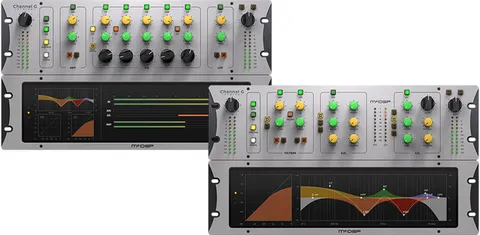
Channel G is built from three plugins. G Dynamics is a console-style dynamics section with an expander/gate, a compressor/limiter and a versatile filter section. G Equalizer is a five-band console-style EQ with its own filter section. G Console combines the dynamics and EQ configurations in a single plugin.

All Channel G configurations include calibration modes for music, post-production and models of popular analogue mixing desks, so the processing can be matched to the kind of mix you are doing.
Workflow, formats and activation

The plugin is listed in VST3, VST2, AU and AAX formats and runs on Windows and macOS in 64-bit. Mono and stereo versions are available. Activation requires an iLok2 or iLok3 USB Smart Key, or a free iLok License Manager account with iLok Cloud. Each McDSP v7 plugin includes two activations per license or subscription.

McDSP lists support for Pro Tools, Logic Pro, Cubase, Nuendo, Ableton Live, LUNA, Reaper, Sonar, Studio One and other DAWs that support the listed formats. The developer also notes that VST support ended with v7.0 for its HD plugins.

04Specs

Will it run?

Formats, systems and requirements as listed by Plugin Boutique. Missing details are left out, not guessed.

DeveloperMcDSP
TypePlugin
CategoryChannel Strip
FormatsVST3, VST2, AU, AAX
Operating systemsWindows, macOS
Architecture64-bit
Free trialYes
05FAQ

Questions, answered

What formats does Channel G Surround HD v7 support?

The plugin is listed in VST3, VST2, AU and AAX formats. McDSP notes that VST support ended with v7.0 for its HD plugins, so check the format you need before purchase.

Which operating systems are supported?

Channel G Surround HD v7 is listed for Windows and macOS. The macOS requirements in the developer's documentation include macOS 10.13 or higher, with 64-bit support only.

What do I need to activate the plugin?

Activation requires an iLok2 or iLok3 USB Smart Key, or a free iLok License Manager account and iLok Cloud session. Each v7 plugin includes two activations per license or subscription.

What do I need to use Channel G Surround HD v7?

You need a compatible host that supports AAX, AU or VST3 plugin formats, such as Pro Tools, Logic Pro, Cubase or Ableton Live, plus an iLok account or USB Smart Key for authorization.

07Developer

More from McDSP

All McDSP products →