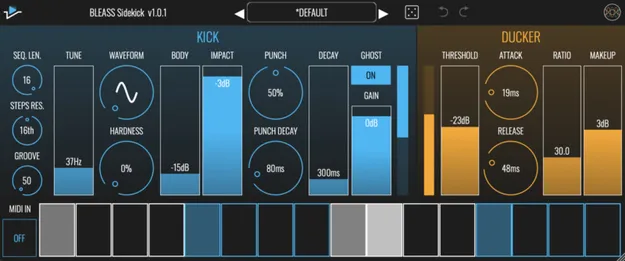
BLEASS Sidekick kick drum synth, step sequencer and ducker plugin interface

BLEASS Sidekick: Kick Synth, Step Sequencer and Ducker Plugin Free Download

Rated 4.6/5 on Plugin Boutique (71 ratings)

BLEASS Sidekick is a plugin that combines an analogue-style kick drum synth, a step sequencer and a ducker (sidechain compressor) to create rhythmic dynamics within a track.

VST3AUAAXStandaloneWindowsmacOS64-bit
AVAILABLE ATPlugin Boutique
Free trial available from the developer
01Overview

Sidekick is built around three parts that work together: a kick drum synth, a built-in sequencer and a ducker. The kick synth uses an analogue-style engine inspired by vintage beatboxes, and it can be triggered from the 16-step sequencer or from an external MIDI input. Its output can be mixed with the incoming audio, used to drive the ducker, or both. The result is a tool for adding kick parts to loops or for shaping the rhythm of any track or full mix.

Best for

  • Adding kicks to loops
  • Rhythmic sidechain ducking
  • Ducking full mixes
  • Trigger-based dynamic rhythms
  • Classic analogue kick tones
Developer
BLEASS
Category
Drum Tools
Store
Plugin Boutique
02Key features

What you get

  • Kick drum synth with analogue-style engine inspired by vintage beatboxes
  • Tune range from 20Hz to 100Hz with morphable sine-to-triangle waveform
  • Hardness, Body and Impact controls for overdrive, octave layering and attack
  • Punch and Punch Decay for resonant filter sweeps at the start of the kick
  • Built-in 16-step sequencer with variable length and swing groove control
  • MIDI In for triggering the kick from a controller or DAW MIDI track
  • Ducker with Threshold, Attack, Release, Ratio and Makeup controls
  • Ghost mode for routing the kick to a separate channel
03In depth

Kick Synth and Sound Shaping Controls

The kick section covers a broad range of classic analogue kick tones. Tune sets the pitch from 20Hz to 100Hz, and Waveform morphs smoothly between sine and triangle shapes. Hardness adds overdrive for a brighter, harder edge, while Body mixes in a second oscillator an octave above the first for a fuller sound.

Impact emphasizes the attack for more thump, and Punch adds a resonant filter sweep at the start of the sound, with Punch Decay setting its length from a short transient to a noticeable sweep. Decay sets the overall length, from clicky short kicks to booming, pitched tones. Ghost removes the kick from the plugin's output, so it can be routed to a separate channel through multi-out or multi-bus routing in supported hosts.
Sequencer and Ducker Workflow

The 16-step sequencer lets you set the sequence length from 4 to 16 steps and the note length of each step. Groove adds swing timing, and MIDI In lets a controller or a MIDI track in your DAW trigger the kick while any pattern programmed into the plugin still plays. Velocity is set by dragging within a step cell, and alternating grey and blue shading marks each group of four steps.

The ducker reduces the level of the audio passing through the plugin whenever the kick triggers. Threshold sets sensitivity, Attack and Release control how quickly the compressor engages and recovers, Ratio sets the depth of gain reduction, and Makeup restores the level lost during ducking. The developer highlights using the kick and sequencer purely as a trigger for the ducker, which can create detailed dynamic rhythms within a single part or an entire mix.

04Specs

Will it run?

Formats, systems and requirements as listed by Plugin Boutique. Missing details are left out, not guessed.

DeveloperBLEASS
TypePlugin
CategoryDrum Tools
FormatsVST3, AU, AAX, Standalone
Operating systemsWindows, macOS
Architecture64-bit
Free trialYes
05FAQ

Questions, answered

What formats does BLEASS Sidekick support?

BLEASS Sidekick is available in VST3, AU, AAX and Standalone formats. It runs on Windows and macOS, and is 64-bit.

What do I need to use BLEASS Sidekick?

Sidekick is not a standalone product in practice and requires a host. It is compatible with VST3, Audio Unit and AAX compatible DAWs, and supports M1 chips on macOS.

Which operating systems are required?

The developer lists Windows 8 and later for Windows, and macOS 10.9 and later for Mac, including macOS 11 Big Sur.

Can I use Sidekick without the ducker?

Yes. Used without the ducker, Sidekick makes it easy to add your own kick parts to loops and other percussive parts.

07Developer

More from BLEASS

All BLEASS products →