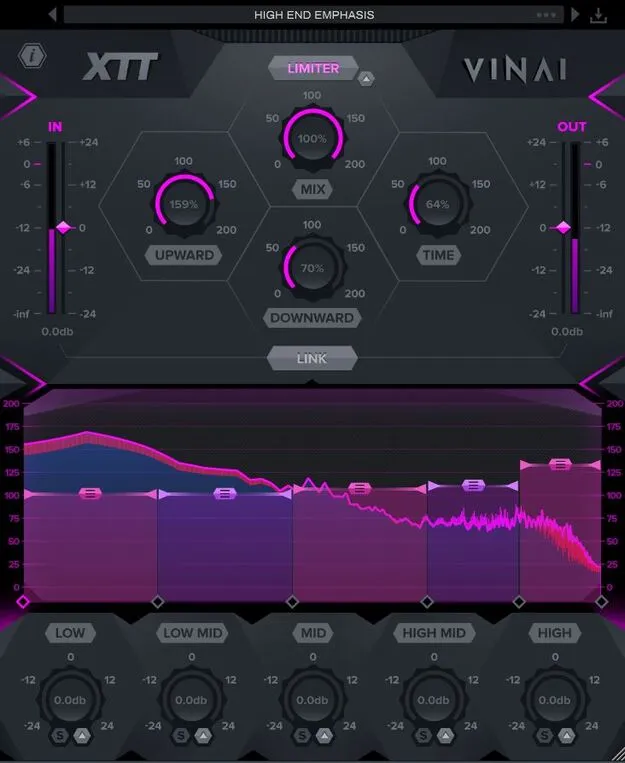
XTT by VINAI multiband compressor plugin interface for AAX on Windows and macOS

XTT by VINAI: Multiband Compressor Plugin for Mixing Free Download

Rated 4.6/5 on Plugin Boutique (465 ratings)

XTT by VINAI is a 5-band multiband compressor plugin designed with the Italian production duo VINAI and developed by W. A. Production. It offers upward and downward compression, a built-in limiter and linked input and output gain faders.

AAXWindowsmacOS64-bit
AVAILABLE ATPlugin Boutique
Free trial available from the developer
01Overview

XTT is a compression plugin built around the gain staging approach that VINAI say they developed over years of processing their own productions. Its main idea is to show the input level clearly, so you can trim the signal before it reaches the compressor, and to link input and output gain so the overall level stays under control while you shape the sound. The plugin is available in AAX format for Windows and macOS.

Best for

  • Mix bus compression
  • Parallel drum compression
  • Vocal level balancing
  • Transient shaping
  • Gain staging before mastering
  • Creative room tone
Category
Compressors
Store
Plugin Boutique
02Key features

What you get

  • Five adjustable bands with crossover, threshold and make-up gain
  • Upward and downward multiband compression running together up to 200%
  • Per-band RMS, attack, release and mid/side shaping with solo and mute
  • Global Time dial to scale attack and release across all bands
  • Linked input and output faders for gain staging
  • Built-in brick wall limiter with adjustable boost
  • Real-time frequency display for each band
  • Central Mix control for parallel compression
  • Pop and click free bypass
  • Factory presets from subtle shaping to saturated compression
03In depth

Five-Band Compression With Upward and Downward Control

XTT splits the audio into five bands with adjustable crossover points: low, low-mid, mid, mid-high and high. Each band has its own threshold and make-up gain dial, so you can compress each range separately.

Upward and downward compression can be used at the same time, with a range of up to 200 percent. Downward compression can tame transients while upward compression lifts quieter material such as room ambience. The developer also suggests the combination can be used creatively to emphasize transients or add room tone to a dry sound.

Each band includes a surgical shaping section with solo and mute buttons and controls for RMS, attack, release and mid/side balance. A global Time dial scales the attack and release times of all five bands together.

Gain Staging, Limiting and Visual Feedback

The input level is shown visually so you can trim the signal before processing. The input and output faders can be linked to keep the outgoing level steady while you adjust compression.

XTT includes a brick wall limiter with an adjustable boost setting. A real-time frequency display shows how the signal changes at each stage of the chain for every band. A central Mix control blends the compressed signal with the dry audio for parallel compression, and the bypass is designed to be free of pops and clicks for A/B testing.

XTT also includes factory presets that range from subtle shaping to heavier saturated compression, and you can save your own settings.

04Specs

Will it run?

Formats, systems and requirements as listed by Plugin Boutique. Missing details are left out, not guessed.

DeveloperW. A. Production
TypePlugin
CategoryCompressor
FormatsAAX
Operating systemsWindows, macOS
Architecture64-bit
Free trialYes
05FAQ

Questions, answered

What formats and operating systems does XTT support?

XTT is available in AAX format for Windows and macOS, and it is 64-bit. The AAX format requires Pro Tools 11 or higher.

Which system versions are required to run XTT?

The developer lists Windows 8 or later (32 or 64-bit) and macOS 10.13 or later (64-bit only). Apple Silicon users should check the current compatibility status of the plugin before purchasing.

Does XTT have a trial version?

Yes, a trial version is available.

What is the Link feature on XTT?

The linked input and output faders let you trim the signal going into the plugin while keeping control of the output volume, which helps preserve the loudness of the sound while you adjust compression.

07Developer

More from W. A. Production

All W. A. Production products →