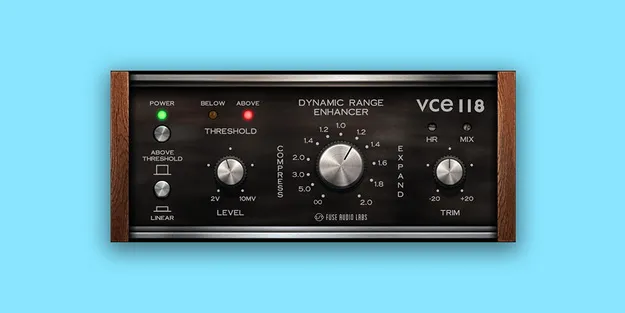
VCE-118 – Dynamic Range Enhancer dynamics plugin interface by Fuse Audio Labs

VCE-118 – Dynamic Range Enhancer: Compressor and Expander Plugin by Fuse Audio Labs Free Download

Rated 4.8/5 on Plugin Boutique (205 ratings)

VCE-118 – Dynamic Range Enhancer is a dynamics processor plugin from Fuse Audio Labs that combines compression and expansion. It offers a linear mode for extreme dynamics effects and a Mix control for parallel processing.

VST3VST2AUAAXWindowsmacOS64-bit
AVAILABLE ATPlugin Boutique
Free trial available from the developer
01Overview

VCE-118 – Dynamic Range Enhancer is built around a special ratio implementation that covers compression from 1:1 to ∞:1 and expansion from 1:1 to 1:2. The Threshold control sets how strongly the effect is applied, while the Mode button switches between regular operation, which processes only levels above the threshold, and linear operation, which affects the full level range. The developer, Fuse Audio Labs, says the design is inspired by early VCA compressors.

Best for

  • Drum punch enhancement
  • Parallel drum compression
  • Transient shaping
  • Gate-like effects
  • Extreme pumping effects
  • Creative dynamics processing
Store
Plugin Boutique
02Key features

What you get

  • Combines compression and expansion in one dynamics processor
  • Compression ratios from 1:1 to ∞:1
  • Expansion ratios from 1:1 to 1:2
  • Mode button switches regular and linear operation
  • Linear mode processes the full level range
  • Threshold control sets the intensity of the effect
  • Mix knob for parallel compression or expansion
  • Inspired by early VCA compressor designs
03In depth

Compression, Expansion and Linear Mode

VCE-118 handles both compression and expansion in one unit. In regular mode, only levels above the threshold are processed, which suits punch enhancement and controlled gain reduction. Switching to linear mode extends the processing to the full level range above and below the threshold, which allows more extreme dynamics effects.

The Threshold control adjusts the intensity of whatever the processor is doing, so the same ratio range can be used for subtle or aggressive results.
Parallel Blending and Creative Uses

The Mix knob lets you blend the processed signal with the dry signal, which is the basis for parallel compression or parallel expansion. According to Fuse Audio Labs, the plugin can produce punchy compression, transient-shaping and gate-like effects. Fuse Audio Labs also positions it for both subtle punch enhancement and more extreme sonic manipulation, depending on how the controls are set.

04Specs

Will it run?

Formats, systems and requirements as listed by Plugin Boutique. Missing details are left out, not guessed.

DeveloperFuse Audio Labs
TypePlugin
CategoryDynamics Processor
FormatsVST3, VST2, AU, AAX
Operating systemsWindows, macOS
Architecture64-bit
Free trialYes
05FAQ

Questions, answered

What is VCE-118 – Dynamic Range Enhancer?

It is a dynamics processor plugin from Fuse Audio Labs that combines compression and expansion. It includes a linear mode and a Mix control for blending processed and dry signals.

What formats and operating systems does VCE-118 support?

VCE-118 is available in VST3, VST2, AU and AAX formats. It runs on Windows and macOS, and is a 64-bit plugin.

What do I need to use VCE-118?

You need a VST2, VST3, AAX or AudioUnits compatible host, a display resolution of 1280x1024 pixels or more, and at least 2GB of RAM. Windows requires Windows 7 or newer, and Mac requires macOS 10.12 or newer.

What is the difference between regular and linear mode?

In regular mode, only levels above the threshold are processed. Linear mode affects the full level range above and below the threshold, which creates more extreme dynamics effects.

07Developer

More from Fuse Audio Labs

All Fuse Audio Labs products →