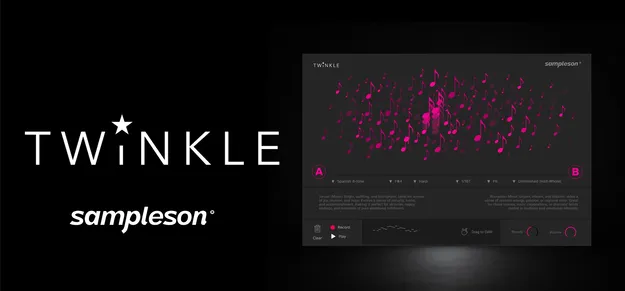
Twinkle by Sampleson MIDI ornament plugin interface

Twinkle: Gesture-Based MIDI Ornament Generator by Sampleson

Twinkle is a gesture-based MIDI plugin by Sampleson that generates short ornaments such as arpeggios, trills and runs from mouse drags. It outputs MIDI to your DAW or to external instruments.

VST3VST2AUStandaloneWindowsmacOS64-bit
AVAILABLE ATPlugin Boutique
Opens the store in a new tab
01Overview

Twinkle is built around a simple idea: you drag your mouse across an interface and it produces a short, decorative musical phrase. The plugin offers 32 modes and two independently assignable scales and root notes, so you can shape the tone of each gesture. Its built-in recorder lets you capture phrases and drag them into your DAW, or you can record its MIDI output in real time to drive any instrument. The developer also includes mockup instruments to hear results right away. No musical knowledge is needed to start.

Best for

  • Film score flourishes
  • Quick melodic ornaments
  • MIDI sketching
  • Driving external instruments
  • Cinematic arpeggios
Developer
Sampleson
Store
Plugin Boutique
02Key features

What you get

  • Generate expressive musical ornaments with a single gesture
  • Interactive canvas for intuitive phrase creation
  • 32 modes, each with its own set of ornaments
  • Two independently assignable scales and root notes
  • Full MIDI Out to control external instruments
  • Built-in recorder with drag and drop to DAW
  • Includes mockup instruments
  • Retina- and 4K-ready user interface
03In depth

Drag-Based Ornament Creation

Twinkle replaces note entry with a gesture. Drag across the canvas and the plugin generates a phrase that fits the scale and mode you have selected. Sampleson describes the output as arpeggios, trills, runs and bursts of notes, meant for adding quick flourishes to an existing composition or sketching spontaneous ideas.

The interface is Retina- and 4K-ready, so the canvas stays sharp on high-resolution displays.
Modes, Scales and MIDI Output

The plugin provides 32 modes, each with its own set of ornaments. Each mode comes with a short guide describing the moods it suits, which helps when you are not sure where to start. You can assign two scales and root notes independently.

For output, Twinkle offers full MIDI Out. Use the built-in recorder to capture a phrase and drag it into your DAW, or record the MIDI in real time to play external instruments such as strings, pianos or modular synths. Pro Tools is not supported.

04Specs

Will it run?

Formats, systems and requirements as listed by Plugin Boutique. Missing details are left out, not guessed.

DeveloperSampleson
TypePlugin
CategoryVirtual Instruments
FormatsVST3, VST2, AU, Standalone
Operating systemsWindows, macOS
Architecture64-bit
05FAQ

Questions, answered

What is Twinkle used for?

Twinkle generates short ornaments such as arpeggios, trills and runs from mouse drags. You can use the output as MIDI in your DAW or to play external instruments.

Which formats and operating systems does Twinkle support?

Twinkle is available as VST3, VST2, AU and Standalone, for Windows and macOS. The macOS version runs on Apple Silicon and Intel Macs.

What do I need to use Twinkle?

Twinkle requires a host that supports VSTi or AU plugins, 4GB of RAM and about 400 MB of disk space. Online activation is required, and Pro Tools is not supported.

Do I need music theory knowledge to use Twinkle?

No. Each mode includes a guide explaining the emotions and moods it suits, and the plugin applies the composition techniques automatically.

07Developer

More from Sampleson

All Sampleson products →