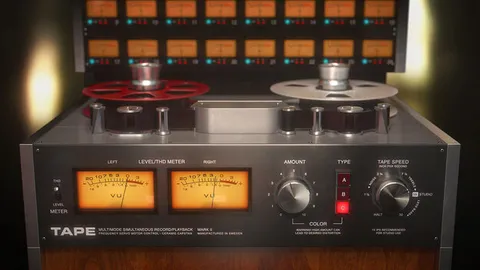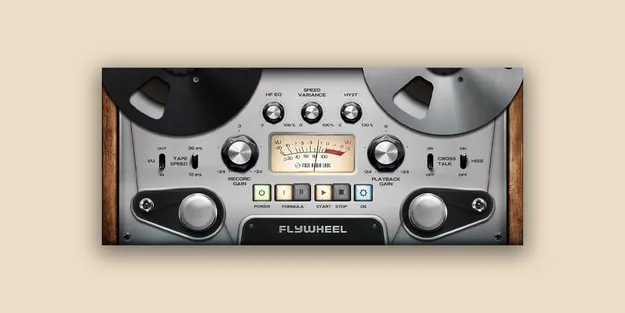
FLYWHEEL Reel-To-Reel Tape by Fuse Audio Labs tape emulation plugin interface

FLYWHEEL Reel-To-Reel Tape: Tape Emulation Plugin by Fuse Audio Labs Free Download

Rated 4.8/5 on Plugin Boutique (151 ratings)

FLYWHEEL Reel-To-Reel Tape is a tape emulation plugin from Fuse Audio Labs that recreates the analog sound of reel-to-reel tape recording. It combines saturation, hysteresis, high-frequency loss and head bump in one interface.

VST3VST2AUAAXWindowsmacOS64-bit
AVAILABLE ATPlugin Boutique
Free trial available from the developer
01Overview

FLYWHEEL Reel-To-Reel Tape models the character of reel-to-reel tape recording without tying itself to one specific machine. Instead, it combines the core imperfections of tape, including saturation, hysteresis, high-frequency loss and head bump, into a single tone-shaping panel. Fuse Audio Labs positions it as a way to add warmth, presence and cohesion to recordings, mixes and masters. It is available as a plugin in VST3, VST2, AU and AAX formats on Windows and macOS, and a trial is offered.

Best for

  • Mix bus warmth
  • Analog drum saturation
  • Vocal tape color
  • Mastering cohesion
  • Tape stop transitions
  • Lo-fi textures
Store
Plugin Boutique
02Key features

What you get

  • Emulates the analog sound of reel-to-reel tape recording systems
  • Models saturation, hysteresis, high-frequency loss and head bump
  • Simple interface with record gain, tape speed and formula controls
  • Adjustable wow and flutter for tape pitch movement
  • Tape transport stop/start feature
  • Different tape formulas and motor speed variances
  • Optional oversampling for improved audio quality
  • Available in VST3, VST2, AU and AAX formats
03In depth

Tape Sound and Character

The plugin focuses on the analog traits that shape how tape sounds. Saturation adds harmonic density, hysteresis affects how the signal responds to level changes, and high-frequency loss softens the top end. Head bump adds low-frequency weight around the tape's resonance point.

Adjustable wow and flutter let you add the slight pitch movement associated with tape transports. A stop/start feature lets you simulate the transport stopping and starting, which can be used for transitions or tape-style effects.
Controls and Workflow

FLYWHEEL keeps its parameter count small. You set record gain, choose a tape speed and select a formula, then refine the result with hysteresis and EQ. Different tape formulas and motor speed variations give you a range of colors from a single panel.

Optional oversampling is available for improving overall audio quality. Turn it on when you want a cleaner result from the nonlinear processing.

04Specs

Will it run?

Formats, systems and requirements as listed by Plugin Boutique. Missing details are left out, not guessed.

DeveloperFuse Audio Labs
TypePlugin
CategoryTape Emulation
FormatsVST3, VST2, AU, AAX
Operating systemsWindows, macOS
Architecture64-bit
Free trialYes
05FAQ

Questions, answered

What is FLYWHEEL Reel-To-Reel Tape used for?

It is used to add analog tape character to audio. You can apply it to individual tracks, mixes or masters to add saturation, warmth and organic texture.

Which formats and operating systems does FLYWHEEL support?

FLYWHEEL is available in VST3, VST2, AU and AAX formats. It runs on Windows and macOS and is a 64-bit plugin.

What do I need to run FLYWHEEL Reel-To-Reel Tape?

You need a VST2, VST3, AAX or Audio Units compatible host. On Mac, an Intel compatible or Apple Silicon CPU and macOS 10.12 or newer are required. On Windows, an Intel compatible CPU, 2GB RAM and Windows 7 or newer are required, with at least a 1280x1024 display.

Does FLYWHEEL have a trial?

Yes, a trial version is available.

07Developer

More from Fuse Audio Labs

All Fuse Audio Labs products →