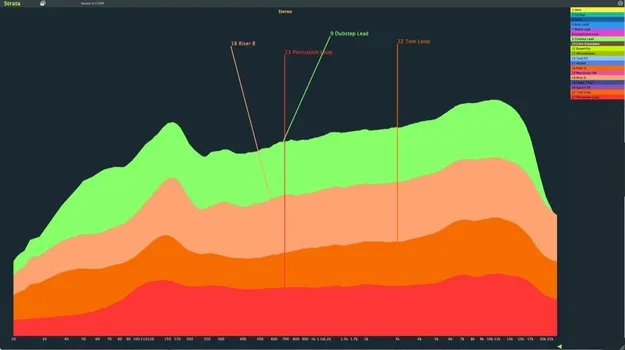
Strata by Crickets Audio spectral metering plugin interface showing layered track frequencies

Strata: Multitrack Spectral Metering Plugin by Crickets Audio

Strata is a multitrack spectral metering plugin from Crickets Audio that displays the frequency content of every track in a single graph. It is built to help producers find masking and frequency collisions during mixing.

VST3AUAAX
AVAILABLE ATPlugin Boutique
Opens the store in a new tab
01Overview

Strata works as a pair of components: a lightweight track plugin placed on each channel you want to monitor, and a single display window that combines all of their data. Instead of checking one channel or the master bus at a time, you see how every track occupies the frequency range at once. That makes it easier to notice when a synth overlaps your hi-hats or when a background part crowds the space around your kick and bass.

Best for

  • Low-end mud detection
  • Mix masking analysis
  • Multi-monitor mixing setups
  • Heavy session CPU management
  • Frequency clash troubleshooting
Category
Metering
Store
Plugin Boutique
02Key features

What you get

  • Displays every track's frequency content simultaneously in one unified window
  • Layered spectral views help identify instrument collisions
  • Maps plugin colors to match your DAW track colors
  • Track plugins pass audio without coloring the sound
  • Global low CPU mode pauses processing during heavy sessions
  • High-contrast palettes for improved visual clarity
  • High frame rate graphics for smooth real-time monitoring
  • Resizable interface for any screen or multi-monitor setup
  • Focus on specific tracks to examine problem frequency areas
  • Real-time analysis shows where the mix lacks space
03In depth

Seeing Frequency Collisions Across the Whole Mix

Strata layers the spectral data from each track on top of the others, so the relationships between instruments are visible in one view. Crickets Audio describes the display as a layered heatmap of the project, which lets you identify where tracks compete for the same frequencies.

The layered views are meant to reveal hidden collisions quickly, especially in the low end where buildup often sounds muddy even when individual EQ settings look correct. You can focus on specific tracks to examine problem areas in more detail.
Workflow, Display Options and Performance

Strata Track is designed to pass audio through without coloring the sound, so it can sit at the end of any channel's signal chain. Strata Vision can be placed anywhere and resized to fit a single screen or a multi-monitor setup.

For visual clarity, you can map graph colors to your DAW track colors or choose among high-contrast palettes. A global low CPU mode pauses processing across all instances with one action, which helps during heavy sessions.

04Specs

Will it run?

Formats, systems and requirements as listed by Plugin Boutique. Missing details are left out, not guessed.

DeveloperCrickets Audio
TypePlugin
CategoryMetering
FormatsVST3, AU, AAX
05FAQ

Questions, answered

What formats does Strata support?

Strata is available in VST3, AU and AAX formats.

How does Strata Track differ from Strata Vision?

Strata Track is a lightweight plugin placed on each track you want to monitor, and it passes audio through unchanged. Strata Vision is the display window that combines data from all the Strata Track instances into one graph.

Can I match Strata's colors to my DAW?

Yes. You can map plugin colors to match your DAW track colors, or switch to one of several high-contrast palettes.