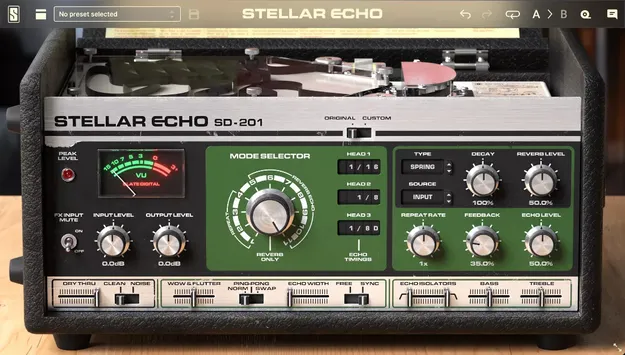
Stellar Echo SD-201 by Slate Digital tape echo plugin interface with moving tape animation

Stellar Echo SD-201: Analog Tape Echo Plugin by Slate Digital

Stellar Echo SD-201 is a tape delay plugin from Slate Digital that recreates a legendary hardware tape echo. It adds plate, chamber and hall reverbs alongside the original spring tank.

VST3VST2AUAAXWindowsmacOS64-bit
AVAILABLE ATPlugin Boutique
Opens the store in a new tab
01Overview

Stellar Echo SD-201 is built around the sound of a classic analog tape echo. The developer describes it as retaining the signature character of the original unit, with the subtle pitch and timing variations that tape delays are known for. Beyond the original tape and spring sound, it adds plate, chamber and hall reverbs for the delay path. It is available in VST3, VST2, AU and AAX formats for Windows and macOS.

Best for

  • Tape delay effects
  • Spring reverb textures
  • Psychedelic delay washes
  • Stereo tape echo
  • Vintage vocal delays
  • Creative feedback saturation
Developer
Slate Digital
Category
Delays
Store
Plugin Boutique
02Key features

What you get

  • Digital recreation of a legendary hardware tape echo
  • Original and Custom processing modes
  • Adds plate, chamber and hall reverbs to the delay path
  • Original spring tank retained alongside new reverbs
  • Wow & Flutter slider for speed and tuning deviations
  • Dry Thru slider controls dry signal level at output
  • FX Input Mute and Clean/Noise switches
  • Fourth tape head with per-head volume, balance and position in Custom mode
03In depth

Tape Character and Sound Shaping

Slate Digital says Stellar Echo keeps the signature character of the original hardware, including natural speed imperfections and tuning deviations. The Wow & Flutter slider controls how much of this movement you hear, so you can go from subtle drift to pronounced warble.

The Dry Thru slider sets how much of the unprocessed input reaches the output, and the FX Input Mute switch blocks new audio from entering the plugin. The Clean/Noise switch toggles the input noise of the original unit, letting you choose between a clean signal and the authentic hiss. Bass and Treble sliders are joined by HP and LP isolators for further shaping of the echoes.
Original and Custom Processing Modes

The Original mode recreates the hardware with three tape heads set at fixed distances. It is the mode to use when you want the unit's sound as it was designed.

Custom mode adds a fourth tape head and gives control over the output volume, stereo balance and physical position of each head. This lets you build rhythmic patterns and stereo spreads that the original hardware could not produce. The GUI shows a moving tape animation at the top of the unit, similar to virtual tape machine interfaces.

04Specs

Will it run?

Formats, systems and requirements as listed by Plugin Boutique. Missing details are left out, not guessed.

DeveloperSlate Digital
TypePlugin
CategoryDelay
FormatsVST3, VST2, AU, AAX
Operating systemsWindows, macOS
Architecture64-bit
05FAQ

Questions, answered

What formats does Stellar Echo SD-201 support?

Stellar Echo SD-201 is available in VST3, VST2, AU and AAX formats. It runs on both Windows and macOS.

What do I need to run Stellar Echo SD-201?

On macOS you need macOS 13 or later and an Intel or Apple Silicon processor with 4GB RAM, using AU, VST2 or AAX in a 64-bit host. On Windows you need Windows 10 or 11, an Intel or AMD processor and 4GB RAM, using VST2, VST3 or AAX in a 64-bit host. A free iLok license manager account is required to run Slate Digital software.

What is the difference between Original and Custom mode?

Original mode recreates the hardware with three tape heads at fixed distances. Custom mode adds a fourth tape head and gives control over the volume, stereo balance and position of each head.

07Developer

More from Slate Digital

All Slate Digital products →