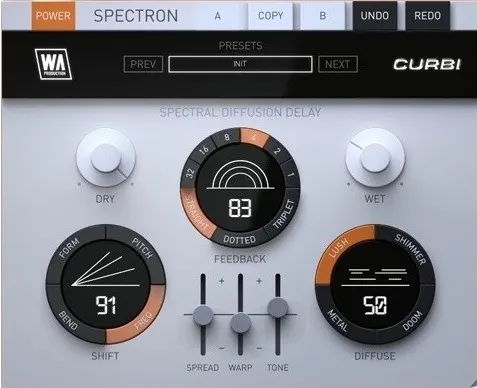
Spectron by Curbi spectral delay plugin interface

Spectron by Curbi: Spectral Delay and Diffuse Effect Plugin

Rated 4.6/5 on Plugin Boutique (73 ratings)

Spectron by Curbi is a spectral delay effect plugin that processes individual frequencies separately to create evolving textures, reverb-like diffusion and pitch-shifted echoes. It runs on Windows and macOS in VST3, VST2, AU and AAX formats.

VST3VST2AUAAXWindowsmacOS64-bit
AVAILABLE ATPlugin Boutique
Opens the store in a new tab
01Overview

Spectron is a delay-category effect developed by W. A. Production with electronic music producer Curbi. Instead of delaying the whole signal evenly, it sends each frequency down its own delayed path, so repeats can smear, shift and bloom over time. The plugin includes a SHIFT control for spectral pitch and formant changes, a DIFFUSE control for reverb-like spread, and SHIMMER, DOOM, METAL and LUSH modes for tonal color. Factory presets from Curbi give a starting point for experimentation.

Best for

  • Ambient pads and atmospheres
  • Risers and transitions
  • Reverb-like spread effects
  • Sound design textures
  • Shimmer delay effects
  • Film and game sound design
Category
Delays
Store
Plugin Boutique
02Key features

What you get

  • Spectral delay that processes each frequency band individually
  • SHIFT control for spectral pitch, frequency and formant changes
  • DIFFUSE control for reverb-like spread and evolving tails
  • SHIMMER, DOOM, METAL and LUSH tonal modes
  • Real-time frequency spectrum monitoring
  • SPREAD control for stereo width across channels
  • A/B comparison with undo and redo
  • Resizable interface with factory presets and PDF manual
03In depth

Spectral Delay Sound and Character

Spectron's core idea is spectral delay. Each frequency band gets its own delayed path, so the echoes build layers that a standard delay cannot produce. The developer describes results ranging from shimmering and ethereal to deep and menacing.

SHIFT adds spectral pitch shifting, frequency shifting and formant manipulation, and the effect grows with each repeat. DIFFUSE spreads the sound across time for reverb-like tails. SHIMMER moves the signal up an octave, DOOM moves it down, and METAL and LUSH push it toward metallic and chorus-like tones.
Controls, Monitoring and Workflow

The main controls are DRY/WET for balancing the original and processed signal, FEEDBACK for the number of repeats, TIME and TYPE for delay time and sync, and SPREAD for stereo width by separating delays across left and right channels.

A real-time frequency spectrum display shows how the sound is being affected. The interface is resizable, and A/B comparison with undo and redo lets you test settings without losing your starting point. A full PDF manual and tutorial video are included.

04Specs

Will it run?

Formats, systems and requirements as listed by Plugin Boutique. Missing details are left out, not guessed.

DeveloperW. A. Production
TypePlugin
CategoryDelay
FormatsVST3, VST2, AU, AAX
Operating systemsWindows, macOS
Architecture64-bit
05FAQ

Questions, answered

What formats does Spectron support?

Spectron is available in VST3, VST2, AU and AAX formats.

Which operating systems can run Spectron?

Spectron runs on Windows 8 and later (64-bit only) and macOS 10.13 and later (64-bit only).

Is the AAX version compatible with all Pro Tools versions?

The AAX format is compatible with Pro Tools 11 and higher only. Mac users on Apple Silicon should check the current compatibility status before purchasing.

What is the difference between SHIFT and DIFFUSE?

SHIFT applies spectral pitch shifting, frequency shifting and formant manipulation that grows with each repeat. DIFFUSE spreads the sound across time to create reverb-like effects.

07Developer

More from W. A. Production

All W. A. Production products →