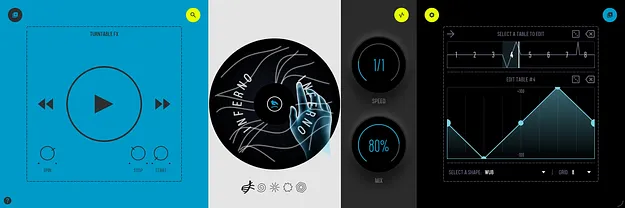
SKR8 DJ scratch effect plugin interface by Thenatan Audio

SKR8: DJ Scratch Effect Plugin by Thenatan Audio

Rated 4.7/5 on Plugin Boutique (6 ratings)

SKR8 is a DJ scratch effect plugin by Thenatan Audio that performs turntable scratches in real time on your own audio, controlled by drawn curves across eight tempo-synced tables.

VST3VST2AUAAXWindowsmacOS64-bit
AVAILABLE ATPlugin Boutique
Opens the store in a new tab
01Overview

SKR8 is built around a turntable engine rather than a sample library. You draw a scratch routine across eight tables, assign one of 22 turntablist techniques to each, and run the result through one of five turntable models. The plugin also models the platter itself, with brake, backspin and motor-restart controls. Because it processes your audio directly, it can scratch drums, vocals, basslines or a full mix. Thenatan Audio describes it as a sketchpad for scratching that works with no records, decks or sample packs.

Best for

  • Turntablism scratching
  • Drum bus scratch effects
  • Vocal chops and stutters
  • Tempo-synced DJ effects
  • Hip hop production
  • Mix transitions and breakdowns
Category
DJ Tools
Store
Plugin Boutique
02Key features

What you get

  • Eight independent scratch tables played as one continuous routine
  • Snap grid from 2 to 16 divisions, or freehand drawing
  • 22 turntablist scratch techniques selectable per table
  • Five turntable models with distinct tone and character
  • Platter brake, backspin and motor-restart controls with adjustable times
  • 24 tempo-synced divisions from 8/1 to 1/64, including triplets and dotted values
  • Automatic and manual scratch modes with DAW automation support
  • 50 factory presets storing full routine and motor settings
03In depth

Drawing Scratch Routines and Turntable Techniques

Each of the eight scratch tables is drawn with the mouse. The middle line represents a record sitting still, lines above pull the platter forward, and lines below spin it back. Sharp spikes produce stabs, slow arcs produce drags, and tight zig-zags produce scribbles. A grid snap with 2 to 16 divisions keeps cuts on the beat, and it can be switched off for looser timing. Every table offers a menu of 22 scratch styles, including Baby, Chop, Flare, Crab, Scribble, Chirp, Drag and Orbit, plus a No Hand option for silence between cuts. You can pick a technique per table, then drag its points to reshape it.

The five turntable models change how the same drawn motion sounds. Inferno is a clean, dramatic pitch throw. Dust adds soft bit-crunch hiss as the motion slows. Ratchet adds a steady mechanical chop, Sawblade adds a denser chop with grit, and Tremor produces a fast wobble on pitch.
Motor Control, Tempo Sync and Automation

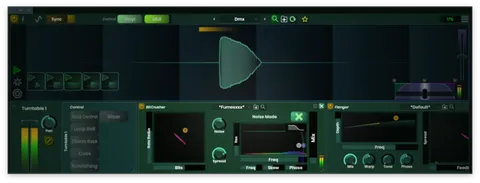
The motor controls let you brake the platter to a stop, restart it, or spin it backward for a backspin. Stop Time and Start Time set each ramp independently, and Spin Time controls how far the scratch travels. The on-screen deck follows the engine, so the brake is visible as well as audible.

Speed is set by a single knob with 24 musical divisions, from 8/1 to 1/64, including straight, dotted and triplet values. The routine follows project tempo changes. Automatic mode plays the routine in time, while Manual Scratch mode hands control to a single knob you can ride live or record as DAW automation. Front-panel controls are automatable, and the Mix knob blends the scratched signal with your dry input.

04Specs

Will it run?

Formats, systems and requirements as listed by Plugin Boutique. Missing details are left out, not guessed.

DeveloperThenatan Audio
TypePlugin
CategoryDJ Tools
FormatsVST3, VST2, AU, AAX
Operating systemsWindows, macOS
Architecture64-bit
05FAQ

Questions, answered

What is SKR8?

SKR8 is a scratch effect plugin by Thenatan Audio that performs turntable-style scratches on your own audio using drawn routines, rather than playing scratch samples.

Which formats and operating systems does SKR8 support?

SKR8 is available in VST3, VST2, AU and AAX formats for Windows and macOS, in 64-bit versions. It runs on Windows 7, 8 and 10 or later, and on OS X 10.9.5 Mavericks or later, with native Apple Silicon support on Mac.

What do I need to use SKR8?

SKR8 needs a compatible DAW with a supported format. It requires 4 GB of RAM and 2 GB of free space on the system drive. It works in most major DAWs, including FL Studio, Logic and Ableton Live, but does not work in Pro Tools because it lacks AAX support.

07Developer

More from Thenatan Audio

All Thenatan Audio products →