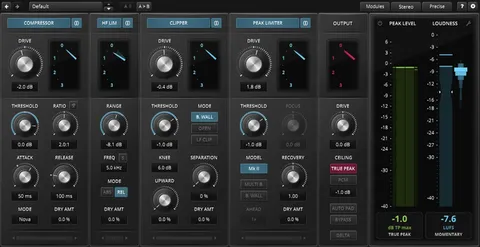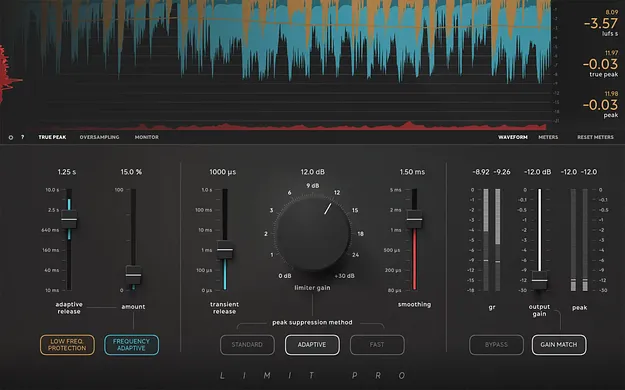
Limit Pro limiter plugin interface by Softube

Limit Pro: Mastering and Mixing Limiter by Softube

Limit Pro is a limiter plugin by Softube for mastering, mixing and single tracks. It offers three peak suppression methods, frequency-adaptive release times and a Low Frequency Protection mode.

VST3VST2AUAAXRTASWindowsmacOS64-bit
AVAILABLE ATPlugin Boutique
Opens the store in a new tab
01Overview

Limit Pro is a limiter plugin from Softube built for pushing loudness without heavy distortion. Its peak suppression, release and metering controls can be adjusted to suit different genres and material. It is designed for mastering, mixing and individual tracks, and it is included alongside a simpler companion plugin, Limit Go. The plugin runs in the common VST3, VST2, AU, AAX and RTAS formats on Windows and macOS.

Best for

  • Mastering loudness
  • Bus limiting
  • Bass-heavy electronic mixes
  • Single track limiting
  • Transparent loudness control
Developer
Softube
Category
Limiters
Store
Plugin Boutique
02Key features

What you get

  • Three peak suppression methods for different music styles
  • Frequency-adaptive control of release times
  • Adaptive Release for longer release times on sustained material
  • Low Frequency Protection mode for sub-bass
  • True Peak limiting
  • Transparent oversampling using linear phase filters
  • Gain Match and Delta monitoring
  • Low latency and low CPU usage
03In depth

Peak Suppression and Release Control

Limit Pro offers three peak suppression methods, so you can choose an approach that fits the music rather than relying on a single method. Release behavior is more flexible than on a standard limiter. Transient Release works much like the release on most limiters. Adaptive Release releases faster for transients than for sustained material, which lets you use longer release times without the limiter pumping the mix.

Frequency-adaptive control gives different frequencies different release times without changing the tonal balance of the audio. Softube describes this as a way to reduce low-frequency distortion from the limiter.
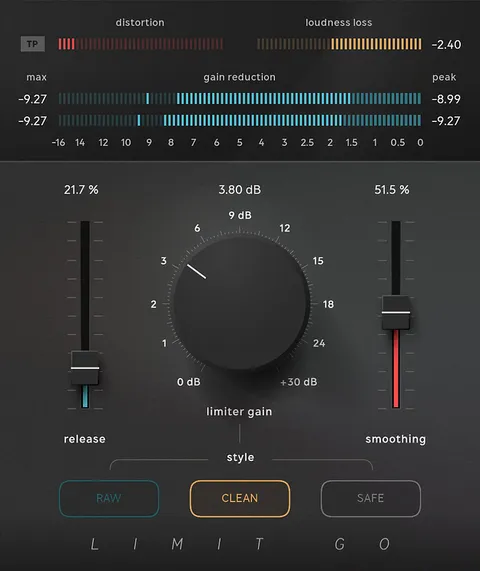
Low Frequency Protection and Metering

Limiters often handle bass poorly, and many rely on long look-aheads that add latency. Limit Pro's Low Frequency Protection takes control of limiting in the sub-bass range to help keep bass intact when heavy low-end material, such as 808 kicks, hits the limiter.

The metering covers true peak, peak, LUFS, loudness loss and distortion, along with a real-time view of peak suppression. Gain Match and Delta monitoring help you compare processed and unprocessed signal.

04Specs

Will it run?

Formats, systems and requirements as listed by Plugin Boutique. Missing details are left out, not guessed.

DeveloperSoftube
TypePlugin
CategoryLimiter
FormatsVST3, VST2, AU, AAX, RTAS
Operating systemsWindows, macOS
Architecture64-bit
05FAQ

Questions, answered

What formats does Limit Pro support?

Limit Pro is available in VST3, VST2, AU, AAX and RTAS formats. It runs on Windows and macOS.

What do I need to run Limit Pro?

You need a 64-bit host that supports AU, VST, VST3 or AAX, a Softube account and an iLok account. On macOS, Sonoma 14, Sequoia 15 or Tahoe 26 is required, and on Windows, Windows 10 (64-bit) or Windows 11.

What is Limit Go?

Limit Go is a second plugin included with Limit Pro, intended for super-fast adjustments, while Limit Pro offers more extensive control.

Which DAWs does Softube test Limit Pro in?

Softube officially tests its plugins in the most recent versions of Pro Tools, Logic Pro, Cubase, Ableton Live, Studio One and Reaper. It recommends VST3 because some features are not present in the older VST format.

07Developer

More from Softube

All Softube products →