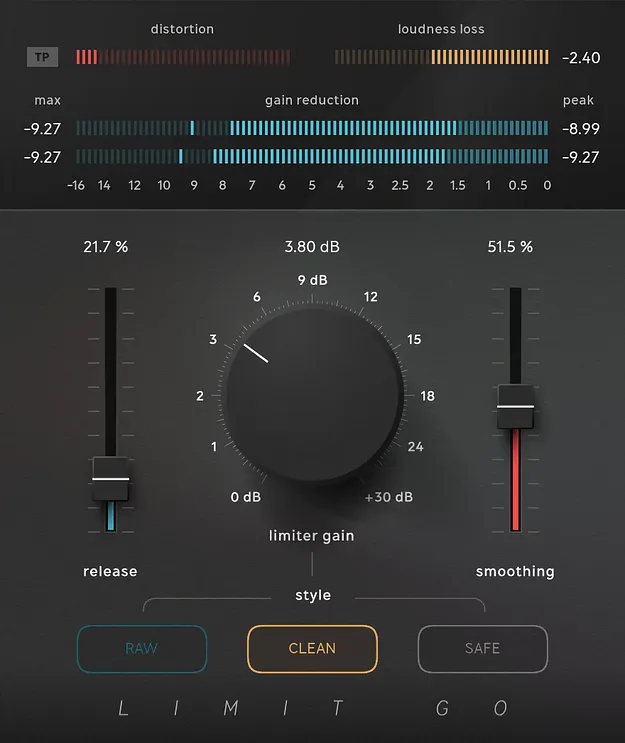
Limit Go by Softube limiter plugin interface with meters and controls

Limit Go: Fast Limiter Plugin by Softube

Limit Go is a streamlined limiter plugin from Softube, built on the algorithm of Limit Pro. It offers three limiting styles, True Peak processing and a simple control set for mastering, mixes and single tracks.

VST3VST2AUAAXRTASWindowsmacOS64-bit
AVAILABLE ATPlugin Boutique
Opens the store in a new tab
01Overview

Limit Go is aimed at producers who want a limiter that stays out of the way. It uses the same core algorithm as Softube's Limit Pro, but with a reduced control set focused on release, limiter gain, smoothing and style. The interface places meters along the top and controls at the bottom, so you can set the limiter quickly. It includes true peak, loudness loss, gain reduction and distortion metering, which shows how the limiter alters the audio. Limit Go is also available with an upgrade path to Limit Pro.

Best for

  • Mix bus limiting
  • Electronic music loudness
  • Mastering single tracks
  • Acoustic music limiting
  • Fast limiter setup
Developer
Softube
Category
Limiters
Store
Plugin Boutique
02Key features

What you get

  • Three limiting styles: Raw, Clean and Safe
  • Controls for release, limiter gain, smoothing and style
  • True Peak processing
  • Low latency and low CPU usage
  • Metering for true peak, loudness loss, gain reduction and distortion
  • Console 1 and Flow Studio compatible
  • Upgrade path to Limit Pro
03In depth

Three Limiting Styles for Different Material

Limit Go offers three styles that Softube loosely ties to genres or production approaches.

Raw is intended for dense electronic mixes where some high-frequency distortion is acceptable. With Smoothing and Release at 0%, it behaves close to a clipper.

Clean is described as a general-purpose choice for pop, rock and other recorded music, producing less distortion than Raw. Safe is designed for acoustic material where preserving the frequency range of the song is the priority.
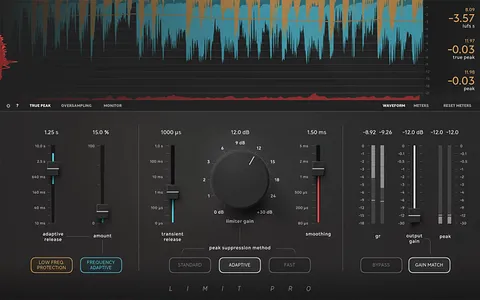
Workflow, Metering and System Requirements

The plugin is built for fast results, with low latency and low CPU usage. Its True Peak processing is suited to mastering, mixing and single tracks.

Limit Go runs as VST3, VST2, AU, AAX and RTAS on Windows and macOS, and is 64-bit. On macOS it supports Sonoma 14, Sequoia 15 and Tahoe 26. On Windows it supports Windows 10 (64-bit) and Windows 11. Softube recommends VST3 and officially tests in the latest versions of Pro Tools, Logic Pro, Cubase, Ableton Live, Studio One and Reaper. A Softube or iLok account is required for licensing.

04Specs

Will it run?

Formats, systems and requirements as listed by Plugin Boutique. Missing details are left out, not guessed.

DeveloperSoftube
TypePlugin
CategoryLimiter
FormatsVST3, VST2, AU, AAX, RTAS
Operating systemsWindows, macOS
Architecture64-bit
05FAQ

Questions, answered

What formats does Limit Go support?

Limit Go is available in VST3, VST2, AU, AAX and RTAS formats. Softube recommends VST3 because some of its plugins include features not present in the older VST format.

Which operating systems does Limit Go run on?

Limit Go supports Windows and macOS. On Windows it requires Windows 10 (64-bit) or Windows 11. On macOS it supports Sonoma 14, Sequoia 15 and Tahoe 26, and runs natively on Apple silicon.

What do I need to use Limit Go?

You need a compatible 64-bit host such as an AU, VST, VST3 or AAX DAW, a Softube account and an iLok account, and internet access for downloading installers and managing licenses. Use the latest iLok License Manager, which is downloaded separately from ilok.com.

Is Limit Go an upgrade-able version of Limit Pro?

Limit Go includes an upgrade path to Limit Pro. Limit Go shares the algorithm and core quality of Limit Pro but has a simpler control set.

07Developer

More from Softube

All Softube products →