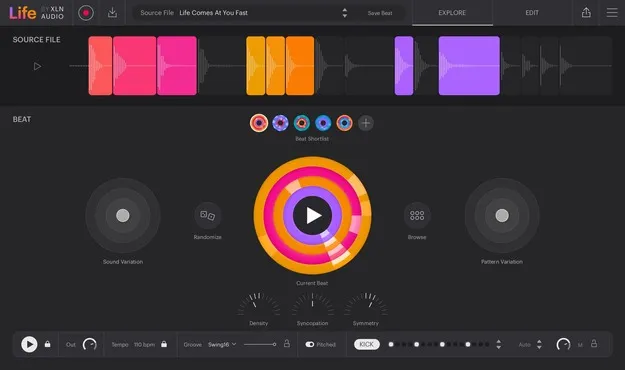
Life by XLN Audio sampler plugin interface for generating beats from recordings

Life: Sampler Plugin for Beats from Field Recordings by XLN Audio Free Download

Rated 4.7/5 on Plugin Boutique (831 ratings)

Life by XLN Audio is a sampler plugin that turns your own recordings, such as everyday sounds and instrument takes, into beats generated automatically. It runs as VST2, AU, AAX and standalone on Windows and macOS.

VST2AUAAXStandaloneWindowsmacOSiOS64-bit
AVAILABLE ATPlugin Boutique
Free trial available from the developer
01Overview

Life by XLN Audio takes a different approach to beat-making than sample libraries. Instead of loading prepackaged loops, you record sounds from your surroundings or from your DAW, and the plugin slices and processes them into beats. XLN Audio says the workflow is built on machine learning models that drive features such as Beat and Sound Variation and the Density, Syncopation and Symmetry controls. The result is a starting point built from your own material.

Best for

  • Beats from field recordings
  • Found-sound drum patterns
  • Personal sample sourcing
  • Rhythm idea generation
  • Sound design from everyday noises
Developer
XLN Audio
Category
Samplers
Store
Plugin Boutique
02Key features

What you get

  • Automatic slicing, processing and beat generation from recordings
  • Life DAW Recorder for high-fidelity capture from your DAW
  • Life Field Recorder app for iOS and Android
  • Import audio or video from phone or computer
  • Sound Variation and Pattern Variation for quick alternatives
  • Density, Syncopation and Symmetry rhythm controls
  • Editable slice points, FX and sequencers
  • Runs as VST2, AU, AAX and standalone
03In depth

Recording and Generating Beats from Your Own Sounds

Life works from recordings you make yourself. The companion Life Field Recorder app on iOS and Android sends phone recordings straight into the plugin. The Life DAW Recorder captures audio at high fidelity from any instrument, microphone or outboard gear connected to your DAW. You can also import audio or video from your phone or computer.

Once a recording is selected, Life slices it and generates beats automatically. You can audition variations, keep the results you like, and refine them with Sound Variation and Pattern Variation. For more control, you can edit slice points, effects and sequencers directly.
Shaping Beats with Variation and Density Controls

The Density, Syncopation and Symmetry controls shape the rhythmic character of the generated beats. Beat and Sound Variation let you move through alternatives without starting over. Because each beat begins from a recording you captured, the results reflect the specific sounds in your material rather than a shared sample pool.

Life is designed to sit alongside your existing tools. XLN Audio suggests using its beats as a starting point or as a personal layer next to the sample libraries and instruments you already rely on.

04Specs

Will it run?

Formats, systems and requirements as listed by Plugin Boutique. Missing details are left out, not guessed.

DeveloperXLN Audio
TypePlugin
CategorySampler
FormatsVST2, AU, AAX, Standalone
Operating systemsWindows, macOS, iOS
Architecture64-bit
Free trialYes
05FAQ

Questions, answered

What is Life by XLN Audio used for?

Life is used to create beats from your own recordings. You capture sounds such as a dripping faucet or an amp crackle, and the plugin slices and processes them into beats you can tweak in your project.

Which formats and operating systems does Life support?

Life is available as VST2, AU, AAX and standalone. It runs on Windows 7 to 11 and macOS 10.13 or later, both in 64-bit only. The Life Field Recorder companion app works with iOS 15.4 or later and Android 7.0 or later.

What do I need to use Life?

Life needs a 64-bit host that supports VST, AU or AAX plugins. XLN Audio lists testing with Ableton Live 9 or later, Logic Pro 9 and 10, Pro Tools 11 or later, Cakewalk by Bandlab, Reason 10.3 or later, Reaper 5 or later and Cubase 8 or later. Life is currently not compatible with Logic via Rosetta. The system also needs at least 2 GB of RAM, with 4 GB recommended, and an internet connection during installation.

07Developer

More from XLN Audio

All XLN Audio products →