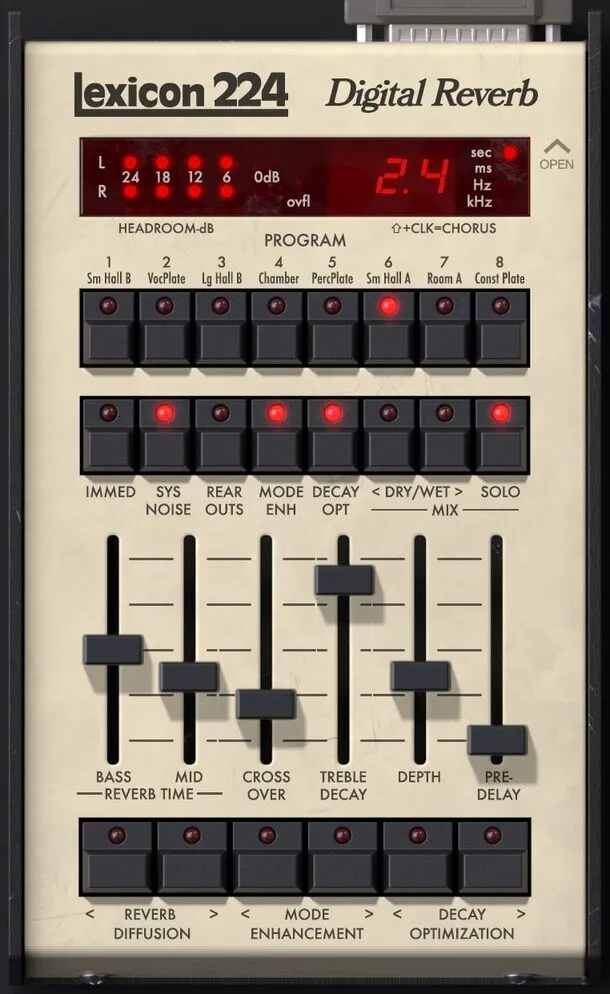
Lexicon 224 Digital Reverb plugin interface by Universal Audio

Lexicon 224 Digital Reverb: Emulation of the Classic Lexicon Reverb Unit

Rated 4.7/5 on Plugin Boutique (430 ratings)

Lexicon 224 Digital Reverb is a reverb effects plugin from Universal Audio that emulates the algorithms of the original Lexicon 224 hardware unit, available in VST3, AU and AAX formats for Windows and macOS.

VST3AUAAXWindowsmacOS64-bit
AVAILABLE ATPlugin Boutique
Opens the store in a new tab
01Overview

The Lexicon 224 is a digital reverb unit that shaped the sound of many 1980s recordings, and this plugin recreates it inside a digital audio workstation. Universal Audio builds it on the same algorithms as the original hardware, with eight reverb programs and one chorus program. Each parameter is exposed as a slider or button, so the controls follow the layout of the hardware. It is aimed at producers who want that specific vintage reverb character on drums, vocals, guitars and other sources.

Best for

  • Vintage 1980s drum reverb
  • Lush vocal reverb
  • Guitar ambience
  • Plate reverb on snares
  • Concert hall reverb
Category
Reverbs
Store
Plugin Boutique
02Key features

What you get

  • Reverb emulation using the same algorithms as the original Lexicon 224 hardware
  • Eight classic reverb programs plus one chorus program
  • Plate and Concert programs for vintage 1980s sounds
  • Slider and button controls for every hardware parameter
  • Split Bass and Mid decay with a Crossover control
  • System Noise switch to model hardware noise and gain stepping
  • Hidden controls for input and output gain and pitch shift
  • Included presets from Lexicon 224 users Chuck Zwicky and Kevin Killen
03In depth

Vintage Lexicon Reverb Character and Controls

Universal Audio says the plugin uses the algorithms and control processor code of the original hardware, based on the final firmware version 4.4. The developer also includes the original input transformers and 12-bit gain stepping converters in the model.

The interface puts the controls on sliders. Bass and Mid decay can be set separately, a Crossover control shapes the reverb image, and Treble Decay rolls off high frequencies. Depth sets the distance between source and reverb, Predelay sets the gap before the reverb starts, and Diffusion controls how quickly echo density builds over time.
Authenticity Settings and Hidden Controls

A System Noise control turns the hardware's inherent dynamic noise on or off, including gain stepping, parameter zippering and quiescent noise. Clicking the Open text beside the display reveals hidden controls, among them Input and Output gain, Pitch Shift and a selectable Bug Fix mode that toggles historical fixes in the Hall B and Chorus programs.

The Plate and Concert programs are the ones to reach for when you want vintage 1980s sounds.

04Specs

Will it run?

Formats, systems and requirements as listed by Plugin Boutique. Missing details are left out, not guessed.

DeveloperUniversal Audio
TypePlugin
CategoryReverb
FormatsVST3, AU, AAX
Operating systemsWindows, macOS
Architecture64-bit
05FAQ

Questions, answered

What formats and operating systems does Lexicon 224 Digital Reverb support?

The plugin is available in VST3, AU and AAX formats. It runs on Windows and macOS, in 64-bit versions.

What do I need to use Lexicon 224 Digital Reverb?

You need a supported DAW that is compatible with VST3, AU or AAX, a free iLok account, and an internet connection to download the software and authorize the UAD Native plug-ins. An iLok USB key is optional. The free UA Connect application manages the plugins.

Does the plugin require UA hardware?

No. The UAD Native version runs on a Mac or PC without any UA hardware. The Apollo Realtime and UAD-2 version runs accelerated on Apollo interfaces and UAD-2 hardware.

07Developer

More from Universal Audio

All Universal Audio products →