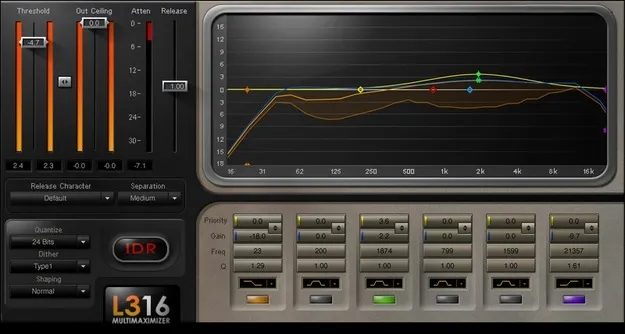
L3-16 Multimaximizer by Waves multiband limiter plugin interface

L3-16 Multimaximizer: Multiband Limiter Plugin by Waves

L3-16 Multimaximizer is a multiband limiter plugin from Waves for mastering. It combines paragraphic EQ-style controls with dynamics processing to raise level across 16 virtual bands.

VST2AUAAXWindowsmacOS
AVAILABLE ATPlugin Boutique
Opens the store in a new tab
01Overview

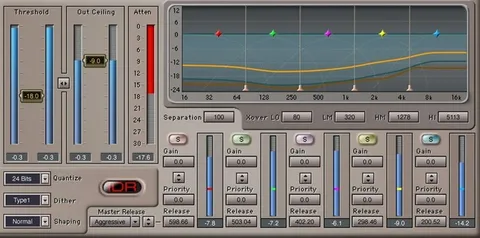
Waves designed the L3-16 Multimaximizer as a mastering tool for maximizing level with minimal audible side effects. Its display shows 16 virtual bands, with attenuation, EQ and priority curves drawn together so you can see how each band is being processed. The controls follow a familiar paragraphic EQ layout, which keeps the interface approachable while the processing goes well beyond a conventional limiter. The plugin is available in VST2, AU and AAX formats.

Best for

  • Mastering full mixes
  • Loudness maximization
  • Vocal-forward master balance
  • Frequency-specific limiting
  • Final output dithering
Developer
Waves
Category
Limiters
Store
Plugin Boutique
02Key features

What you get

  • Multiband level maximization across 16 virtual bands
  • Linear-phase crossover filtering to avoid phase smearing
  • 21 release characters from warm classical to punchy modern
  • Auto-release that responds to changes in dynamics
  • Three selectable band slopes for broader or narrower control
  • Priority option to keep vocals and key elements unmasked
  • Bell or shelf EQ stage per band
  • Dithering and noise-shaping options
  • 38 included presets for mastering applications
03In depth

Sound and Processing Character

The L3-16 uses linear-phase crossover filtering, which Waves says avoids phase smearing across the band split. Waves also states that the linear-phase design reproduces transients with high clarity.

Release behavior is a major part of the sound. The plugin offers 21 release characters, which Waves describes as ranging from warm classical to punchy modern. Auto-release adjusts the response as the dynamics of the material change.

The Priority option is intended to keep key elements, such as vocals, from being masked by the limiting action.
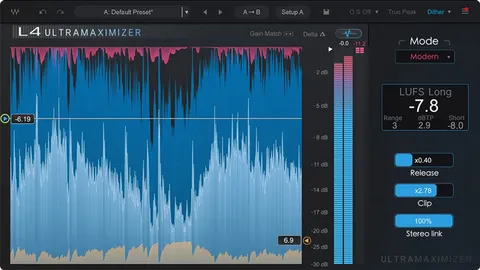
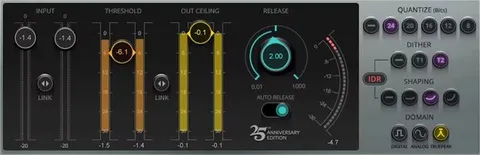
Controls and Workflow for Mastering

Each band can be set with a bell EQ stage for precise focus or a shelf stage for broader changes. Three selectable band slopes let you make the band boundaries broader or narrower.

The plugin includes dithering and noise-shaping options for the final output stage. A set of 38 presets covers a range of mastering applications, giving you starting points to adjust from.

The L3-16 runs on Windows 10 and later in VST and AAX formats, and on macOS Monterey 12 through Sequoia 15 in VST, AU and AAX formats.

04Specs

Will it run?

Formats, systems and requirements as listed by Plugin Boutique. Missing details are left out, not guessed.

DeveloperWaves
TypePlugin
CategoryLimiter
FormatsVST2, AU, AAX
Operating systemsWindows, macOS
05FAQ

Questions, answered

What formats does the L3-16 Multimaximizer support?

The L3-16 is available in VST2, AU and AAX formats. Waves lists support for macOS and Windows.

What do I need to run the L3-16 Multimaximizer?

On Mac, it requires macOS Monterey 12, Ventura 13, Sonoma 14 or Sequoia 15 and runs as VST, AU or AAX. On PC, it requires Windows 10 or later and runs as VST or AAX.

What does the Priority option do?

Priority is intended to ensure key elements such as vocals are not masked by the limiting action. It is designed for keeping important parts of the mix audible while the master is maximized.

07Developer

More from Waves

All Waves products →