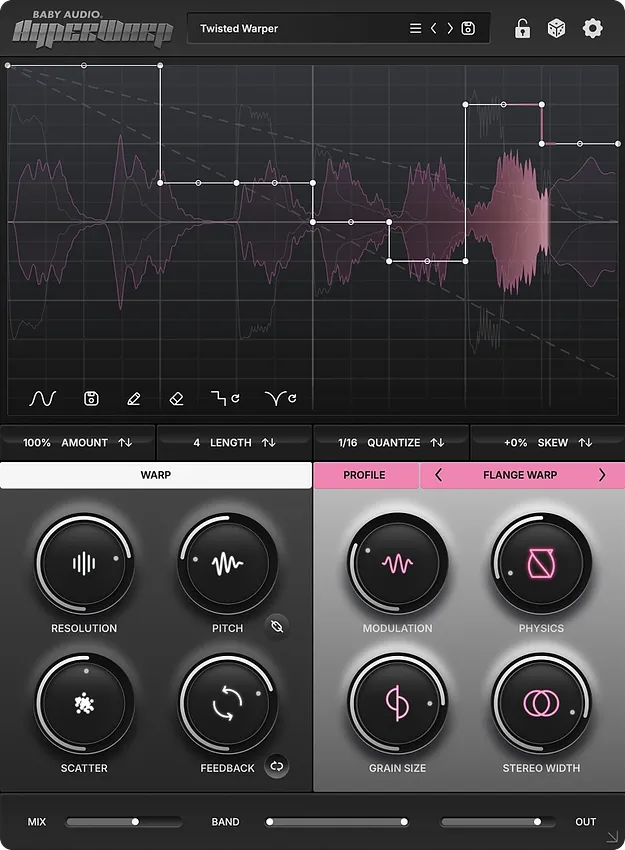
HyperWarp granular multi-effect plugin interface by Baby Audio

HyperWarp: Granular Multi-Effect Plugin by Baby Audio

Rated 5.0/5 on Plugin Boutique (11 ratings)

HyperWarp is a time-bending granular multi-effect plugin from Baby Audio that breaks audio into grains and reassembles them to create motion, glitches and texture.

VST3VST2AUAAXWindowsmacOS64-bit
AVAILABLE ATPlugin Boutique
Opens the store in a new tab
01Overview

HyperWarp slices incoming audio into microscopic snapshots using a granular engine, then reorders them through a graph interface. Baby Audio built it for rhythmic stutters, half-time edits, tape-stop style moves and granular sound design. Seven effect profiles shape the character of each sequence, and each profile offers four macro controls. It suits producers who want to turn loops, stems and full tracks into glitchy chops or new textures.

Best for

  • Glitch stutter edits
  • Half-time breakdowns
  • Tape-stop transitions
  • Loop chopping
  • Granular sound design
  • Vocoder-style harmonics
Developer
Baby Audio
Store
Plugin Boutique
02Key features

What you get

  • Time-bending granular effect for motion, texture and color
  • Graph interface for building rhythmic sequences and time-warped motion
  • Seven effect profiles, each with four macro controls
  • Per-grain control over pitch, resolution, randomness and feedback
  • Graph randomizers with the ability to lock favorite parameters
  • Global wet/dry mix and band-narrowing filters on the effect signal
  • 200+ global and graph-specific presets
  • Available in VST3, VST2, AU and AAX formats
03In depth

Shaping Time With the Graph Interface

The graph is the core of HyperWarp. You draw speed shifts, stutter steps and direction changes to build rhythmic sequences or smooth, time-warped motion. Precise half-time edits, sloping stutters and vinyl-style scratches are all made from the same panel.

At the grain level, you can adjust pitch, reshape resolution, add randomness and introduce feedback. Those per-grain controls let you move from subtle time manipulation to heavily processed results.
Seven Effect Profiles and Macro Controls

HyperWarp includes seven sound profiles: Clean Warp, Flange Warp, Degrade Warp, Filter Spam, Harmo-Nicer, Fauxcoder and Lo-Fizzly. Clean Warp handles crisp temporal manipulation with independent pitch and time, while Fauxcoder is a resonant harmonic generator reminiscent of classic vocoder effects.

Each profile has four purpose-built macro controls. Randomizers can create stepped or smooth graph shapes, and you can lock the parts you like before refining them with the macros.

Global wet/dry mix and band-narrowing filters on the effect signal help you blend extreme processing back into the original source.

04Specs

Will it run?

Formats, systems and requirements as listed by Plugin Boutique. Missing details are left out, not guessed.

DeveloperBaby Audio
TypePlugin
CategoryMulti Effect
FormatsVST3, VST2, AU, AAX
Operating systemsWindows, macOS
Architecture64-bit
05FAQ

Questions, answered

What is HyperWarp used for?

HyperWarp is used to create time-based effects such as stutters, half-time edits, scratches and tape stops, as well as granular textures. It can also turn loops, stems and full tracks into glitchy rhythmic chops.

What formats and operating systems does HyperWarp support?

HyperWarp is available in VST3, VST2, AU and AAX formats, all 64-bit. It runs on Windows and macOS, and the developer lists support for macOS 10.11 and later, including native Apple Silicon, and Windows 10 and newer.

What do I need to use HyperWarp?

HyperWarp is a plugin, so it needs a compatible host. The developer lists all major DAWs as supported, including Ableton Live, Pro Tools, Logic Pro, FL Studio, Cubase, Studio One, Bitwig, Reaper and Reason.

07Developer

More from Baby Audio

All Baby Audio products →