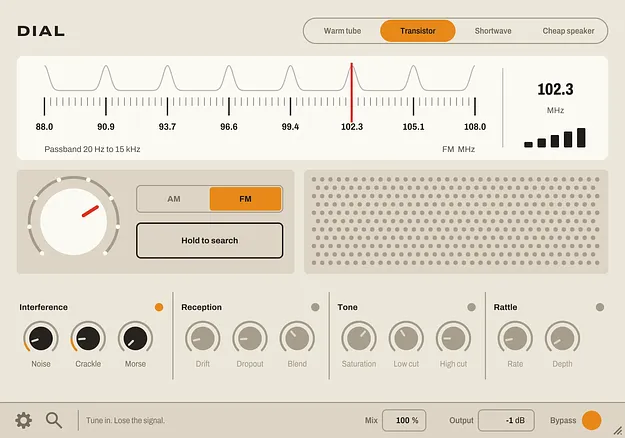
DIAL radio-style multi-effect plugin interface by Thenatan Audio

DIAL: Radio-Style Multi Effect Plugin by Thenatan Audio

DIAL is a multi-effect plugin by Thenatan Audio that processes audio through a six-stage radio chain, modelling tuning, interference, tone, reception, rattle and output. It runs in VST3, VST2, AU and AAX formats on Windows and macOS.

VST3VST2AUAAXWindowsmacOS64-bit
AVAILABLE ATPlugin Boutique
Opens the store in a new tab
01Overview

DIAL is built around a single signal path that behaves like a real radio receiver rather than a generic lofi filter. Audio passes through six processors in a fixed order, with noise entering before the band filter, so the radio model shapes the interference the same way it shapes your sound. A tuning dial with seven stations lets you lock onto a clear signal or drift between stations and let the static take over. The plugin ships in VST3, VST2, AU and AAX formats for 64-bit hosts on Windows and macOS.

Best for

  • Lofi drum processing
  • Telephone and intercom effects
  • Transition and fill sweeps
  • Vintage radio sound design
  • Broken signal textures
  • Speaker rattle effects
Store
Plugin Boutique
02Key features

What you get

  • Six processors in a fixed chain: Tuner, Interference, Tone, Reception, Rattle and Output
  • Seven tunable stations with a live frequency readout and signal-strength display
  • Hold-to-search button that hops the dial at random and glides back on release
  • AM and FM bands with a crossfading band switch
  • Four radio models that change voicing, drive and interface appearance
  • Independent noise, crackle and Morse interference sources
  • Gain-compensated saturation with Low Cut and High Cut controls
  • Per-block bypass that stops processing and reduces CPU load
03In depth

Tuning, Reception and Interference Controls

The Tuner section centers on a dial with seven stations marked along the scale. Park the needle on a station and the signal comes through clear. Drift between stations and only a ghost of the signal bleeds through the noise. Hold the Search button to hop the dial at random, with the needle gliding back to your Tune setting when you release it.

The Interference stage adds a broadband hiss, irregular crackle and tone pips from a neighboring station. Each random source is seeded independently. The Reception stage controls slow tuning drift and random signal dropout, so the sound seems to breathe and fade over time.
Radio Models and Band Switching

DIAL offers four radio models: Warm Tube, Transistor, Shortwave and Cheap Speaker. Each changes the voicing, band bias and drive, and the interface re-skins to match the radio it represents. You can automate the model parameter to switch radios mid-track.

The AM band narrows the passband to 300Hz to 3.4kHz and folds the signal to mono, which produces a telephone or intercom character. The FM band runs from 60Hz to 15kHz and stays in stereo. The band switch crossfades, so you can automate it mid-phrase without clicks.

04Specs

Will it run?

Formats, systems and requirements as listed by Plugin Boutique. Missing details are left out, not guessed.

DeveloperThenatan Audio
TypePlugin
CategoryMulti Effect
FormatsVST3, VST2, AU, AAX
Operating systemsWindows, macOS
Architecture64-bit
05FAQ

Questions, answered

What formats does DIAL support?

DIAL is available in VST3, VST2, AU and AAX formats. Pro Tools is not supported because the AAX version is not compatible with the Pro Tools setup listed in the system requirements.

Which operating systems does DIAL run on?

DIAL runs on Windows 7, 8 and 10 or later, and on macOS 10.9.5 Mavericks or later, including native Apple Silicon support.

What do I need to run DIAL?

You need a 64-bit host with at least 4 GB of RAM and 2 GB of free space on the system drive. It works in most major DAWs, including FL Studio, Logic and Ableton Live.

07Developer

More from Thenatan Audio

All Thenatan Audio products →