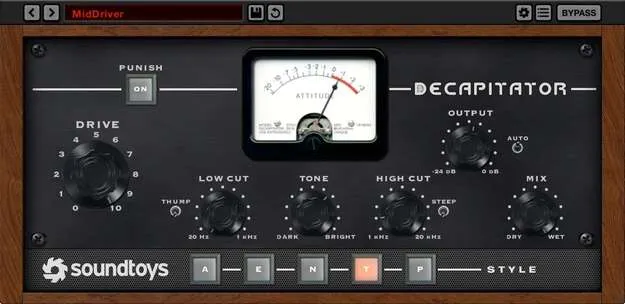
Decapitator analog saturation plugin interface by Soundtoys

Decapitator: Analog Saturation Plugin by Soundtoys

Rated 4.8/5 on Plugin Boutique (2,736 ratings)

Decapitator is a saturation plugin from Soundtoys that models five analog studio hardware circuits. It adds analog-style warmth, grit and character to individual tracks or full mixes.

VST3VST2AUAAXWindowsmacOS64-bit
AVAILABLE ATPlugin Boutique
Opens the store in a new tab
01Overview

Decapitator is an effects plugin from Soundtoys focused on analog saturation. Its five models are based on studio hardware including consoles, preamps, EQs and compressors. The developer describes the processing as responsive, so the saturation changes with the dynamics of the signal rather than staying fixed. A Punish button adds extra gain for heavier distortion, while a modeled tone control and a mix knob let you shape the sound and blend in dry signal for parallel processing.

Best for

  • Vocal saturation
  • Drum bus warmth
  • Parallel distortion
  • Guitar and synth grit
  • Adding analog character
Developer
Soundtoys
Category
Saturation
Store
Plugin Boutique
02Key features

What you get

  • Five analog saturation models based on studio hardware
  • Responsive saturation that follows track dynamics
  • Punish button for extra gain and heavier drive
  • Analog-modeled tone control shapes saturation contour
  • Mix knob for parallel processing without sub-mixes
  • Available in VST3, VST2, AU and AAX Native formats
  • 64-bit only, supports 44.1 kHz to 192 kHz sample rates
03In depth

Analog Saturation Models and Tone Shaping

Decapitator offers five analog saturation models, each based on a different type of studio hardware. Soundtoys says it collected and analyzed vintage and modern gear before building the models, choosing units it considered to have distinctive character at both subtle and extreme settings.

The modeled tone control shapes the contour of the saturation, so you can adjust the tonal balance of the distorted signal rather than only its amount. The mix knob blends the processed signal with the dry input, which lets you run Decapitator as a parallel effect without setting up routing or sub-mixes.

The Punish button adds an extra chunk of gain for driving the circuit harder. Soundtoys describes the result as closer to driving high-end studio gear than to the fizzy distortion of a stomp box.
Using Decapitator on Vocals, Drums and Instruments

Because the saturation ranges from very subtle to extreme, Decapitator can be used across many kinds of material. Soundtoys suggests trying it on vocals, drums, guitars and synths, especially sources that sound a little too polite.

For a gentle color, keep the drive low and use the mix knob to keep some of the original signal. For more aggressive character, engage the Punish button and adjust the tone control to set how the saturation sits in the frequency range.

Decapitator is available in VST3, VST2, AU and AAX Native formats for Windows and macOS.

04Specs

Will it run?

Formats, systems and requirements as listed by Plugin Boutique. Missing details are left out, not guessed.

DeveloperSoundtoys
TypePlugin
CategorySaturation
FormatsVST3, VST2, AU, AAX
Operating systemsWindows, macOS
Architecture64-bit
05FAQ

Questions, answered

What is Decapitator used for?

Decapitator is used to add analog-style saturation to tracks and mixes. It can add warmth, edge or heavy distortion depending on the model and how far you push the drive.

Which formats and operating systems does Decapitator support?

Decapitator is available in VST3, VST2, AU and AAX Native formats. It runs on Windows 7 and later and on macOS 10.12 Sierra and later, and is 64-bit only.

What do I need to use Decapitator?

A free account at ilok.com is required to use Decapitator. A physical iLok USB key is not needed.

07Developer

More from Soundtoys

All Soundtoys products →