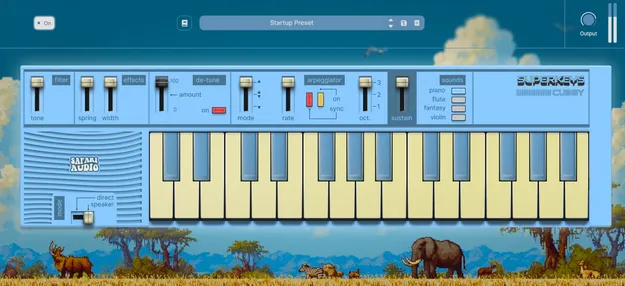
Cubby by Safari Audio retro keyboard virtual instrument plugin interface

Cubby: Retro Home-Keyboard Virtual Instrument by Safari Audio

Rated 4.7/5 on Plugin Boutique (6 ratings)

Cubby is a retro-style virtual instrument plugin by Safari Audio that recreates the sound of 1980s-style home keyboards. It offers four tones, a built-in spring effect, detune, width and a three-mode arpeggiator.

VST3AUAAXWindowsmacOS64-bit
AVAILABLE ATPlugin Boutique
Opens the store in a new tab
01Overview

Cubby is the first release in SuperKeys, a growing line of playful instruments from Safari Audio. Its sound set centers on early digital keyboard character: bright piano, simple flute, dreamy fantasy pads and a nostalgic violin voice. The controls are kept deliberately simple, so you can shape a tone quickly. The developer describes the result as a forgotten keyboard theme, built for melodies, hooks and chords with a lot of color.

Best for

  • Retro keyboard melodies
  • Lo-fi hooks and chords
  • Nostalgic soundtrack pads
  • Tempo-synced arpeggios
  • Playful pop leads
Developer
Safari Audio
Store
Plugin Boutique
02Key features

What you get

  • Four tones: Piano, Flute, Fantasy and Violin
  • Built-in Spring control for springy room space
  • Width control for stereo spread on chords
  • De-tune control for drift or wobble
  • Tone control for quick brightness shaping
  • Sustain control for longer pads and leads
  • Arpeggiator with three modes and BPM Sync on/off
  • Direct and Speaker output modes
03In depth

Sound Character and Core Controls

Cubby offers four tones: Piano, Flute, Fantasy and Violin. Piano is bright and compact, and it sits quickly in a mix. Flute suits simple melodic lines, while Fantasy adds synthetic color with a soundtrack feel. Violin is an ensemble-style tone that responds well to the spring effect and detune.

The control panel is short. Tone adjusts brightness, Spring adds built-in springy room space, and Width spreads chords across the stereo field. De-tune sets the amount of drift or wobble, and Sustain holds notes longer for pads and leads.

Arpeggiator and Speaker Mode

The arpeggiator has three modes and a BPM Sync switch, so movement can lock to your project tempo. The Octave control selects the range for stacked runs.

Speaker Mode switches between Direct and Speaker, changing the sound toward a built-in-speaker character. This is useful when you want a small, lo-fi keyboard identity rather than a clean output.

04Specs

Will it run?

Formats, systems and requirements as listed by Plugin Boutique. Missing details are left out, not guessed.

DeveloperSafari Audio
TypePlugin
CategoryVirtual Instruments
FormatsVST3, AU, AAX
Operating systemsWindows, macOS
Architecture64-bit
05FAQ

Questions, answered

What formats does Cubby support?

Cubby is available in VST3, AU and AAX formats. It runs on Windows and macOS.

What are the system requirements for Cubby?

Cubby needs a 1 GHz Intel dual-core or AMD equivalent processor and at least 4GB of RAM, with 8GB recommended. On macOS it requires Mac OS X 10.15 or later, with 11 or later recommended. On Windows it requires Windows 8 or later and a 64-bit system.

What sounds does Cubby include?

Cubby includes four tones: Piano, Flute, Fantasy and Violin. Each is designed for a different kind of melody or texture.

What is Cubby's arpeggiator?

The arpeggiator offers three modes, an Octave selector for range, and a BPM Sync on/off switch to lock movement to tempo.

07Developer

More from Safari Audio

All Safari Audio products →