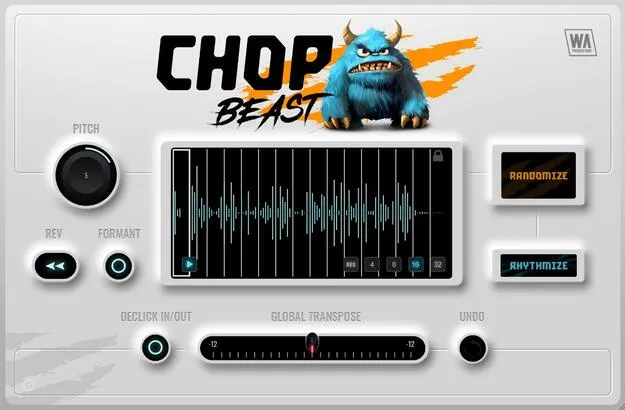
ChopBeast by W. A. Production audio chop and remix plugin interface

ChopBeast: Audio Chop and Remix Plugin by W. A. Production Free Download

Rated 4.4/5 on Plugin Boutique (159 ratings)

ChopBeast is an audio chop and remix plugin by W. A. Production that slices a loop or phrase into up to 32 chops and rearranges them into new rhythmic and melodic patterns. It runs as an AAX plugin on Windows and macOS.

AAXWindowsmacOS64-bit
AVAILABLE ATPlugin Boutique
Free trial available from the developer
01Overview

ChopBeast takes an audio file, divides it into chops and recombines them. The developer describes it as a rewrite of its earlier plugin ChopMonster, with added declicking, independent chop preview and sample rate matching. Each instance handles up to 32 chops, and you can audition or trigger the results from MIDI before exporting them to your DAW. The plugin is aimed at producers who want to build stuttered vocal hooks, percussion patterns or bass riffs from existing material.

Best for

  • Stuttered vocal chops
  • Percussion loop patterns
  • Bass line riffs
  • Full mix chopping
  • Remix and sample flips
Store
Plugin Boutique
02Key features

What you get

  • Chops audio loops and phrases into up to 32 slices per instance
  • Per-chop reverse and pitch controls
  • Creative formant shifting for individual slices
  • Multiple randomization modes for generating variations
  • MIDI audition and triggering of chopped patterns
  • Declick option for smoother transitions between chops
  • Global transpose for the whole pattern
  • Resizable interface with a full PDF manual and tutorial video
03In depth

Chop Control and Sound Shaping

Each chop can be pitched and reversed on its own, so a single loop can yield several different textures. Creative formant shifting changes the timbre of individual slices, which helps when a chopped vocal needs to sit differently from its source.

Declicking smooths the joins between chops, reducing the clicks and pops that often appear when slices are rearranged. Independent chop preview lets you audition one slice at a time, and full sequence preview lets you check the whole arrangement before you export it.

Global transpose shifts the whole pattern at once. Multiple randomization modes generate variations, and undo lets you step back when a result goes too far.
Workflow, Export and Who It Is For

ChopBeast can be triggered over MIDI, which makes it possible to play chopped material like an instrument. When a result works, you can export it into your DAW for further editing. The sample rate matching feature keeps playback unchanged if you change your DAW's sample rate, and loaded samples keep their original speed and sample rate.

The interface is resizable and the developer describes the plugin as CPU friendly. A full PDF manual and a tutorial video are included, which helps with the less obvious controls.

The plugin suits producers who build beats or remixes from loops, vocals and full mixes, and anyone who wants to generate rhythmic variations from a single source.

04Specs

Will it run?

Formats, systems and requirements as listed by Plugin Boutique. Missing details are left out, not guessed.

DeveloperW. A. Production
TypePlugin
CategoryMulti Effect
FormatsAAX
Operating systemsWindows, macOS
Architecture64-bit
Free trialYes
05FAQ

Questions, answered

What formats and operating systems does ChopBeast support?

ChopBeast is available in the AAX format for Windows and macOS. It is a 64-bit plugin.

What do I need to run ChopBeast?

The developer lists Windows 8 or higher (64-bit), macOS 10.10 or higher (64-bit), and Pro Tools 11 or higher for the AAX format. Apple Silicon Mac users should check the current compatibility status of the plugin on their system before buying.

Does ChopBeast have a trial version?

Yes, a trial version is available.

Can I export chopped material to my DAW?

Yes. ChopBeast supports DAW export, so you can take your chopped creations into your session for further editing.

07Developer

More from W. A. Production

All W. A. Production products →