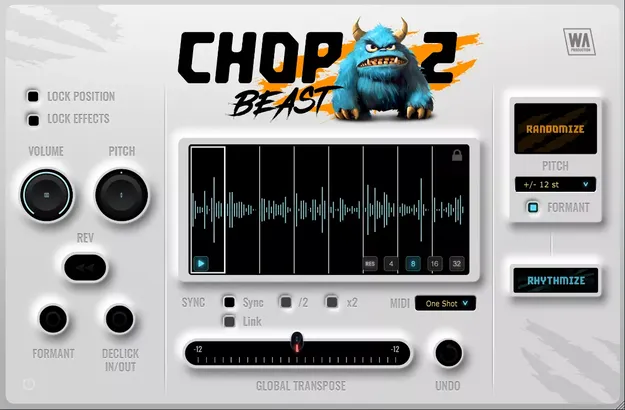
ChopBeast 2 audio chop and remix plugin interface by W. A. Production

ChopBeast 2: Audio Chop and Remix Plugin by W. A. Production

Rated 4.4/5 on Plugin Boutique (20 ratings)

ChopBeast 2 is an audio chop and remix plugin from W. A. Production that slices a loaded audio phrase into up to 32 chops and rearranges them with per-slice and randomization controls. It runs as VST3, VST2, AU and AAX on Windows and macOS.

VST3VST2AUAAXWindowsmacOS64-bit
AVAILABLE ATPlugin Boutique
Opens the store in a new tab
01Overview

ChopBeast 2 is built for rhythmic slicing of percussion, melodies, vocals and full mixes. You drag in an audio file, choose up to 32 chops, and rearrange them manually or with randomization. Per-slice controls cover volume, pitch, reverse, declicking and formant shifting, so you can rebuild a loop into something new while keeping the parts you like. MIDI triggering, DAW tempo sync and DAW export connect the plugin to your production workflow.

Best for

  • Chopped vocal edits
  • Percussion loop rebuilding
  • Melodic loop randomization
  • Daft Punk style chop loops
  • Rhythmic full-mix slicing
  • DAW tempo-synced chops
Store
Plugin Boutique
02Key features

What you get

  • Up to 32 chops per instance for detailed slicing
  • Per-chop volume, reverse, pitch, declick and formant shifting
  • Multiple melodic randomization modes with interval-based pitch
  • Lock position and FX on selected slices while randomizing others
  • MIDI audition in one-shot and loop modes
  • DAW sync with half time and double time modes
  • Global transpose for the whole sequence
  • Resizable interface with a full PDF manual and tutorial video
03In depth

Per-Slice Control and Melodic Randomization

ChopBeast 2 gives you control over each individual slice. You can adjust the volume of every chop to balance the result, reverse single slices, and shift pitch per slice. Pitch randomization can be limited to discrete intervals, including octaves, fifths, thirds, and major and minor intervals, which keeps the results musical.

A Lock option holds the position and effects of chosen slices, so you can keep the core of a sequence while randomizing the rest. A formant shaping toggle and per-chop declicking are also available for smoother transitions between chops.
Timing, MIDI and DAW Workflow

DAW Sync locks playback to your host tempo so chops stay on the beat. Half time and double time modes are included for rhythmic variation. Link playback syncs a chopped loop to bar position in your DAW.

MIDI audition supports one-shot and loop triggering, giving you a way to play chops from a keyboard. Once you are happy with a sequence, you can export it to your DAW for further processing. The interface is resizable, and the developer lists the plugin as responsive and CPU friendly.

04Specs

Will it run?

Formats, systems and requirements as listed by Plugin Boutique. Missing details are left out, not guessed.

DeveloperW. A. Production
TypePlugin
CategoryMulti Effect
FormatsVST3, VST2, AU, AAX
Operating systemsWindows, macOS
Architecture64-bit
05Upgrades

Upgrade and crossgrade options

06FAQ

Questions, answered

What formats and operating systems does ChopBeast 2 support?

ChopBeast 2 is available in VST3, VST2, AU and AAX formats. It runs on Windows 8 or higher (64-bit) and macOS 10.10 or higher (64-bit). The AAX version requires Pro Tools 11 or higher.

How many slices can I create?

You can select up to 32 chops per instance. Each chop has its own volume, pitch, reverse and declick settings.

Can ChopBeast 2 sync to my DAW tempo?

Yes. DAW Sync locks playback to your project tempo, and half time and double time modes are available. Link playback can also sync the chopped loop to bar position.

Does ChopBeast 2 include documentation?

Yes. The plugin comes with a full PDF manual and a tutorial video.

08Developer

More from W. A. Production

All W. A. Production products →