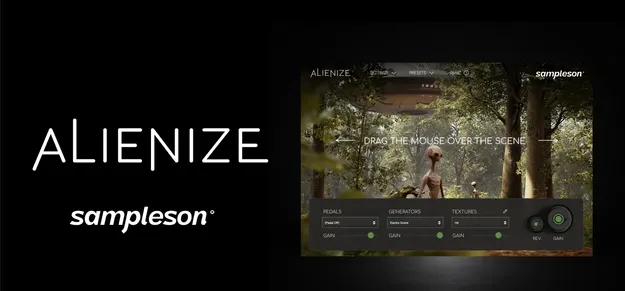
Alienize by Sampleson sci-fi virtual instrument plugin interface

Alienize: Sci-Fi Virtual Instrument by Sampleson

Rated 4.5/5 on Plugin Boutique (11 ratings)

Alienize is a virtual instrument by Sampleson for creating sci-fi underscores, drones, arpeggios and textures. It is controlled by mouse position or a MIDI controller and runs as a VST2 or AU plugin on Windows and macOS.

VST2AUWindowsmacOS
AVAILABLE ATPlugin Boutique
Opens the store in a new tab
01Overview

Alienize is built for composers and producers who score science fiction and other atmospheric material. Its 41 sound modules cover ambient pads, arpeggios, drones, melodic lines and percussive textures. Rather than editing parameters alone, you shape sounds through gestures: the mouse position on screen generates and manipulates sound in real time, and you can perform it live or sync it to video. Presets and automatable parameters let you fit the instrument into a standard DAW workflow.

Best for

  • Sci-fi film scoring
  • Live gesture performance
  • Video synchronization
  • Ambient pad textures
  • Arpeggiated sci-fi sequences
  • Metallic percussive effects
Developer
Sampleson
Store
Plugin Boutique
02Key features

What you get

  • Cinematic instrument designed for sci-fi music scoring
  • Ambient, arp, drone, melodic and texture modules
  • 41 sound modules, each with its own gesture behavior
  • Mouse position as an automatable DAW parameter
  • Mouse-to-MIDI CC mapping for hardware control
  • Granular, Wavetable, Oscillator and Sampling engines
  • 120 included presets
  • Low CPU usage and roughly 200 MB install size
  • Scalable HD interface
03In depth

Gesture-Based Sound Design and Control

Alienize uses the position of your mouse on screen to generate and manipulate sound while you play. Each of the 41 modules responds to gestures in its own way. For example, the Theremin module's pitch follows the left-right cursor position.

The mouse position is also published as an automatable parameter in your DAW, so you can record and edit gesture movements like any other automation. You can map the same parameter to a MIDI CC to control it from a hardware controller instead.

The developer also notes that you can play gestures over a movie to create synchronization on the fly, which suits scoring work.
Engines, Modules and Presets

Alienize combines Granular, Wavetable, Oscillator and Sampling engines. The module library includes ambient and drone sounds such as Alien zones, A.I Drone, Electro Drone and Bass Drone, arpeggiated patches such as Arp 1, Arp 2 and Hard Arp, and percussive and metallic textures such as Bronze, Rust, Smash and Ufo.

The instrument ships with 120 presets, giving you starting points before you build your own patches. It is listed at about 200 MB and is described as having low CPU usage.

04Specs

Will it run?

Formats, systems and requirements as listed by Plugin Boutique. Missing details are left out, not guessed.

DeveloperSampleson
TypePlugin
CategoryVirtual Instruments
FormatsVST2, AU
Operating systemsWindows, macOS
05FAQ

Questions, answered

What formats and operating systems does Alienize support?

Alienize is available as a VST2 and AU plugin. It runs on Windows and macOS.

What do I need to use Alienize?

You need a VSTi or AU plugin host. The listed requirements are 200 MB of disk space and 4 GB of RAM. On Windows, Windows 7 or later is required; on macOS, macOS 10.7 or later. Pro Tools is not supported.

Can I control Alienize with a MIDI controller?

Yes. The mouse position can be mapped to a MIDI CC, so you can control the gesture parameter from a hardware controller.

Can I automate Alienize in my DAW?

Yes. The mouse-position parameter is published as an automatable parameter in your DAW.

07Developer

More from Sampleson

All Sampleson products →