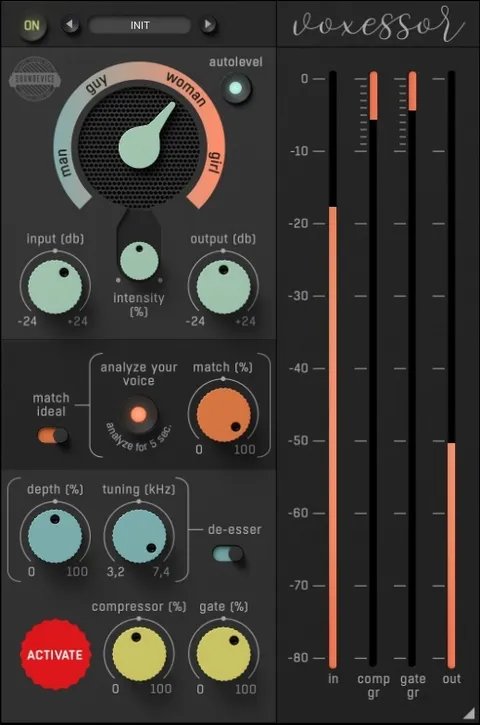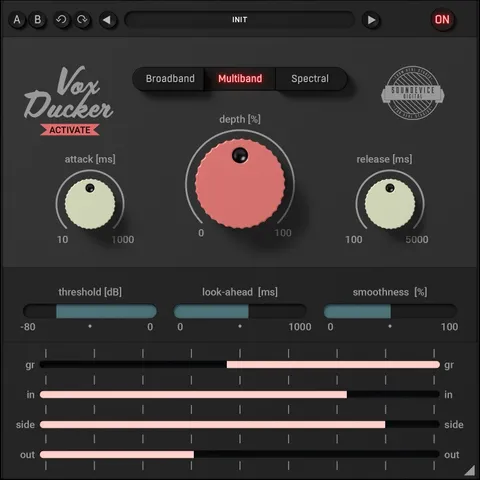
VoxDucker by United Plugins audio ducking plugin interface

VoxDucker: Automatic Audio Ducking Plugin by United Plugins

Rated 4.6/5 on Plugin Boutique (222 ratings)

VoxDucker is an effects plugin from United Plugins that automatically lowers, or ducks, a backing track when a voice signal is present on its sidechain input. It is built for voiceovers, podcasts and video narration.

VST3VST2AUAAXWindowsmacOS64-bit
AVAILABLE ATPlugin Boutique
Opens the store in a new tab
01Overview

VoxDucker is designed for producers who mix spoken or sung voice over background music. You place it on the music track and route the voice into its sidechain input, and the plugin moves the music out of the way so the voice stays in focus. The developer describes the plugin as handling voiceovers, podcasts and audiobooks, and says it can also duck other sources such as bass under a kick or rhythm guitar under a lead.

Best for

  • Voiceover mixing
  • Podcast music beds
  • Audiobook narration
  • Video narration
  • Bass ducking under kick
  • Rhythm guitar under lead
Store
Plugin Boutique
02Key features

What you get

  • Automatic ducking of backing music under a voice signal
  • Sidechain input for routing voice into the plugin
  • Depth control with pre-set starting points for quick results
  • Selectable ducking modes for voice or other audio types
  • Metering for ducking amount and input, output and sidechain levels
  • Internal 64-bit audio processing at any sampling rate
  • Smart bypass that avoids clicks during parameter automation
  • Sleep-on-silence mode that reduces CPU use when processing is unnecessary
03In depth

Ducking Controls and Modes

Most of the work is done with the depth control, which sets how much the signal is ducked. United Plugins says the plugin has been pre-set for multiple scenarios, so in many cases depth alone is enough to get a usable result.

For finer adjustment, VoxDucker offers a larger set of parameters. It provides selectable ducking modes, and the metering section shows the amount of ducking along with input, output and sidechain levels. The interface can be resized by dragging its bottom-right corner, which helps when screen space is limited.
Who Uses VoxDucker and What You Need to Run It

VoxDucker suits video makers, podcasters, broadcasters and audiobook producers who need voice and music balanced quickly. The developer also notes that it is not limited to voice and can duck any audio type.

It runs as a 64-bit plugin in VST3, VST2, AU and AAX formats. On macOS it requires 10.10 or later, and Apple Silicon and macOS 11 Big Sur are supported. On Windows it supports Windows 8 through Windows 11 in 32-bit and 64-bit editions. Both platforms require an Intel or AMD processor with SSE2 support and a compatible host.

04Specs

Will it run?

Formats, systems and requirements as listed by Plugin Boutique. Missing details are left out, not guessed.

DeveloperUnited Plugins
TypePlugin
CategoryVocal Processing
FormatsVST3, VST2, AU, AAX
Operating systemsWindows, macOS
Architecture64-bit
05FAQ

Questions, answered

What formats does VoxDucker support?

VoxDucker is available in VST3, VST2, AU and AAX formats. It runs on both Windows and macOS.

What do I need to run VoxDucker?

You need a VST2, VST3, AAX or AU compatible host on macOS, or a VST2, VST3 or AAX compatible host on Windows. An Intel or AMD processor with SSE2 support is required on both platforms.

How do I set up the sidechain for voiceovers?

Place VoxDucker on the music track and route the voice track into the plugin's sidechain input. Routing steps differ between DAWs, so check your DAW documentation.

Does VoxDucker need an iLok or internet connection?

No. The developer states that no iLok, dongle or internet access is needed, because activation uses licence files.

07Developer

More from United Plugins

All United Plugins products →