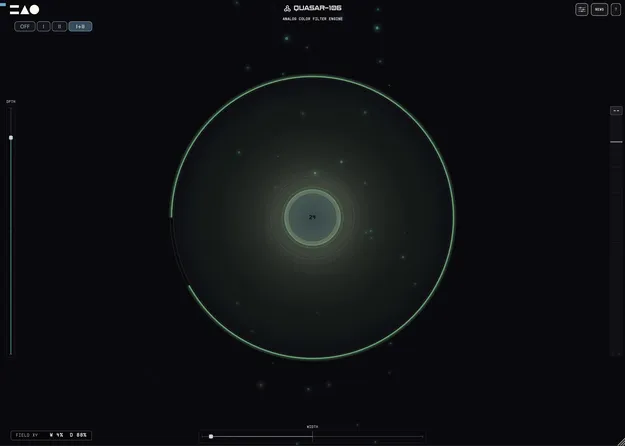
QUASAR-106 by MNTRA Instruments Juno-style filter, chorus and drive effects plugin interface

QUASAR-106: Juno-Inspired Filter, Chorus and Drive Plugin by MNTRA Instruments

QUASAR-106 is a Juno-inspired multi effect plugin from MNTRA Instruments that combines a filter, BBD-style chorus and vintage-style drive to add motion, stereo width and analog color to any source.

VST3AUWindowsmacOS64-bit
AVAILABLE ATPlugin Boutique
Opens the store in a new tab
01Overview

QUASAR-106 is built around the filter, drive and chorus path associated with the Roland Juno-106. MNTRA Instruments models that signal chain with its Anima Circuits technology, offering a 24 dB four-pole slope alongside a 12 dB two-pole mode. Three chorus modes, a single Vintage control and a Perform View interface give producers a way to shape a sound by ear. It is available as a VST3 and AU plugin for Windows and macOS.

Best for

  • Juno-style synth sweeps
  • Adding stereo width to pads
  • Warming up clean sources
  • Saturating drum buses
  • Vintage-style tape and chorus character
  • Live resonance performance
Store
Plugin Boutique
02Key features

What you get

  • 24 dB four-pole and 12 dB two-pole filter slopes
  • Three BBD chorus modes including a combined mode
  • Stereo width expandable up to 2.5 times
  • Vintage-style drive from subtle warmth to harmonic grit
  • Single Vintage knob for chorus drift and high-end darkening
  • Modeled resonance with OSC Safe Mode for live use
  • Reactive Perform View with audio-driven visuals
  • Fully automatable parameters in any VST3 or AU host
03In depth

Filter, Chorus and Drive in One Signal Path

The filter offers a punchy 24 dB four-pole contour and a smoother 12 dB two-pole mode, so a sweep can have either bite or breath without switching plugins. The chorus provides three BBD modes: a slow, deep setting, a fast, tight setting, and both combined. Stereo width can open up to 2.5 times at maximum.

The drive stage ranges from subtle warmth to heavier harmonic grit and is designed to stay clean at the top end, where digital clipping often breaks down. Resonance can be pushed into self-oscillation, and an OSC Safe Mode keeps that behavior controlled for live use.
Vintage Aging and the Perform View

The Vintage control ages the whole circuit from a single knob. Higher settings deepen chorus drift, darken the high end, raise the noise floor and add resonance wobble, while zero keeps the sound clean and modern.

The Perform View maps the filter and chorus to an audio-reactive iris, a field and a center circle that toggles the slope. Every parameter is automatable in your DAW, and an Advanced panel exposes the individual controls for precise editing.

04Specs

Will it run?

Formats, systems and requirements as listed by Plugin Boutique. Missing details are left out, not guessed.

DeveloperMNTRA Instruments
TypePlugin
CategoryMulti Effect
FormatsVST3, AU
Operating systemsWindows, macOS
Architecture64-bit
05FAQ

Questions, answered

What formats and operating systems does QUASAR-106 support?

QUASAR-106 is available in VST3 and AU formats. It runs on Windows 10 or newer and on macOS, with macOS support limited to Apple Silicon Macs (M1 or newer). Intel-based Macs are not supported.

What do I need to use QUASAR-106?

You need a 64-bit VST3 or AU plugin host and any major DAW with VST3 effect support. Allow at least 250 MB of free disk space, and 8 GB of RAM is recommended. An internet connection is required for download and initial MNTRA account activation.

Does QUASAR-106 need an internet connection after activation?

No. After the first activation it runs offline with a 30-day grace window after each verification. Reconnect within 30 days and it keeps working. If the window lapses without re-verification, the plugin mutes until you sign in again.

07Developer

More from MNTRA Instruments

All MNTRA Instruments products →