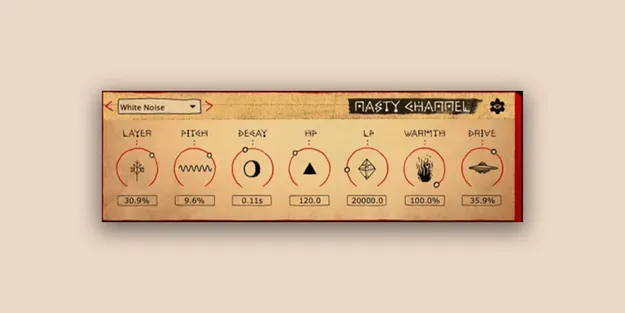
Nasty Channel distortion plugin interface by Imperial Dust

Nasty Channel: Distortion and Layer Effect Plugin by Imperial Dust Free Download

Nasty Channel is a distortion effect plugin from Imperial Dust that adds grit, saturation and noise layers to individual tracks, buses or the master channel. It is available in VST3 and AU formats.

VST3AUWindowsmacOS
AVAILABLE ATPlugin Boutique
Free trial available from the developer
01Overview

Nasty Channel combines a drive stage, a warmth processor, filters and a layer generator in one compact effect. The layer section offers 17 noise or oscillator sources that follow the input signal, so you can add crunch, grit or shimmer alongside the original sound. The developer describes it as a simple way to add distortion with a usable top end. It runs on Windows and macOS inside any DAW that supports VST3 or AU effects.

Best for

  • Bass top-end grit
  • Drum crunch and shimmer
  • Synth distortion
  • Bus saturation
  • Master channel warmth
  • Washed-out textures
Developer
Imperial Dust
Category
Distortion
Store
Plugin Boutique
02Key features

What you get

  • 17 selectable noise or oscillator layers that follow the input signal
  • Pitch control for tuning the layer signal
  • Decay control for short hits or washed-out tails
  • Highpass filter to remove low end from the layer
  • Lowpass filter to tame high-end harshness
  • Warmth processor for low and low-mid color
  • Drive control from subtle saturation to heavy distortion
  • Seven streamlined controls for fast sound shaping
03In depth

Layered Grit and Distortion Controls

The core of Nasty Channel is its layer section. Choose one of 17 noise or oscillator layers, then shape it with Pitch and Decay. Pitch changes the tuning of the layer signal, while Decay sets how long it rings. Longer decay settings produce washed-out, atmospheric textures.

The Drive control moves from subtle saturation to heavy distortion. Warmth adds low and low-mid color, and the HP and LP filters let you trim the low end of the layer and tame harsh high frequencies. Together these seven controls cover the main shaping tasks without a deep menu structure.
Using Nasty Channel on Bass, Drums and Buses

Imperial Dust positions Nasty Channel as both a mixing utility and a creative effect. On bass, the developer points to the upper harmonics and overdrive as the source of presence, which the layer and drive stages can add without changing the sub. The HP filter on the layer path helps keep low frequencies clean.

Because it works on individual tracks, buses and the master channel, it can be used to add character to drum groups or to glue a full mix. Its filters and warmth control make it easy to fit the added texture into the existing balance.

04Specs

Will it run?

Formats, systems and requirements as listed by Plugin Boutique. Missing details are left out, not guessed.

DeveloperImperial Dust
TypePlugin
CategoryDistortion
FormatsVST3, AU
Operating systemsWindows, macOS
Free trialYes
05FAQ

Questions, answered

What formats does Nasty Channel support?

Nasty Channel is available as a VST3 and an AU plugin.

Which operating systems does Nasty Channel run on?

Nasty Channel supports Windows and macOS. The developer lists minimum requirements of macOS 12 or Windows 10.

What do I need to use Nasty Channel?

Nasty Channel needs to be loaded in a DAW that supports VST3 or AU audio effects.

Is there a trial version?

Yes, Nasty Channel offers a trial.