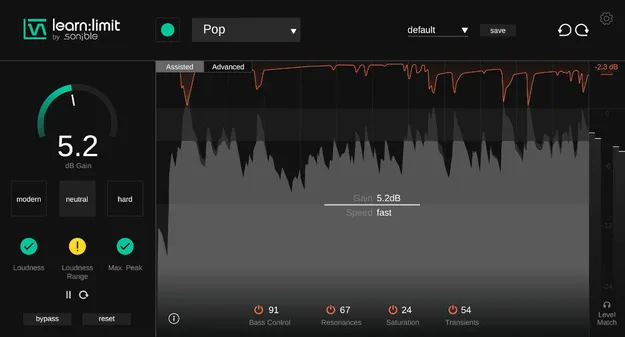
learn:limit by sonible limiter plugin interface

learn:limit: Intelligent Limiter with Loudness Monitoring by sonible

learn:limit is a limiter plugin from sonible that uses AI to set limiting parameters for a track and shows loudness, peak levels and dynamics through real-time feedback.

VST3VST2AUAAXWindowsmacOS64-bit
AVAILABLE ATPlugin Boutique
Opens the store in a new tab
01Overview

learn:limit is built around two ideas: automatic parameter setting and built-in loudness monitoring. The AI-based parametrization suggests limiting settings for the material it processes, while the monitoring shows how loud the track is and how that loudness affects its dynamics. The plugin also includes an Assisted view and an Advanced view, so it can serve as a learning tool as well as a working tool at the final stage of a mix.

Best for

  • Final-stage mastering limiting
  • Learning loudness and peak levels
  • Checking loudness during mixing
  • Balancing loudness and dynamics
  • Producer education
Developer
sonible
Category
Limiters
Store
Plugin Boutique
02Key features

What you get

  • AI-based parametrization that sets limiting parameters for your track
  • Intelligent loudness monitoring with real-time feedback
  • Peak level and dynamics feedback with quality indicators
  • Assisted view with educational hints
  • Advanced view for practical, hands-on control
  • Shows trade-offs between loudness and dynamics
  • Available as VST3, VST2, AU and AAX
  • Runs on Windows and macOS in 64-bit
03In depth

AI-Assisted Limiting and Loudness Monitoring

The core of learn:limit is its AI-based parametrization, which sets the limiter for your track rather than leaving every control to manual trial and error. Resonance Sound describes the plugin as a way to take the guesswork out of limiting.

The intelligent loudness monitoring gives real-time feedback on loudness, peak levels and dynamics. Because it shows the trade-offs between loudness and dynamics, you can see how pushing the level affects the character of the mix before you commit to a final setting.
Assisted and Advanced Views for Learning and Mixing

learn:limit offers two views. The Assisted view is designed for education, with hints and quality indicators that explain what the meters are showing. The Advanced view is designed for practical use, for producers who already understand limiting and want more direct control.

This split makes the plugin suited to producers who are still building an understanding of loudness and peak management, as well as to those who want to check their final-stage limiting with feedback.

04Specs

Will it run?

Formats, systems and requirements as listed by Plugin Boutique. Missing details are left out, not guessed.

Developersonible
TypePlugin
CategoryLimiter
FormatsVST3, VST2, AU, AAX
Operating systemsWindows, macOS
Architecture64-bit
05FAQ

Questions, answered

What does learn:limit do?

learn:limit is an intelligent limiter. It uses AI to set limiting parameters for your track and provides real-time loudness, peak and dynamics feedback to show the trade-offs between loudness and dynamics.

Which formats and operating systems does learn:limit support?

learn:limit is available in VST3, VST2, AU and AAX formats. It runs on Windows and macOS in 64-bit.

What do I need to run learn:limit?

On Mac, you need macOS 10.13 or later; M1 Apple Silicon is supported. On PC, you need Windows 10 or later, 64-bit only. Both platforms list at least 4 GB of RAM and an Intel Dual Core i5 CPU as recommended, with supported sample rates from 44.1 kHz to 192 kHz.

Is learn:limit suitable for beginners?

The Assisted view includes educational hints and quality indicators designed to help you understand loudness, peak levels and dynamics, while the Advanced view offers more direct control.

07Developer

More from sonible

All sonible products →