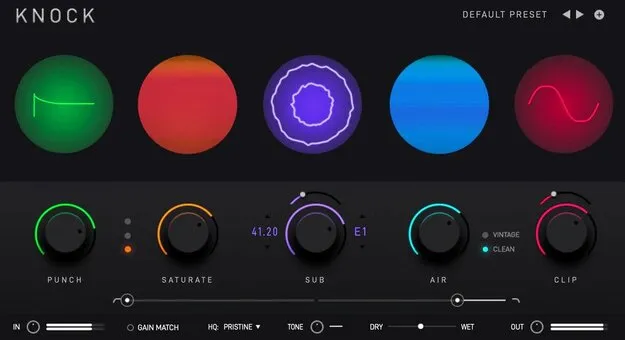
KNOCK drum multi-effect plugin interface by KNOCK Audio

KNOCK: Drum Processing Plugin by KNOCK Audio

Rated 4.7/5 on Plugin Boutique (612 ratings)

KNOCK is a multi-effect drum processing plugin by KNOCK Audio that combines transient shaping, saturation, sub-frequency generation, high-end air and clipping in one tool for making drums punch through a mix.

VST3AUAAXWindowsmacOS64-bit
AVAILABLE ATPlugin Boutique
Opens the store in a new tab
01Overview

KNOCK is built around five processing stages for drums: Punch, Saturate, Sub, Air and Clip. KNOCK Audio says the plugin was developed with producer and sound designer DECAP, and draws on the sound of his DRUMS THAT KNOCK drum kit series. The developer says it includes the features DECAP used to craft that sound, along with factory presets made by DECAP. It is offered in VST3, AU and AAX formats.

Best for

  • Drum loop processing
  • Kick drum sub tuning
  • 808 saturation
  • One-shot drum shaping
  • Breakbeat low end
  • Drum bus clipping
Developer
KNOCK Audio
Store
Plugin Boutique
02Key features

What you get

  • Transient shaper (Punch) for snappier attack
  • Saturation with soft, medium and hard modes
  • Sub generator that detects kick drums and adds a tunable sub tone
  • Air stage with vintage and clean modes
  • Adjustable hard/soft clipper with selectable curve
  • Factory presets crafted by DECAP
  • Available in 64-bit VST3, AU and AAX formats
  • Runs on Windows and macOS
03In depth

How the Five Drum Processing Stages Work

Punch is a transient shaper that emphasizes the attack of a drum sound, making it snappier. The developer positions it for drum loops and one-shots.

Saturate adds harmonic distortion and compensates for perceived loudness. It offers three selectable modes labeled soft, medium and hard. The developer recommends it for 808s, one-shots and drum loops.

Sub detects when a kick drum is present and generates a layered sub-frequency tone. You can choose the pitch of that tone, which makes it useful for tuning a kick to the key of a track. Air adds high-frequency content with two selectable modes, vintage and clean.
Clipping and Workflow

Clip is an adjustable hard or soft clipper. Its curve can be set harder for a more aggressive tone or softer for a rounder one. KNOCK Audio describes the effect as a way to push drums into a warm, aggressive character.

KNOCK Audio says the plugin is designed to be easy to use for beginners and experienced producers, and that it is light on CPU, so it can be placed on many tracks at once.

04Specs

Will it run?

Formats, systems and requirements as listed by Plugin Boutique. Missing details are left out, not guessed.

DeveloperKNOCK Audio
TypePlugin
CategoryMulti Effect
FormatsVST3, AU, AAX
Operating systemsWindows, macOS
Architecture64-bit
05FAQ

Questions, answered

What is KNOCK?

KNOCK is a multi-effect plugin for drums from KNOCK Audio, combining transient shaping, saturation, sub generation, air and clipping.

Which formats and operating systems does KNOCK support?

KNOCK is available in 64-bit VST3, AU and AAX formats and runs on Windows and macOS. Windows support is listed for VST3 and AAX, and macOS for AU, VST3 and AAX.

What do I need to use KNOCK?

KNOCK requires 8 GB of RAM, with 16 GB recommended, and about 500 MB of free disk space. Supported processors include Intel Core i5, i7, i9 and Xeon, and Apple M1 on macOS. An internet connection is needed every 30 days to validate your license when used through a Rent to Own plan or Beatport Studio membership.

07Developer

More from KNOCK Audio

All KNOCK Audio products →