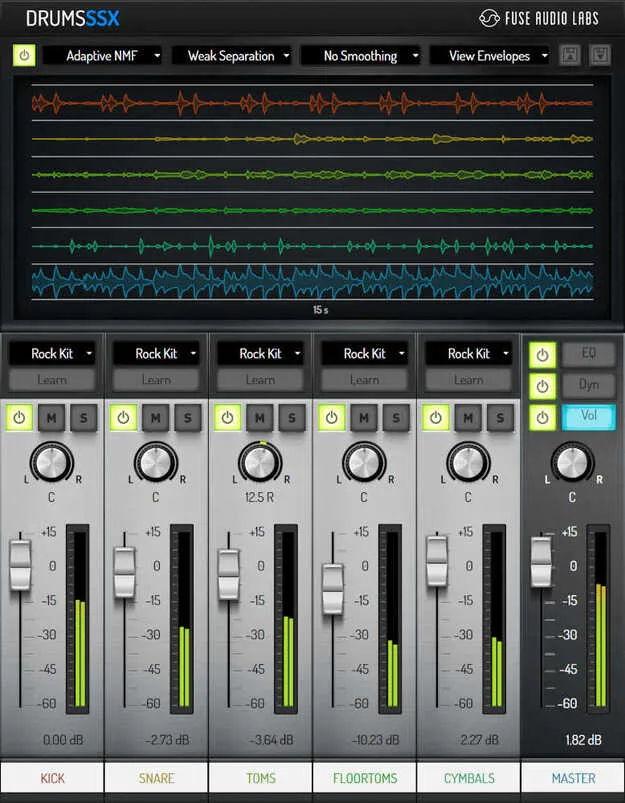
DrumsSSX Drum Remixer plugin interface by Fuse Audio Labs

DrumsSSX Drum Remixer: Drum Separation and Remixing Plugin by Fuse Audio Labs

Rated 4.5/5 on Plugin Boutique (179 ratings)

DrumsSSX Drum Remixer is a drum effects plugin from Fuse Audio Labs that separates mono or stereo acoustic drum recordings into individual components so they can be remixed without multitrack sources.

VST3VST2AUAAXWindowsmacOS64-bit
AVAILABLE ATPlugin Boutique
Opens the store in a new tab
01Overview

DrumsSSX Drum Remixer is built for editing finished drum recordings. Its name stands for Drum signal Source Separator and Remixer. The developer positions it for situations where the original multitrack session is not available. Instead of relying only on EQs, compressors or transient shapers, the plugin uses an NMF separation algorithm to isolate drum elements and rebalance them. It is a fit for producers who need to fix or reshape a drum bus after the fact.

Best for

  • Hi-hat bleed reduction
  • Drum replacement triggers
  • Snare tone adjustment
  • Kick editing
  • Tom and cymbal spreading
  • Remixing finished drum recordings
Category
Drum FX
Store
Plugin Boutique
02Key features

What you get

  • Separates mono or stereo drum recordings into individual components
  • Trainable real-time NMF separation algorithm
  • Stereo to 5.1 unmixing mode
  • Musical 3-band linear phase EQ
  • Dynamics module for each drum instrument
  • Built-in mixer and analyzer view
  • Customizable drum kit presets
  • Creates trigger signals for drum replacement
03In depth

Separation and Editing Tools

DrumsSSX combines several tools in one interface. The core is a trainable real-time NMF separation algorithm, which Fuse Audio Labs describes as the engine that splits a drum recording into its components. A stereo to 5.1 unmixing mode extends this to surround-style workflows.

The plugin also includes a 3-band linear phase EQ and a dynamics module for each instrument, along with a mixer and an analyzer view. Drum kit presets provide starting points for common setups.
Practical Uses for Drum Production

The developer highlights several practical tasks: reducing hi-hat bleed in individual tracks, spreading toms and cymbals, adjusting snare tone, and working with the kick. DrumsSSX can also create trigger signals for drum replacement.

Because the plugin targets drums specifically, its tools are aimed at these tasks rather than general-purpose processing, which suits engineers and producers who edit recorded kits.

04Specs

Will it run?

Formats, systems and requirements as listed by Plugin Boutique. Missing details are left out, not guessed.

DeveloperFuse Audio Labs
TypePlugin
CategoryDrum FX
FormatsVST3, VST2, AU, AAX
Operating systemsWindows, macOS
Architecture64-bit
05FAQ

Questions, answered

What is DrumsSSX used for?

DrumsSSX separates mono or stereo drum recordings into individual components so they can be remixed. It is aimed at cases where multitrack drum signals are not available.

Which formats and systems does DrumsSSX support?

DrumsSSX is available in VST3, VST2, AU and AAX formats. It runs on Windows and macOS, and is a 64-bit plugin.

What do I need to use DrumsSSX?

You need a VST2, VST3, AAX or Audio Units compatible host. On Mac, a 64-bit Intel or Apple Silicon CPU, 2GB RAM and macOS 10.12 or newer are required. On Windows, an Intel compatible CPU (at least 2 GHz recommended), 2GB RAM and Windows 7 or newer are required. Both platforms need a display of at least 1280x1024 pixels.

07Developer

More from Fuse Audio Labs

All Fuse Audio Labs products →