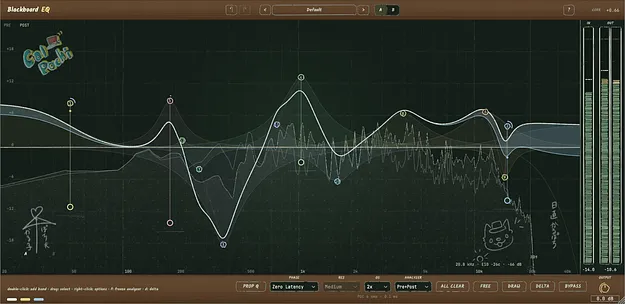
Blackboard EQ by CalPochi equalizer plugin interface showing a drawn EQ curve

Blackboard EQ: Draw-Your-Curve Equalizer Plugin by CalPochi

Blackboard EQ is an equalizer plugin by CalPochi that lets you draw EQ curves directly on screen. It offers up to 24 bands, per-band dynamic EQ and saturation, and is available in VST3 and AU formats.

VST3AUWindowsmacOS64-bit
AVAILABLE ATPlugin Boutique
Opens the store in a new tab
01Overview

Blackboard EQ is built around the idea of shaping sound by drawing. Instead of relying only on numeric controls, you sketch your curve on a visual display and adjust each point as you go. Alongside static equalization, it combines per-band dynamic processing, saturation, left/right and mid/side routing, and selectable phase modes in one interface. Its layout suits mixing tasks where you want to see how much processing is applied and change only the parts of the spectrum that need it.

Best for

  • Vocal harshness control
  • Mid/Side cleanup
  • Mastering bus EQ
  • Bass weight and low end
  • Mixing annotation and notes
Developer
CalPochi
Category
EQ
Store
Plugin Boutique
02Key features

What you get

  • Up to 24 EQ bands with independent frequency, gain and Q
  • Eight filter types including Bell, Notch, Tilt and Brickwall
  • Slopes from 12 to 96 dB/oct in Linear Phase mode
  • Per-band Stereo, Left, Right, Mid and Side processing
  • Per-band Dynamic EQ with Threshold, Range, Attack and Release
  • Per-band Saturation with Drive and Character controls
  • Switchable Zero Latency and Linear Phase modes
  • 2x and 4x oversampling with Pre/Post analysers and A/B comparison
  • Alt-drag band solo auditioning and right-click EQ notes
  • FREE Draw mode for annotations with no effect on audio
03In depth

Sound Shaping and Processing Modes

Blackboard EQ provides up to 24 bands, each with independent control over frequency, gain, Q, filter type, slope and processing channel. Eight filter types are available, including Low Cut, Bell, Notch, Band Pass and Tilt, and cut slopes run from 12 to 96 dB/oct.

You can switch between Zero Latency mode for responsive everyday processing and Linear Phase mode, which offers selectable resolutions and a Brickwall option for cut filters. Two x and four x oversampling and Proportional Q give further control over the processing.
Workflow, Dynamic EQ and Annotations

Each band can be assigned to Stereo, Left, Right, Mid or Side, so you can target only the component you need. Enabling Dyn turns a band into a dynamic EQ with Threshold, Range, Attack and Release controls, which suits taming harshness or muddiness only when it appears.

The Sat section adds Drive and Character controls for saturation on selected frequency ranges. Alt-drag solos a band while you search for the right frequency, and right-clicking an EQ point lets you add a note explaining the change. FREE Draw mode adds chalk-style annotations that have no effect on the audio.

04Specs

Will it run?

Formats, systems and requirements as listed by Plugin Boutique. Missing details are left out, not guessed.

DeveloperCalPochi
TypePlugin
CategoryEQ
FormatsVST3, AU
Operating systemsWindows, macOS
Architecture64-bit
05FAQ

Questions, answered

What formats and operating systems does Blackboard EQ support?

Blackboard EQ is available as a 64-bit VST3 and AU plugin. It runs on macOS 10.13 or later, including Intel and Apple Silicon, and on Windows 10 or later in VST3 format.

What do I need to run Blackboard EQ?

On macOS you need version 10.13 (High Sierra) or later and a VST3 or Audio Unit compatible host. On Windows you need Windows 10 or later (64-bit) and a VST3 compatible host.

What is the difference between Zero Latency and Linear Phase modes?

Zero Latency mode is designed for fast, responsive everyday processing. Linear Phase mode offers selectable resolutions and more precise processing for mixing and mastering, and it unlocks the Brickwall cut option.

Does the FREE Draw mode affect my audio?

No. Anything drawn in FREE Draw mode is purely visual and has no effect on the audio, and the annotations are saved with the session.

07Developer

More from CalPochi

All CalPochi products →