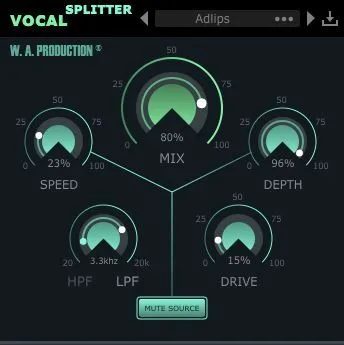
Vocal Splitter stereo vocal effect plugin interface by W. A. Production

Vocal Splitter: Stereo Vocal Effect Plugin by W. A. Production Free Download

Rated 4.4/5 on Plugin Boutique (2,538 ratings)

Vocal Splitter is a vocal processing effect plugin by W. A. Production that turns mono vocals into a wider, thicker stereo sound. It is available in AAX format for Windows and macOS.

AAXWindowsmacOS64-bit
AVAILABLE ATPlugin Boutique
Free trial available from the developer
01Overview

Vocal Splitter is built to widen a mono vocal recording so it sounds fuller in a stereo mix. W. A. Production designed it around a processing technique that engineers have long used to help flat mono vocals stand out. Beyond vocals, the developer notes the plugin can also be used on other audio. The plugin includes Speed, Depth and Drive controls, a Mute Source button for send-style use, and a set of presets for quick starting points.

Best for

  • Mono vocal widening
  • Vocal doubling effects
  • Stereo send processing
  • Effects bus processing
  • Thickening lead vocals
Store
Plugin Boutique
02Key features

What you get

  • Creates wide, modern stereo vocals from a mono source
  • Presets for one-click transformations
  • Speed and Depth dials set the strength of the effect
  • Drive dial adds grit and increases definition
  • Mute Source button for using the effect as a send
  • Click-free bypass for A/B comparison
  • Minimal phasing with high pass and low pass filters
  • Resizable user interface
  • Includes a full PDF manual and tutorial video
03In depth

How Vocal Splitter Creates Stereo Width

Vocal Splitter combines two processes. The first is a phase-offset vibrato that splits the left and right channels by detuning them asymmetrically. The second is an asymmetrical rectification of the left and right signal, which the developer says creates a better defined stereo image.

The Speed and Depth dials control the vibrato, letting you move from subtle thickening to full doubling. The Drive dial adds grit and definition. According to W. A. Production, pushing Drive hard produces a saturation-like effect and pulls the stereo image back toward the center.
Mixing Controls and Filters

The central mix dial blends the dry source signal with the added stereo signal. Pressing Mute Source leaves only the processed audio, which is useful for soloing the effect or running the plugin on an effects bus.

The high pass and low pass filters limit the added stereo signal to a chosen frequency range. The developer advises this to avoid unwanted phasing in the low end. The bypass control is click and pop free, so A/B comparisons stay smooth.

04Specs

Will it run?

Formats, systems and requirements as listed by Plugin Boutique. Missing details are left out, not guessed.

DeveloperW. A. Production
TypePlugin
CategoryVocal Processing
FormatsAAX
Operating systemsWindows, macOS
Architecture64-bit
Free trialYes
05FAQ

Questions, answered

What formats does Vocal Splitter support?

Vocal Splitter is available in AAX format. It runs on Windows 8 or later (32 and 64-bit) and macOS 10.13 or later (64-bit only).

What do I need to use Vocal Splitter in Pro Tools?

The AAX format requires Pro Tools 11 or higher. An internet connection is required to authorise and use the software.

Is there a trial version of Vocal Splitter?

Yes, a demo is available so you can test the plugin before purchasing.

07Developer

More from W. A. Production

All W. A. Production products →