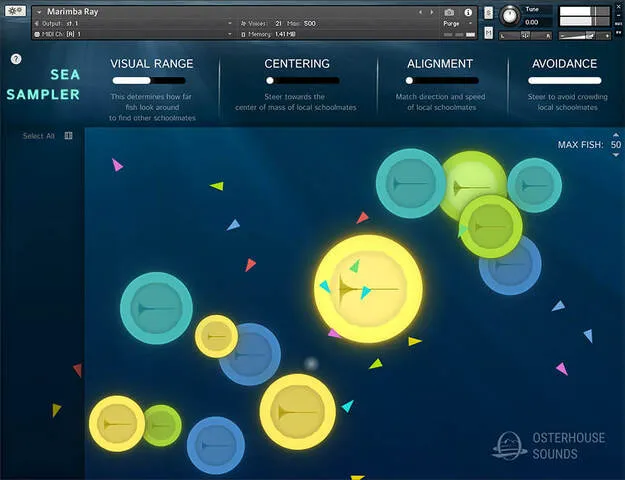
Sea Sampler by Ben Osterhouse Kontakt instrument interface with fish and sample objects

Sea Sampler: Chaotic Texture Instrument by Ben Osterhouse

Sea Sampler is a Kontakt instrument by Ben Osterhouse for generating chaotic textures. You drop samples into an underwater scene, then play flocks of colored fish that trigger the sampled objects they collide with.

REQUIRESKontaktHost player sold separately
StandaloneKontaktWindowsmacOS
AVAILABLE ATPlugin Boutique
Opens the store in a new tab
01Overview

Sea Sampler takes a different approach to sample playback. Instead of triggering samples directly from a keyboard, you place them as objects in a sea and let fish move between them. Each pitch you play releases a fish of a different color, and when a fish hits an object, that object's sample plays, regardless of the pitch the fish was spawned from. The result is generative, unpredictable and well suited to experimental textures and sound design.

Best for

  • Chaotic texture generation
  • Experimental sound design
  • Generative sample performance
  • Ambient and atmospheric sounds
  • Sample-based sound effects
Requires
Kontakt
Store
Plugin Boutique
02Key features

What you get

  • Automatically analyzes and automaps dropped samples into objects
  • Objects can be moved, resized, or removed by dragging
  • Each played pitch spawns a differently colored fish
  • Fish speed and triggered volume follow how hard you play
  • Emitter position and Visual Range control fish attraction
  • Max Fish control replaces the oldest fish at the limit
  • Pedal holds fish alive after key release
  • Modwheel, Pitchwheel and Expression (CC 11) add live control
03In depth

Sound Design and Playback Behavior

Sea Sampler analyzes and automaps the samples you drop into it, creating an object for each one. You can move objects by dragging their centers, resize them by dragging their edges, or remove them by shrinking them to a very small size.

The speed of each fish depends on how hard you play the key, and faster fish play their samples louder. This links keyboard dynamics to the density and volume of the texture, so performance and playing style shape the output.

You can also change how objects sound by altering their pitch, applying filters, sending them to different reverbs, or shaping them with envelopes.
Controlling the Fish and Emitter

The emitter is where fish spawn. Dragging it attracts nearby fish, and faster movement draws more of them in. Turning down Visual Range limits how far fish can see the emitter.

Max Fish sets how many fish can exist at once. When the limit is reached, the oldest fish are replaced by new ones.

The Pedal keeps fish alive after you release a key, the Modwheel increases how often fish emit, the Pitchwheel changes the speed of the simulation's framerate, and Expression (CC 11) twirls the emitter in a circle.

04Specs

Will it run?

Formats, systems and requirements as listed by Plugin Boutique. Missing details are left out, not guessed.

DeveloperBen Osterhouse
TypePlugin
CategoryKontakt Instrument
RequiresKontakt
FormatsStandalone, Kontakt
Operating systemsWindows, macOS
05FAQ

Questions, answered

What do I need to use Sea Sampler?

Sea Sampler requires Kontakt. It is compatible with the free Kontakt Player version 7.3 or later, and it also works in the full version of Kontakt 7.3 or later.

Which operating systems and formats does Sea Sampler support?

Sea Sampler runs on Windows and macOS. It is available as a Standalone application and as a Kontakt instrument. Windows 10 or 11 is supported, along with Intel Macs and Apple Silicon Macs on the macOS versions listed in the system requirements.

What are the samples in Sea Sampler made from?

The presets use samples taken from other Osterhouse Sounds libraries, synthesized sounds, and recordings of household objects. The samples are available as WAV files.

07Developer

More from Ben Osterhouse

All Ben Osterhouse products →