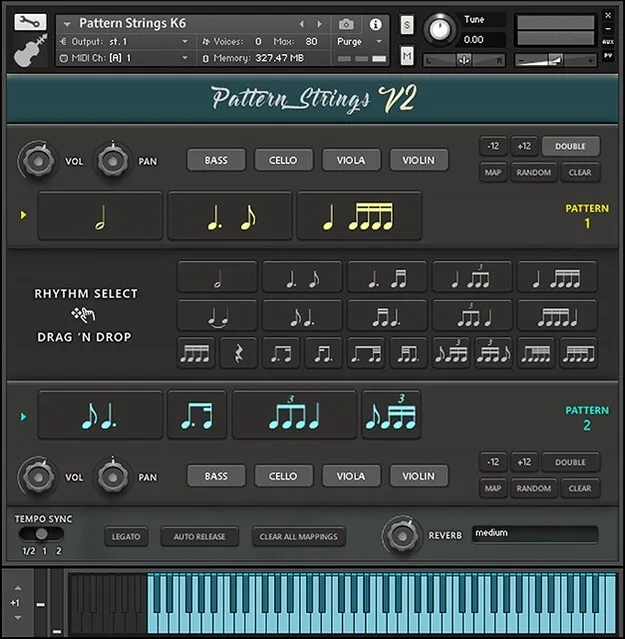
Pattern Strings by Ben Osterhouse Kontakt instrument interface with pattern strips

Pattern Strings: Tempo-Synced String Ostinato Instrument for Kontakt

Rated 5.0/5 on Plugin Boutique (35 ratings)

Pattern Strings is a Kontakt instrument by Ben Osterhouse that provides 19 tempo-synced string rhythm fragments, recorded on violin, viola, cello and bass, which you arrange into ostinato sequences.

REQUIRESKontaktHost player sold separately
Kontakt
AVAILABLE ATPlugin Boutique
Opens the store in a new tab
01Overview

Pattern Strings takes a pattern-based approach to string ostinatos. Instead of playing long lines by hand, you build phrases from a library of short rhythmic fragments and drag them into sequences. The developer notes that the rhythms flow together with natural phrasing. The instrument runs inside Kontakt and needs around 8.5GB of free disk space for its samples.

Best for

  • String ostinatos
  • Tempo-synced string sequences
  • Film score rhythms
  • Cinematic string lines
  • Layered string arrangements
Requires
Kontakt
Store
Plugin Boutique
02Key features

What you get

  • 19 tempo-synced string rhythm fragments
  • Violin, viola, cello and bass with two dynamic layers
  • Four round robins per recorded sample
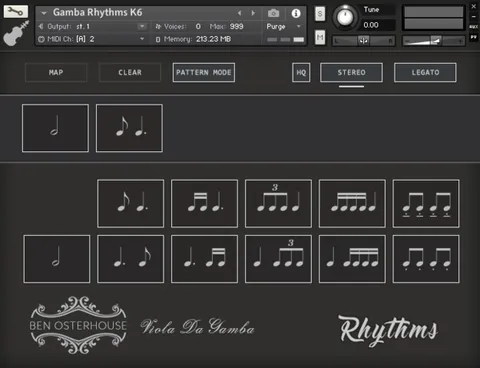
  • Drag-and-drop sequencing across two pattern strips
  • Legato mode syncs new notes to held notes
  • Automatic downbow and upbow direction on beats
  • Tempo-sync switch for half or double sample speed
  • Stereo doubling without extra voices or memory
  • Custom Keyswitches for recalling saved patterns
  • Random button for generating rhythm sequences
03In depth

Rhythm Library and Sequencing Workflow

The instrument includes 19 rhythms recorded in two dynamic layers on violin, viola, cello and bass, with four round robins for variation. You drag rhythms from the centre of the interface onto one of the two pattern strips, and you can reorder them by dragging them around.

With Legato turned on, new notes start in sync with previously held notes. Ben Osterhouse describes this as a way to create convincing lines by changing notes along the rhythms.

The Random button generates a rhythm sequence, which can be a quick way to find a starting point.
Sound, Tempo Sync and Playback Options

Automatic bow direction plays downbow samples on downbeats and upbow samples on upbeats, creating an ebb and flow between beats. Doubling adds stereo-doubled samples to thicken an instrument, and the developer states this does not increase voice count or memory use.

The tempo-sync switch sets sample playback to half or double speed. Some samples were recorded at 90 bpm and others at 80 bpm, so this option helps keep them close to their intended speed at your project tempo.

Custom Keyswitches let you save pattern variations to keys at the bottom of the keyboard. Click Map, select a key, and the current pattern is recalled from that key.

04Specs

Will it run?

Formats, systems and requirements as listed by Plugin Boutique. Missing details are left out, not guessed.

DeveloperBen Osterhouse
TypePlugin
CategoryKontakt Instrument
RequiresKontakt
FormatsKontakt
05FAQ

Questions, answered

What do I need to use Pattern Strings?

Pattern Strings requires Kontakt. The system requirements list 8.5GB of available hard drive space and Kontakt Full Version 5.8.1 or later.

Which formats is Pattern Strings available in?

Pattern Strings is listed as a Kontakt instrument.

How many rhythms are included?

The instrument includes 19 tempo-synced rhythms recorded on violin, viola, cello and bass.

Why does the tempo-sync switch matter?

Some samples were recorded at 90 bpm and others at 80 bpm. The tempo-sync switch sets playback to half or double speed so the samples stay closer to their intended speed at your project tempo.

07Developer

More from Ben Osterhouse

All Ben Osterhouse products →