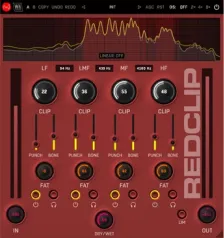
RedClip multiband clipping plugin interface by W. A. Production

RedClip: Multiband Creative Clipping Plugin by W. A. Production Free Download

Rated 4.7/5 on Plugin Boutique (72 ratings)

RedClip is a multiband clipping plugin by W. A. Production that splits audio into four bands for creative clipping, loudness shaping and added punch. It runs on Windows and macOS.

VST3VST2AUAAXWindowsmacOS64-bit
AVAILABLE ATPlugin Boutique
Free trial available from the developer
01Overview

RedClip goes beyond standard peak clipping by letting you process audio across four separate bands. Each band has its own clip and fatness controls, while crossovers can be set to linear phase or analog-type behavior. Punch and Bone sliders adjust the character of the clip, and a live spectrum display shows what the processing is doing in real time. It suits channel processing as well as mix and master bus work, with a factory preset library to start from.

Best for

  • Channel punch and weight
  • Mix bus loudness shaping
  • Mastering multiband clipping
  • Creative distortion effects
  • Drum and bass enhancement
Category
Limiters
Store
Plugin Boutique
02Key features

What you get

  • Multiband clipper splitting audio into four bands
  • Clip, Fatness and Dry/Wet controls per band
  • Punch and Bone sliders for adjustable clip character
  • Linear phase and analog-type crossover modes
  • Live frequency spectrum monitoring
  • AB comparison with copy/paste and undo/redo
  • Resizable vector-based interface
  • Categorized factory presets and full PDF manual
03In depth

Multiband Clipping and Crossover Options

RedClip splits the signal into four bands before clipping, so you can treat low, low-mid, high-mid and high frequencies differently. The crossover frequencies are adjustable, and you can switch between linear phase crossovers, which keep phase transparent, and analog-type crossovers, which the developer describes as warmer.

The multiband Clip knobs set how much clipping is applied to each band. Per the developer, these work in parallel, so the signal can be pushed hard without the processing breaking down at high settings.
Fatness, Punch and Bone Controls

Each band has a Fatness control intended to add weight and harmonic density. The developer states that the clipping blends soft and hard characteristics for a controlled distortion.

Punch sliders add definition and aim to keep the clip stable and forceful, while Bone sliders add body by boosting the midrange before clipping. Together they give you a way to shape the character of the clipped sound beyond the basic amount of clipping.

For gentler results, the Dry/Wet knob blends the processed signal with the original, and Solo and Bypass buttons let you audition each band on its own.

Monitoring, Workflow and Presets

A live frequency spectrum at the top of the interface shows how the signal changes as it passes through the plugin. The interface is resizable, and AB comparison, copy and paste, and undo/redo let you test different chains quickly.

The factory presets are organized into categories, ranging from subtle soft clipping to heavier settings, which gives you starting points for different sources. A full PDF manual and tutorial videos are included.

04Specs

Will it run?

Formats, systems and requirements as listed by Plugin Boutique. Missing details are left out, not guessed.

DeveloperW. A. Production
TypePlugin
CategoryLimiter
FormatsVST3, VST2, AU, AAX
Operating systemsWindows, macOS
Architecture64-bit
Free trialYes
05FAQ

Questions, answered

What formats does RedClip support?

RedClip is available in VST3, VST2, AU and AAX formats. It is 64-bit only.

Which operating systems does RedClip run on?

RedClip runs on Windows 8 and later (64-bit) and macOS 10.10 and later (64-bit). AAX on Pro Tools requires Pro Tools 11 or higher.

Is there a trial version?

Yes, RedClip offers a trial version so you can evaluate it before purchasing.

What is the difference between linear phase and analog-type crossovers?

Linear phase crossovers are designed for transparency, while analog-type crossovers are described by the developer as warmer. You can switch between the two modes with one button.

07Developer

More from W. A. Production

All W. A. Production products →