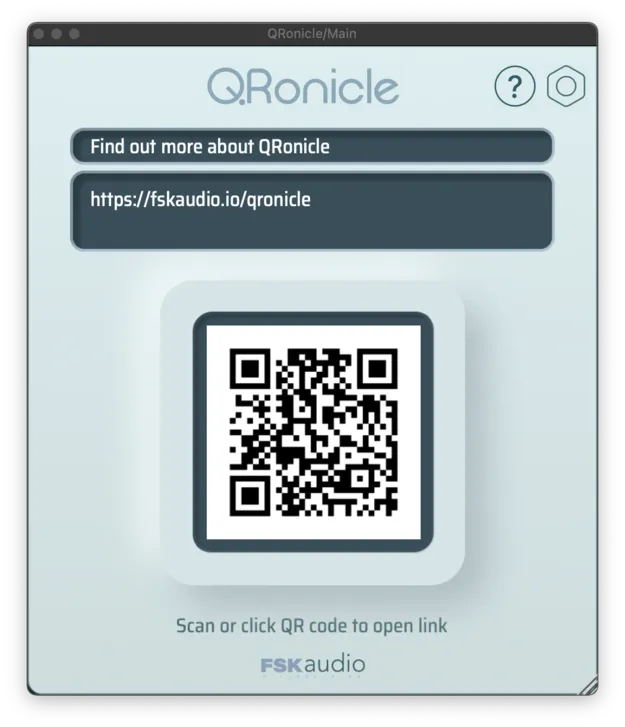
QRonicle by FSK Audio utility plugin interface showing an embedded QR code

QRonicle: QR Code Session Notes Plugin by FSK Audio

QRonicle is a utility plugin from FSK Audio that places a scannable QR code inside your DAW session. Scanning it with a phone opens notes, images or other files saved on a cloud drive.

VST3AUAAXWindowsmacOS
AVAILABLE ATPlugin Boutique
Opens the store in a new tab
01Overview

QRonicle is built for keeping session context attached to the session itself. Instead of hunting through folders or message threads for mic placement photos, outboard settings or recording notes, you place a QR code in the project and scan it with a phone camera. The plugin is listed as a utility and is described as processing no audio, so it is aimed at workflow organization rather than sound. It is available in VST3, AU and AAX formats.

Best for

  • Recording session notes
  • Mic placement documentation
  • Outboard gear settings
  • Collaborator handoff
  • Mix and delivery records
Developer
FSK Audio
Category
Utilities
Store
Plugin Boutique
02Key features

What you get

  • Generates a QR code directly inside your DAW session
  • Links to notes, images, or other files saved on a cloud drive
  • Opens linked content by scanning with any phone camera
  • No additional app needed on DAW or mobile device
  • Listed with zero CPU usage
  • Available in VST3, AU and AAX formats
03In depth

Keeping session notes attached to your project

FSK Audio describes QRonicle as a bridge between a session and the information that lives outside it. Notes can follow the project from tracking through editing, mixing and delivery, so context is less likely to get lost along the way.

Anything you can save to a cloud drive can be linked from the session. That includes written notes for collaborators, photos of microphone placements, and records of outboard gear settings.

Scanning from your phone

To open linked material, you scan the QR code with your phone's camera. According to the developer, no additional app is needed on either the DAW or the mobile device.

The plugin is listed with zero CPU usage, which fits a tool whose job is to link information rather than process audio.

04Specs

Will it run?

Formats, systems and requirements as listed by Plugin Boutique. Missing details are left out, not guessed.

DeveloperFSK Audio
TypePlugin
CategoryUtility
FormatsVST3, AU, AAX
Operating systemsWindows, macOS
05FAQ

Questions, answered

What formats does QRonicle support?

QRonicle is available in VST3, AU and AAX formats. The developer lists support for Mac and Windows.

What operating systems does QRonicle run on?

QRonicle is listed for Windows and macOS.

Does QRonicle process audio?

No. The developer says QRonicle does not process audio and is listed with zero CPU usage. Its purpose is to link your workflow information to the session.

Do I need an app to scan the QR code?

No additional app is required. The developer says you can scan the code with your phone's camera.

07Developer

More from FSK Audio

All FSK Audio products →