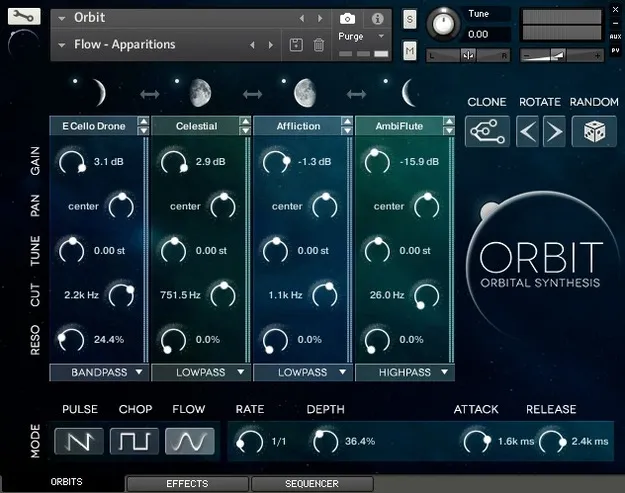
ORBIT by Wide Blue Sound Kontakt instrument interface with four Orbit controls

ORBIT: Orbital Synth and Texture Instrument for Kontakt by Wide Blue Sound

Rated 4.0/5 on Plugin Boutique (10 ratings)

ORBIT is a Kontakt instrument by Wide Blue Sound for creating synths, rhythmic pulses and atmospheric textures. It runs on Windows and macOS and works with Kontakt or the free Kontakt Player.

REQUIRESKontaktHost player sold separately
KontaktWindowsmacOS
AVAILABLE ATPlugin Boutique
Opens the store in a new tab
01Overview

ORBIT is built around four Orbits, each playing its own sound source, which can be shaped and sequenced together. Wide Blue Sound describes the Orbital Synthesis engine as morphing between four creative sound sources to produce tonal pulses, hybrid rhythms and atmospheric beds that evolve over time. Each Orbit can be set to Pulse, Chop or Flow behavior, and the instrument offers 101 sounds per Orbit to start from. It loads in Kontakt on both Windows and macOS.

Best for

  • Atmospheric pads
  • Rhythmic synth pulses
  • Hybrid electronic rhythms
  • Cinematic soundscapes
  • Stuttered chopped textures
Requires
Kontakt
Store
Plugin Boutique
02Key features

What you get

  • Four Orbits, each with Gain, Pan, Tune, Cut and Resonance controls
  • 101 selectable sounds available for each Orbit
  • Pulse Mode using a sawtooth LFO for each Orbit
  • Chop Mode for rhythmic slices using a pulse-wave LFO
  • RATE control clocked to your DAW tempo
  • RANDOM and CLONE functions for fast sound creation
  • WAVES function to step all Orbits through sound sources
  • Per-Orbit mute buttons with solo via Command or Ctrl click
03In depth

Sound Design Controls and Modes

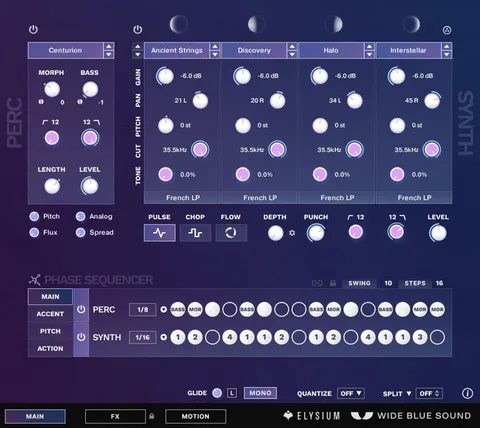
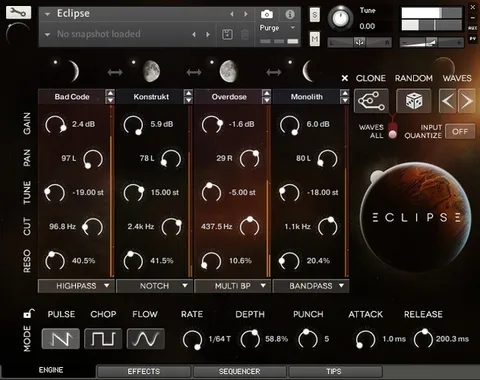
Each Orbit has its own Gain, Pan, Tune, Cut and Resonance controls, so you can refine individual layers. Holding ALT while adjusting a knob changes that parameter across all four Orbits at once.

Pulse Mode starts each Orbit at full volume before the next begins, using a sawtooth LFO. Chop Mode creates rhythmic slices with a pulse-wave LFO. RATE sets the time for each Orbit rotation and is clocked to your DAW, while DEPTH and PUNCH shape the pulse. In Chop Mode, PUNCH is renamed GATE. ATTACK and RELEASE adjust the main volume envelope.
Starting Points and Quick Auditioning

The RANDOM function assigns random sound sources to all four Orbits without changing other settings, which gives you a fast starting point. Command or Ctrl plus click also randomizes the primary Orbit Controls in a semi-intelligent way.

CLONE copies the settings of Orbit 1 to the other three Orbits for a more stable sound. WAVES moves all four Orbits to the previous or next sound source, which helps when you want related sounds but need to audition alternatives. Mute buttons on each Orbit, with Command or Ctrl plus click for solo, help when programming and tweaking.

04Specs

Will it run?

Formats, systems and requirements as listed by Plugin Boutique. Missing details are left out, not guessed.

DeveloperWide Blue Sound
TypePlugin
CategoryKontakt Instrument
RequiresKontakt
FormatsKontakt
Operating systemsWindows, macOS
05FAQ

Questions, answered

What do I need to use ORBIT?

ORBIT requires Kontakt or Kontakt Player 5.6.6 or higher. The developer notes that it is compatible with the free Kontakt Player.

Which operating systems does ORBIT support?

ORBIT is listed for both Windows and macOS. It is available in the Kontakt format.

Does ORBIT sync to my DAW tempo?

Yes. The RATE control sets the time for each Orbit rotation and is clocked to your DAW.

How many sounds does ORBIT include?

The sound selector gives access to 101 sounds for each Orbit, across its four Orbits.

07Developer

More from Wide Blue Sound

All Wide Blue Sound products →