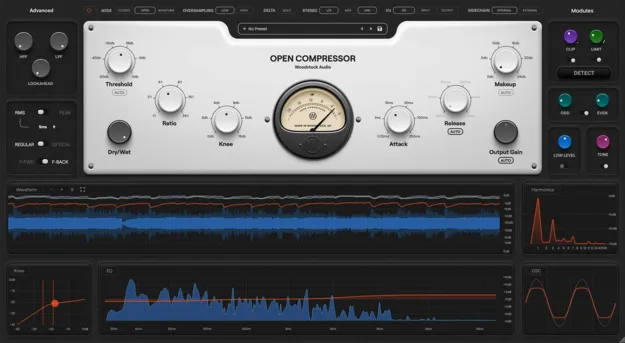
Open Compressor compressor plugin interface by Woodstock Audio

Open Compressor: Visual Dynamics Plugin by Woodstock Audio Free Download

Rated 4.6/5 on Plugin Boutique (8 ratings)

Open Compressor is a modular compressor plugin from Woodstock Audio that combines compression, clipping, limiting and saturation with real-time visual analysis of each processing stage.

WindowsmacOS64-bit
AVAILABLE ATPlugin Boutique
Free trial available from the developer
01Overview

Open Compressor is built around showing what happens at each stage of dynamics processing. Its modular signal path combines Peak and RMS detection, Feedforward and Feedback architectures, and Regular and Optical ballistics, so you can shape the topology to your signal. Woodstock Audio positions it as a workhorse compressor for everyday mixing, with additional clipping, limiting, saturation and tone controls on board. Visualisers including waveform, EQ, knee and harmonic views display how each parameter affects the sound.

Best for

  • Vocal dynamics control
  • Drum bus compression
  • Parallel compression
  • Transient control
  • Mid/Side stereo processing
  • Mix bus limiting
Category
Compressors
Store
Plugin Boutique
02Key features

What you get

  • Threshold, Ratio (1:1–24:1), Attack, Release and Knee controls
  • Regular and Optical modes with distinct attack and release behavior
  • Auto Threshold, Auto Makeup Gain and Auto Release
  • RMS and Peak detection with multiple RMS window options
  • Feedforward or Feedback detector modes with lookahead up to 10 ms
  • Detector HPF/LPF filters and external sidechain input
  • Dual Odd/Even saturator with independent drive controls
  • Oversampling in 2× (Low) or 4× (High) modes
03In depth

Visual Feedback and Dynamics Control

Open Compressor uses enhanced real-time visualisers to show how threshold, ratio, knee and release settings change the signal. Waveform, EQ, Knee and Harmonic views sit alongside an Oscilloscope, and a fullscreen waveform view offers zoom and pause functions.

Auto Threshold applies compression relative to the signal rather than a fixed dB point, which the developer says keeps tone consistent across material with large gain variation. Auto Makeup Gain and Auto Release add further automatic control for quicker setup.

For transient control, the clipper and limiter sit before the compressor in the signal chain. The Detect feature sets them in one step, so the compressor can then be shaped without that job.
Modular Signal Path and Saturation

Each stage can be adjusted separately. Choose Peak or RMS detection with several RMS window options, switch between Feedforward and Feedback detectors, and set lookahead from 0 to 10 ms. Detector HPF and LPF filters and an external sidechain input give further control over what the compressor responds to.

Stereo processing supports L/R, Mid/Side and Link/Unlink modes. A dual Odd/Even saturator with independent drive controls, a Tone control and a Dry/Wet mix allow parallel compression and colour changes after the dynamics stage.

Built-in analogue compressor emulations and a preset manager give starting points, and global and per-module bypass options make A/B comparisons quick.

04Specs

Will it run?

Formats, systems and requirements as listed by Plugin Boutique. Missing details are left out, not guessed.

DeveloperWoodstock Audio
TypePlugin
CategoryCompressor
Operating systemsWindows, macOS
Architecture64-bit
Free trialYes
05FAQ

Questions, answered

What is Open Compressor?

Open Compressor is a compressor plugin from Woodstock Audio that combines compression with clipping, limiting, saturation and tone shaping. It includes visualisers that show how each control affects the signal.

Which operating systems and formats does Open Compressor support?

Open Compressor runs on Windows 10/11 (64-bit) and macOS 10.13+ on Intel or 11+ on Apple Silicon. It requires a 64-bit DAW, and an iLok account is needed for activation in all formats.

What do I need to use Open Compressor?

You need a 64-bit DAW, 4 GB of RAM (8 GB recommended), about 200 MB of disk space and an iLok account with a USB dongle or computer host activation. An internet connection is needed for activation and updates. Hosts listed as tested include Logic Pro, Ableton Live, Cubase, Studio One, Reaper, FL Studio and Pro Tools.

Is there a trial version?

Yes, Open Compressor is available as a trial.