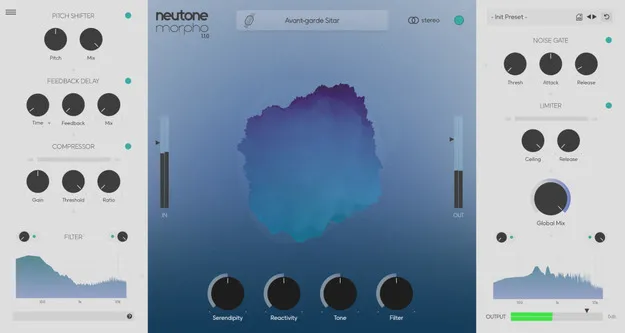
Morpho by Neutone AI tone morphing synth plugin interface

Morpho: AI Realtime Tone Morphing Plugin by Neutone

Morpho is a realtime tone morphing plugin from Neutone that uses machine learning to resynthesize input sound into a different style while keeping the overall shape of the original.

VST3AUWindowsmacOS
AVAILABLE ATPlugin Boutique
Opens the store in a new tab
01Overview

Morpho is built around realtime tone morphing. Incoming audio is resynthesized into a different timbre, and the developer says the original shape of the sound is preserved. It ships with a curated library of models, including African drums, birdsong soundscapes, marimba, and vintage radio transmissions. Users can also train their own models from their audio files, so the plugin can play like a new instrument built from sounds they choose.

Best for

  • Sound design textures
  • Experimental percussion
  • Morphing field recordings
  • Ambient pad creation
  • Custom timbre models
  • Vocal texture processing
Developer
Neutone
Category
Synths
Store
Plugin Boutique
02Key features

What you get

  • Realtime tone morphing that resynthesizes incoming audio into new textures
  • Machine learning-based timbre transformation
  • Curated library of tonal models, including African drums and radio transmissions
  • Drag-and-drop custom model training with no coding or GPU
  • Trained models are private and owned by the user
  • Training Token system for uploading sounds and receiving a custom model
  • Available in VST3 and AU formats
  • Runs on Windows 10 and 11 and macOS 12.0 or later
03In depth

Sound Character and Morphing Models

Morpho processes incoming audio in realtime and resynthesizes it using the selected model. Neutone describes the result as a new texture that keeps the shape of the source sound, so rhythms and contours can remain recognizable while the timbre changes.

The included library covers a wide range of sources, from percussion such as djembe, marimba and modern drum machines to ambient and vocal material like choir ensemble, singing bowl and handpans. Switching models is the main way to change the sonic direction.
Custom Model Training and Ownership

Morpho lets users train personal models by uploading their own audio through a drag-and-drop interface in the Training Dashboard. Neutone says no coding, prior experience or GPU is required.

To train a model, a Training Token must be purchased and the audio files uploaded. Once the model is complete, it appears in the model browser. Neutone states that custom models are private to the user, who keeps full ownership of them. The developer also says it trains models only on sounds it has rights to use and cites its sources in the model browser.

04Specs

Will it run?

Formats, systems and requirements as listed by Plugin Boutique. Missing details are left out, not guessed.

DeveloperNeutone
TypePlugin
CategorySynth
FormatsVST3, AU
Operating systemsWindows, macOS
05FAQ

Questions, answered

What is Morpho?

Morpho is a realtime tone morphing plugin from Neutone. It uses machine learning to resynthesize incoming audio into a different style while keeping the overall shape of the sound.

What formats and operating systems does Morpho support?

Morpho is available in VST3 and AU formats. It runs on Windows 10 and 11 and on macOS 12.0 or later.

What do I need to use Morpho?

Morpho runs as a plugin inside a DAW. Neutone lists Ableton Live 11 and 12, Logic Pro 10, Bitwig Studio 5, Studio One 6, Cubase 13 and Reaper 7 as tested hosts, and recommends a CPU equivalent to Apple M1 or faster.

Do I need coding or a GPU to train a custom model?

No. Neutone says custom models can be created through a drag-and-drop interface without coding experience or a GPU.