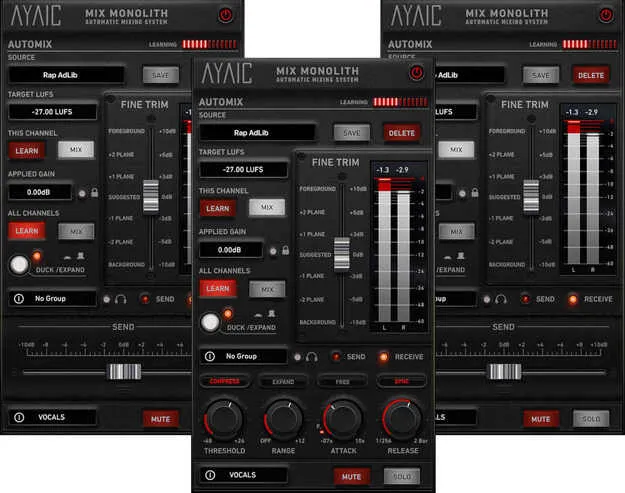
Mix Monolith by AYAIC automatic mixing plugin interface

Mix Monolith: Automatic Mixing Plugin by AYAIC

Rated 4.8/5 on Plugin Boutique (12 ratings)

Mix Monolith is an automatic mixing plugin from AYAIC that levels tracks, buss groups, FX channels and the master fader using level-planes. It is available in VST3, VST2, AU and AAX formats.

VST3VST2AUAAXWindowsmacOS
AVAILABLE ATPlugin Boutique
Opens the store in a new tab
01Overview

Mix Monolith is designed to balance a mix quickly across every level of a session. You can place individual Monoliths on tracks, buss groups, FX channels or the master fader, and they work together as a single system. The developer describes its approach as a way to reach a balanced, open mix in a small number of passes, starting from a session with all faders at 0 dB. It is built for producers, mix and mastering engineers, musicians and singer-songwriters who want to speed up the leveling stage.

Best for

  • Track leveling
  • Bus group balancing
  • Master fader leveling
  • Sidechain-style ducking
  • Quick first-pass mixing
Developer
AYAIC
Category
Mastering
Store
Plugin Boutique
02Key features

What you get

  • Automatic mixing system using level-planes across tracks, busses and master
  • Unlimited Monoliths that function together as one entity
  • "All Channels" and "This Channel" LEARN/MIX functions
  • Infinite DUCK/EXPAND and MUTE groups
  • Fully automatable level-plane fader
  • Free mode for time-based attack and release
  • Sync mode for host-synced, note-based attack and release
  • "F" feature locks attack to 0.07 ms in Sync mode
03In depth

How Mix Monolith Levels a Mix

Mix Monolith uses a level-plane fader to set the relative level of each element. The fader is fully automatable, so you can move elements forward or backward in the mix over time instead of setting one static balance.

Learn modes let you match levels across your session. The "All Channels" LEARN/MIX function works on every Monolith in the session, while "This Channel" works on a single instance. Add as many Monoliths as you need; they all function as one entity.

AYAIC also notes that Mix Monolith pairs with Ceilings Of Sound Pro and Hyper-EQ, letting you shape Hyper-EQ to ceiling curves and hear how elements sit in the mix.
Ducking, Muting and Timing Controls

Mix Monolith supports an unlimited number of DUCK/EXPAND and MUTE groups, which helps when you need to control how sections of a session respond to each other.

Attack and release can be set in two modes. "Free" mode uses time-based settings, while "Sync" mode uses host-synced, note-based values. In Sync mode, the "F" feature locks the attack to a fast 0.07 ms.

The "Applied gain" locking feature lets you hold gain settings in place while you adjust the rest of the mix.

04Specs

Will it run?

Formats, systems and requirements as listed by Plugin Boutique. Missing details are left out, not guessed.

DeveloperAYAIC
TypePlugin
CategoryMastering
FormatsVST3, VST2, AU, AAX
Operating systemsWindows, macOS
05FAQ

Questions, answered

What formats does Mix Monolith support?

Mix Monolith is available in VST3, VST2, AU and AAX formats.

Which operating systems does Mix Monolith run on?

Mix Monolith supports Windows and macOS. The listed support covers Mac OS 10.10 through 13 and Windows 7 through 11.

What do I need to use Mix Monolith?

AYAIC plug-ins require an iLok2 or iLok3 USB smart key, or an iLok manager account with an iLok cloud session for authorization. The minimum listed memory is 4GB RAM, and the display should be larger than 1280 x 800.

Can Mix Monolith work with other AYAIC plugins?

Yes. AYAIC says Mix Monolith can be paired with Ceilings Of Sound Pro and Hyper-EQ, so you can conform Hyper-EQ to ceiling shapes and hear the result in the mix.

07Developer

More from AYAIC

All AYAIC products →